Lead Qualification Automation for Small Business: A Practical Guide
Lead qualification automation can help small businesses respond to enquiries faster, reduce manual admin, and focus attention on the leads most likely to convert. For many owners and small teams, the challenge is not getting enquiries in the door. It is sorting them, following them up consistently, and deciding which ones deserve immediate attention.
This guide explains what lead qualification automation is, how it works, what you can safely automate, and where human review still matters. It also covers the tools involved, the role of AI, and the Australian privacy and spam considerations that small businesses should keep in mind.
null
If you are looking for broader ideas on reducing repetitive admin across your business, small business automation is often the best place to start. Lead handling is just one area where a simple workflow can make a noticeable difference.
What is lead qualification automation?
Lead qualification automation is the use of software, rules, and workflows to help a business identify which incoming leads are worth prioritising. Instead of reading every enquiry manually and deciding what to do next from scratch, the system can collect the details, check them against your criteria, and route them to the right place.
In plain English, it helps answer questions such as:
- Is this enquiry a good fit for our business?
- Does it match the services we actually offer?
- Is it urgent, high value, or ready to buy?
- Should a person follow up immediately, or should it go into a nurture process?
For a small business, that usually means less time spent on repetitive admin and less chance of a good lead sitting unanswered for too long.
Why it matters for small businesses
Small teams often have limited time, limited staff, and a steady stream of enquiries from forms, email, phone calls, social media, or chat tools. Without a clear process, it is easy for leads to be handled inconsistently.
Lead qualification automation can help by:
- making response processes more consistent
- reducing manual data entry
- helping staff focus on better-fit prospects
- cutting down on delays and missed follow-up
- keeping lead information organised in one place
That does not mean every lead should be judged by software alone. It means the first pass can be structured so the right leads get attention sooner.
Manual qualification vs automated qualification
Manual qualification usually means a person reads the enquiry, checks the details, decides whether it is suitable, and then assigns follow-up tasks. That can work well in a small business, but it becomes slower as enquiry volume grows.
Automated qualification uses rules or AI-assisted tools to do part of that work for you. A form might collect key information, a CRM might score the lead, and an automation platform might assign the enquiry to the right team member or send an acknowledgement straight away.
The best approach for most small businesses is a hybrid one: automate the simple, repeatable steps, then keep human review for borderline or high-value leads.
What a lead qualification workflow usually includes
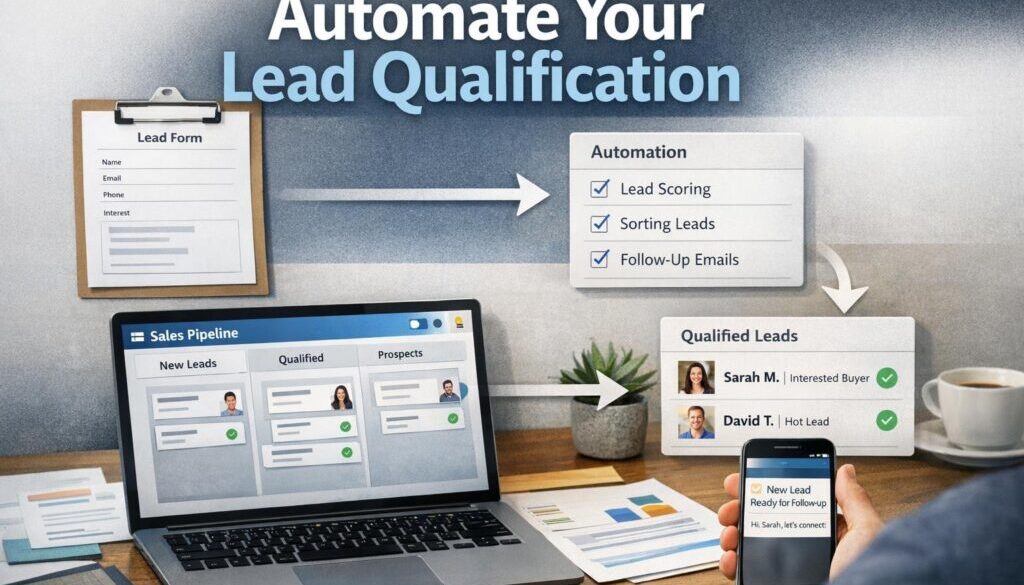
A good lead qualification workflow does more than just collect a name and email address. It should move the enquiry through a simple path from capture to decision to follow-up.
Lead capture
The workflow starts when someone submits a website form, sends an email, books a call, or completes another enquiry step. The main goal here is to capture the lead cleanly and consistently.
Useful capture fields often include:
- name
- email address
- phone number
- service or product interest
- location, if relevant
- timeline or urgency
- basic notes about the request
Clear data at the start makes everything else easier. If the input is messy, the workflow will be messy too.
Qualification questions
Qualification questions help you understand whether the lead is a good fit. These should be short and relevant. If you ask too much too early, you may discourage genuine prospects from completing the form.
Examples of simple qualification questions include:
- What service do you need?
- When do you need help?
- What is your approximate budget range?
- Are you looking for a quote, a call, or general information?
- What location or area are you in?
These questions are especially useful for enquiry-driven businesses such as tradies, consultants, agencies, clinics, accountants, and local service providers.
Scoring and routing
Once the information is collected, the system can score or tag the lead based on your rules. For example, a lead may be marked as high priority if it matches your target service area, budget range, and ideal customer profile.
Routing then sends the lead to the right person or queue. That could mean:
- assigning it to a salesperson
- tagging it for admin review
- sending it to a specific team member based on service type
- placing it into a follow-up sequence
This is where automation solutions can be particularly useful, because the workflow can be designed around your actual process rather than forcing you to change how you work.
Follow-up and CRM updates
Good lead qualification automation does not stop at the first response. It should also update your CRM, create tasks, and move the lead through the pipeline so nothing gets lost.
Common automated actions include:
- sending a confirmation email
- sharing a booking link
- creating a follow-up task
- adding the lead to a pipeline stage
- notifying the right staff member
Many modern CRM platforms can support these kinds of lead management workflows. Official documentation from vendors such as HubSpot, Salesforce, and Microsoft Dynamics 365 Sales shows that lead capture, assignment, scoring, and automation are common CRM capabilities.
What can be automated safely?
For small businesses, the safest starting point is rule-based automation. That means the system follows clear instructions rather than trying to make complex judgments on its own.
Rule-based filters and scoring
Rule-based scoring is straightforward. You decide what matters most, and the system applies that logic every time.
For example, you might prioritise leads that:
- match your service area
- fit your target industry
- request a specific service you offer
- include a timeline that suggests urgency
- meet a basic budget threshold
This type of setup is usually easier to understand, test, and maintain than a more complex AI-driven approach.
Assignment and task creation
One of the most useful automations is assigning the lead to the right person and creating a follow-up task automatically. That removes a small but important manual step from your day.
If your business has different people handling different services, regions, or enquiry types, automated assignment can help enquiries reach the right inbox or owner faster.
Booking links and acknowledgements
Automatic acknowledgement is a simple win. Even if a human does the final qualification, the lead can immediately receive a confirmation message and next step.
This could include:
- a thank-you email
- a booking link for a discovery call
- an explanation of what happens next
- a request for any missing details
This reduces uncertainty for the customer and helps your business look responsive.
Reporting and tracking
Automation can also help you understand where leads come from and how they progress through the pipeline. That makes it easier to spot bottlenecks and improve the process over time.
Useful reporting might include response time, lead source, qualification outcomes, and conversion rates by enquiry type. You do not need a complicated dashboard to get value from this. Often, a simple view of the pipeline is enough to see where leads are stalling.
Businesses that want a broader view of how automated workflows are built can also explore the Business Hub for practical resources and explanations.
Where AI can help — and where it shouldn’t lead
AI is increasingly built into CRM and sales tools, but it should be used carefully. For small businesses, AI is best treated as an assistant, not the final decision-maker.
AI for summarising and categorising leads
AI can help with simple support tasks such as summarising a long enquiry, categorising the topic, or highlighting key details from a message or call note. That can save time when staff are reviewing multiple enquiries each day.
It may also help with drafting a first-pass response or turning unstructured text into a cleaner summary for the CRM.
AI for drafting responses
Drafting is one of the more practical uses of AI in lead handling. A system may be able to suggest a response that staff can review and send.
This can be useful when the reply needs to be polite, consistent, and timely, but still reviewed before it goes out. It is better to treat AI as a drafting tool than as a fully autonomous salesperson.
Why human review still matters
Human review is important when the lead is high value, ambiguous, sensitive, or borderline. AI can misread incomplete information, and a small business cannot afford to reject a good lead by mistake.
Human oversight is especially important if the workflow involves:
- pricing discussions
- specialist advice
- complaints or sensitive issues
- new or unusual enquiry types
In practice, the safest approach is to let automation handle the first sorting step and let a person make the final call where needed.
The best tools for small business lead automation
You do not need an enterprise system to get started. Most small businesses can build a useful workflow from a few familiar tools.
CRM systems
A CRM is usually the centre of the workflow. It stores lead details, tracks where each enquiry is in the pipeline, and helps with follow-up.
Look for CRM features such as:
- lead capture
- pipeline stages
- task creation
- assignment rules
- tags or custom fields
- basic reporting
Forms and landing pages
Forms are often the cleanest way to collect the right information at the right time. A well-designed form can reduce back-and-forth and make qualification easier.
Examples of common tools include form builders inside CRM platforms or standalone tools that connect to your systems later.
Automation platforms
Automation platforms help different tools talk to each other. In simple terms, they move information from one app to another based on a trigger.
Examples of official automation documentation can be found in Zapier Help and Make Help. Microsoft also provides workflow guidance through Power Automate documentation.
These tools are useful when you want form submissions, CRM records, emails, and calendar events to stay in sync without manual copying and pasting.
Email, calendar, and shared inbox tools
Lead qualification does not happen in the CRM alone. Email, calendars, and shared inboxes are often part of the workflow too. If those tools are connected properly, the business can respond faster and keep communication organised.
Australian privacy and spam considerations
Any system that captures lead information needs to be handled carefully. In Australia, privacy and spam obligations may apply depending on the business and the type of communication involved.
Personal information and consent
The Australian Government’s Office of the Australian Information Commissioner explains what counts as personal information and how the Australian Privacy Principles apply. Lead forms often collect personal information such as names, emails, phone numbers, and notes about a person’s needs.
That means businesses should think about:
- why they are collecting the information
- how it will be used
- who can access it
- how long it will be kept
- which third-party tools receive it
Useful official guidance can be found on the Australian Privacy Principles page and the OAIC’s explanation of what is personal information.
Automated email and SMS compliance
If lead qualification automation includes commercial emails or SMS messages, the Spam Act may be relevant. The Australian Communications and Media Authority provides guidance on spam rules and sender obligations.
For practical purposes, that means businesses should be careful with consent, sender identification, and unsubscribe options where required. You can read more on the ACMA spam guidance.
Security and access control
Lead data often includes contact details and private business information. That data should be protected with sensible security measures, such as restricted access, strong passwords, and careful control of connected apps.
The Australian Cyber Security Centre’s official portal at cyber.gov.au is a useful starting point for general security guidance.
Common mistakes to avoid
Lead qualification automation works best when it stays simple. A lot of problems come from trying to automate too much too soon.
Over-automation
If the workflow is too rigid, you may frustrate good prospects. A long qualification form or an overly strict scoring system can turn away leads who might have been a good fit.
Poor data quality
If the form fields are unclear or the data is incomplete, the automation will struggle. Good automation depends on good inputs.
Broken integrations
Even simple workflows can fail if fields do not map correctly between tools. If the CRM, form, and email system are not connected properly, leads can go missing or be routed to the wrong place.
Relying too heavily on AI
AI is useful, but it should not be trusted blindly. A business should not use AI alone to reject, prioritise, or promise outcomes to a lead without review.
That is why many businesses begin with a rule-based approach and only use AI where it genuinely supports the process.
How to start with a simple workflow
The easiest way to begin is not by rebuilding your whole sales process. Start with one lead source and one clear outcome.
1. Begin with one lead source
Choose a single source first, such as a website contact form or enquiry landing page. That makes it easier to test the workflow and spot problems early.
2. Add qualification rules
Decide what makes a lead a good fit. Keep the rules simple and focused on the information that actually helps you decide what to do next.
3. Automate the first response
Set up an acknowledgement, booking link, or task assignment so the lead is not left waiting. This is often the first automation that creates a noticeable improvement in process.
4. Review the workflow regularly
Check whether the lead data is clean, whether the routing makes sense, and whether any good leads are being missed. A workflow should be refined over time, not left untouched.
Document-heavy and workflow-heavy businesses often find this kind of process especially helpful. For example, the trust account automation case study shows how a repetitive administrative process can be simplified with the right workflow design.
Examples of lead qualification automation in practice
Different businesses will use lead qualification automation in different ways, but the pattern is similar: collect the right information, apply simple rules, and route the enquiry efficiently.
A service business might qualify leads based on location, service type, and urgency. A consultant might look at budget, industry, and timeline. A clinic might route enquiries based on appointment type or whether the person is a fit for the service offered.
The point is not to automate every conversation. The point is to reduce unnecessary manual work so staff can focus on the leads that matter most.
For content-led businesses, structured workflow thinking can also support planning and publishing. The content calendar automation case study is a good example of how a repeatable process can be organised more efficiently. And for businesses delivering digital assets or downloads, digital product automation shows how delivery workflows can be made simpler and more reliable.
When to get help
If your lead process is already messy, or if you are not sure where the bottleneck is, it may be worth getting help to map the workflow first. A good automation is usually built from a clear understanding of what happens now, where the delays are, and what needs human review.
That is where Simple Automations can help. The goal is not to add complexity. It is to make the process easier to manage, easier to maintain, and more useful for your team.
Ready to Simplify Your Lead Handling?
If your business is losing time to manual enquiry sorting, follow-up, or data entry, a simple lead qualification workflow may be the right place to start. Simple Automations helps small businesses design practical automation that fits the way they work.
Conclusion
Lead qualification automation is not about removing people from the process. It is about making the first part of lead handling faster, clearer, and more consistent. For small businesses, that usually means less admin, quicker responses, and a better chance of focusing on the right opportunities.
The most practical approach is to start with rule-based automation, keep the workflow simple, and use human review where it matters. If you do that well, lead qualification automation can become a straightforward way to improve both efficiency and customer experience.