AI Receptionist for Small Business: What It Can and Can’t Do
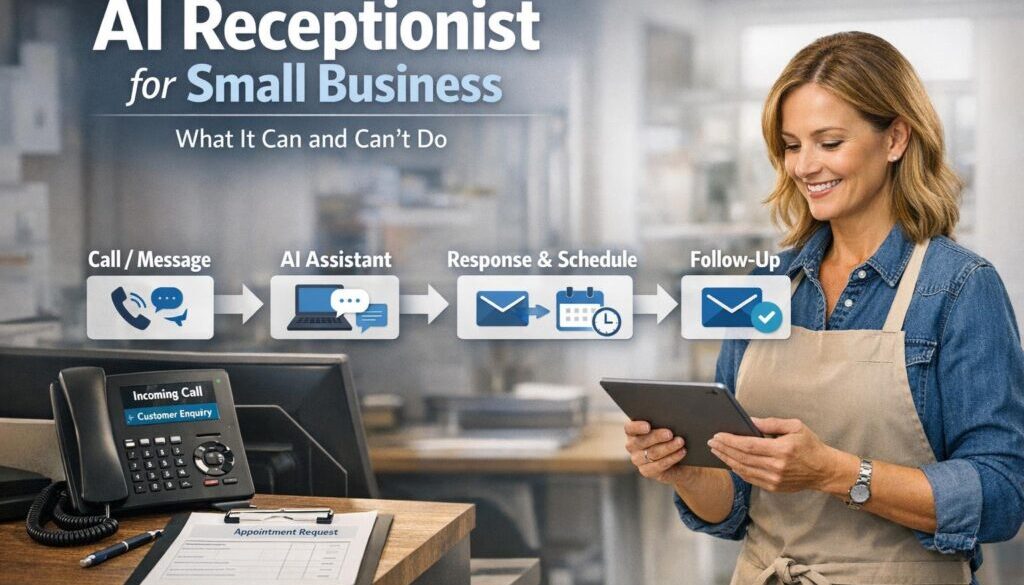
If you are thinking about an AI receptionist for small business, the key question is not whether it sounds impressive. The real question is whether it will genuinely reduce missed calls, handle routine enquiries, and make your front desk easier to manage without creating new problems.
Used well, an AI receptionist can help with basic enquiries, lead capture, appointment handling and after-hours coverage. Used poorly, it can frustrate customers, create double-handling, or miss the nuance that a human receptionist would catch straight away.
This guide explains what an AI receptionist can do well, where it still falls short, and what small businesses should check before adopting one.
null
For businesses trying to reduce repetitive admin more broadly, it can also help to understand how small business automation fits into daily operations. In the right setup, the receptionist is just one part of a bigger workflow.
What is an AI receptionist for small business?
An AI receptionist for small business is usually a phone, chat, or website-based assistant that responds to customer enquiries, collects details, and helps route requests to the right place. Some tools focus on voice calls. Others work through live chat on a website. Some try to do both.
The term can mean different things depending on the product. In practice, it may be any of the following:
- a voice agent that answers incoming calls
- a website chatbot that handles basic questions
- a virtual receptionist that books appointments and takes messages
- an omnichannel tool that handles phone, chat and follow-up notifications
The important thing is not the label. It is whether the tool fits the way your business actually works.
Phone, chat, and website-based versions
Phone-based tools are useful when missed calls are the main problem. Website chat tools are often better for businesses that get a lot of repeat questions online. Some businesses may benefit from both, especially if customers contact them in different ways depending on the time of day.
As you assess options, it helps to think about the whole workflow, not just the first response. That includes what happens after the enquiry is captured and who sees the information next.
What an AI receptionist can do well
A well-configured AI receptionist for small business is best at structured, repeatable tasks. It is not there to replace judgment, but it can take care of the first layer of customer contact.
Answer FAQs and basic business information
Many businesses receive the same questions over and over again: opening hours, service areas, booking availability, location, parking, and payment methods. An AI receptionist can often handle these straightforward enquiries if the information is current and tightly controlled.
This works best when the answers are short and specific. If the system is asked to improvise, accuracy becomes much harder to trust.
Capture leads and call details
One of the strongest use cases is lead capture. Instead of letting a call go to voicemail, the system can gather a name, contact number, reason for calling, and preferred callback time. That can help the business respond later without losing the lead completely.
For businesses that rely on inbound enquiries, this can be one of the most practical uses of an AI receptionist for small business.
Book, reschedule, and cancel appointments
Appointment-based businesses often spend a lot of time on simple scheduling tasks. If the AI receptionist is connected properly to the calendar or booking platform, it may be able to help book appointments, move them, or cancel them when requested.
This is one of the areas where integrations matter most. If the booking system is not connected properly, automation can create confusion instead of reducing it.
Route calls or escalate to staff
Not every enquiry should be handled automatically. A good setup should allow the AI to transfer calls or escalate to a person when needed. That handoff is important for service quality, especially when a customer is upset or the request falls outside a simple script.
For businesses that want more than a basic answering service, automation solutions can be designed around the exact points where escalation should happen.
Provide after-hours coverage
After-hours calls are a common pain point for small businesses. Many owners do not want to miss enquiries outside office hours, but they also do not want to be on call all the time.
An AI receptionist can help bridge that gap by collecting messages, handling routine questions, or directing urgent issues to the right next step. That makes it useful for businesses that want coverage without staffing a full reception desk around the clock.
Send summaries and internal notifications
Another useful feature is summarisation. Instead of listening to a full call recording later, staff may receive a short note or transcript summary. That can reduce manual follow-up and help the team prioritise what needs attention first.
In practice, this is often where the real time savings appear: not in the first customer interaction, but in the reduced admin afterwards.
Where AI receptionists fall short
The biggest mistake businesses make is assuming an AI receptionist for small business can handle every conversation. It usually cannot. The strongest systems still have clear limits, and those limits matter.
Complex or ambiguous enquiries
If a caller is vague, changes topic several times, or asks a nuanced question, the AI may struggle to understand what is actually needed. It is much better at structured requests than open-ended conversations.
That is why businesses should think of it as a triage tool, not a decision-maker.
Emotional, sensitive, or high-stakes calls
Some calls need empathy, judgment, or a human touch. Complaints, medical issues, personal concerns, urgent service failures, and distressed customers are all examples where a person is often better suited to respond.
Even when the AI can technically continue the conversation, that does not mean it should.
Complaints, refunds, and escalations
Issues involving refunds, disputes, or repeated service failures are usually poor candidates for full automation. These are the conversations where tone, discretion, and business context matter.
A sensible approach is to let the AI gather enough information to route the matter correctly, then hand it over to staff.
Risks of incorrect or invented answers
If the knowledge base is incomplete or poorly maintained, AI can give the wrong answer or sound confident while being incorrect. That is a serious customer experience risk.
This is one reason businesses should keep the scope narrow and make sure the information it uses is current. A receptionist that confidently gives the wrong answer can create more work than it saves.
Is an AI receptionist better for phone, chat, or both?
The best channel depends on how your customers contact you. An AI receptionist for small business may work well over the phone, on your website, or across both.
Voice agents
Voice agents answer real phone calls and speak back to customers. They are useful for missed-call prevention and after-hours coverage, especially where most enquiries still arrive by phone.
They can be powerful, but they also need careful setup because spoken conversations are less predictable than a web form.
Website chatbots
Chatbots are often easier to control because the conversation is text-based and more structured. They can answer FAQs, collect contact details, and send the enquiry to staff.
For businesses with a strong online presence, chat can be a practical way to reduce repetitive messaging without changing the phone experience too much.
Omnichannel reception platforms
Some tools aim to work across phone, chat and follow-up workflows. That can be useful, but only if the business genuinely needs all channels and can manage the setup properly.
If the business only needs one or two core functions, a simpler tool may be a better fit.
How it fits into small-business workflows
The value of an AI receptionist for small business depends heavily on how well it fits into your existing systems. A receptionist that cannot connect to calendars, booking tools or staff notification channels may create more manual work instead of less.
Calendars and booking systems
If the AI can check availability and write bookings into the right calendar or appointment system, it becomes much more useful. Without that connection, staff may still need to review everything manually, which defeats part of the purpose.
That is why workflow design matters as much as the AI itself.
CRM and lead logging
Many businesses want every enquiry logged in one place. An AI receptionist can support that by sending the caller’s details into a CRM or lead tracker. If the data lands in the wrong place or is incomplete, however, follow-up can break down quickly.
For a small business, the real benefit is not just answering the phone. It is making sure the lead is captured cleanly and passed to the right person.
Email, SMS, and internal notifications
Once the AI has captured the enquiry, staff often need a simple notification. That could be an email, SMS, task, or note in a shared inbox. The more clearly the handoff is designed, the less likely things are to be missed.
Tools such as Microsoft Power Automate can help connect different systems when the workflow needs more than a basic out-of-the-box setup.
Why integrations matter
Integrations are what turn a chat or voice tool into a practical front-line receptionist. Without them, the business may still need to copy details by hand, check calendars manually, or follow up from multiple systems.
That is why an AI receptionist for small business should be judged on the end-to-end workflow, not just the first response.
Privacy, consent, and security issues Australian businesses should check
If your receptionist collects names, phone numbers, email addresses, appointment details or recordings, you need to think carefully about privacy and security. The rules and obligations can vary depending on the business, but this is not something to ignore.
Privacy Act and Australian Privacy Principles
The Privacy Act 1988 and the Australian Privacy Principles are key reference points for Australian businesses handling personal information. If your business is covered by the law, or otherwise has privacy obligations, you should understand how customer data is collected, used and stored.
The OAIC also provides guidance for small businesses and privacy, which is worth reviewing before rolling out any tool that records or stores customer information.
Call recording and transcription
If the AI receptionist records or transcribes calls, ask how that information is handled. Important questions include:
- Are callers notified?
- Where is the data stored?
- How long are recordings kept?
- Can transcripts be deleted?
- Is the data used to train models?
These are not minor details. They affect compliance, customer trust and vendor risk.
Data storage, retention, and overseas processing
It is also important to know whether the provider stores data overseas, which subprocessors they use, and how long information is retained. If something goes wrong, you need to know how the vendor responds and how your business would access or remove data.
The Notifiable Data Breaches scheme is also relevant if personal information is exposed in a breach.
Security basics and vendor risk
Basic controls such as strong admin passwords, multi-factor authentication, limited staff access and secure data handling are still essential. The Essential Eight is a useful starting point for broader cyber security planning.
Remember: a receptionist tool is not just a convenience layer. It becomes part of your customer data environment.
When a human should step in
One of the smartest ways to use an AI receptionist for small business is to define clear handoff points. The AI can handle routine work, but staff should step in when the conversation becomes uncertain, sensitive or high-risk.
Low-confidence responses
If the AI is unsure, the safest move is to escalate. A low-confidence answer is better treated as a handover trigger than an opportunity to guess.
Sensitive or regulated matters
Medical, legal, financial and other regulated topics are usually not ideal for full automation. Even in less regulated industries, sensitive issues often need a person who can interpret context properly.
Complaints, emergencies, and refunds
These are the moments where customer trust is at stake. The AI can help collect initial details, but a human should own the resolution.
That is why the best systems are designed to support staff, not to shut them out.
Questions to ask before buying an AI receptionist
Before you commit to any tool, ask practical questions. The goal is to understand what the system can really do, how it handles customer data, and how well it fits your workflow.
What data it stores
Ask exactly what information is captured, where it is stored, and whether you can control deletion. This is especially important if the system records or transcribes calls.
Whether it integrates with your systems
Check whether it connects with your calendar, CRM, booking system, phone platform, email and SMS tools. A tool that cannot connect properly may just add another manual step.
How it handles escalation
You should know what happens when the AI cannot answer a question or when the issue needs human support. Good escalation design is essential.
Whether it supports deletion and audit trails
If a customer asks for data to be removed, or you need to review what happened in a call, you will want a clear record. Audit trails matter more than many businesses realise.
How it manages consent and disclosure
Ask how callers are informed that the system is automated, whether recording notices are built in, and what controls exist for consent and disclosure.
These questions help separate a genuinely useful AI receptionist for small business from a tool that looks good in a demo but creates risk later.
Real-world automation examples and practical implementation
Document-heavy workflows are often a good starting point for automation because they are repetitive and easy to standardise. That is one reason why projects like trust account automation are useful examples of how structured admin processes can be simplified.
For content-led businesses, the same logic applies to planning and workflow design. Our content calendar automation case study shows how a recurring planning process can be turned into a more streamlined workflow.
And when a business needs to deliver files or digital products automatically, digital product automation is another example of how a repetitive customer process can be made simpler.
These examples are not all receptionist tools, but they demonstrate the same principle: start with a clear process, automate the repeatable parts, and keep human oversight where judgment is needed.
The bottom line
An AI receptionist for small business can be a very useful front line for routine enquiries, lead capture, appointment handling and after-hours coverage. But it is not a full replacement for staff, and it should not be treated like one.
The best results usually come from a narrow, well-designed workflow: let the AI handle the first response, capture the essentials, and hand over to a person whenever the conversation becomes complex, sensitive or uncertain.
If you are considering an AI receptionist, start by mapping your customer enquiries and identifying where the repeated work really happens. From there, you can decide whether a simple setup is enough or whether you need a more tailored solution.
Ready to Simplify Your Front Desk?
If you want to reduce missed calls, improve handoffs and design a receptionist workflow that fits your business, we can help you identify what should be automated and what should stay human.
To learn more about practical automation for everyday business tasks, visit Simple Automations or browse our Business Hub for more useful guides.