How to Automate Sales Pipeline Updates for Small Business
Keeping your sales pipeline accurate should not feel like a second job. If your team is relying on spreadsheets, inboxes, reminders and memory, it is easy for deal stages to go stale, follow-ups to be missed, and records to drift away from what is actually happening.
This guide shows how to automate sales pipeline updates in a practical, low-complexity way. You will learn what pipeline updates are, which parts of the process can be automated safely, what tools small businesses commonly use, and what to watch out for around privacy, spam and data quality.
null
The goal is simple: fewer manual updates, cleaner records, and a sales process that reflects reality without creating more admin.
If you are also working on broader process improvements, it can help to think in terms of small business automation rather than isolated software tasks. The same mindset that reduces repetitive admin in one workflow can also improve your sales handover, quoting and onboarding processes.
What sales pipeline updates are
A sales pipeline is the journey a lead or deal follows from first enquiry through to won, lost or inactive. A pipeline update is simply a change in that record: a new lead is added, a deal moves to proposal sent, a follow-up task is created, or a closed deal is marked as won.
In a small business, those updates often happen across several tools. A lead might come in through a form, be discussed over email, booked into a calendar, quoted in another system, and then followed up manually in a spreadsheet or CRM.
That is where problems begin. When updates depend on people remembering to type things in, the pipeline stops being a reliable source of truth.
Why small businesses struggle to keep it current
Most small teams do not have a dedicated sales operations person. The same owner or staff member who is selling is often also handling quotes, admin, customer service and invoicing. In that environment, pipeline updates are easy to miss.
The most common issues are:
- manual data entry taking too much time
- deals staying in the wrong stage after a call or meeting
- duplicate records created from forms, email threads or spreadsheet copies
- follow-up tasks not being created consistently
- reports becoming inaccurate because the underlying data is stale
When this happens, the business loses visibility. You cannot easily see which deals need attention, which leads are active, or where the bottlenecks are.
What parts of pipeline management can be automated
You do not need to automate every step at once. In fact, the best way to automate sales pipeline updates is to start with the highest-value, most repetitive actions first.
Lead capture to CRM
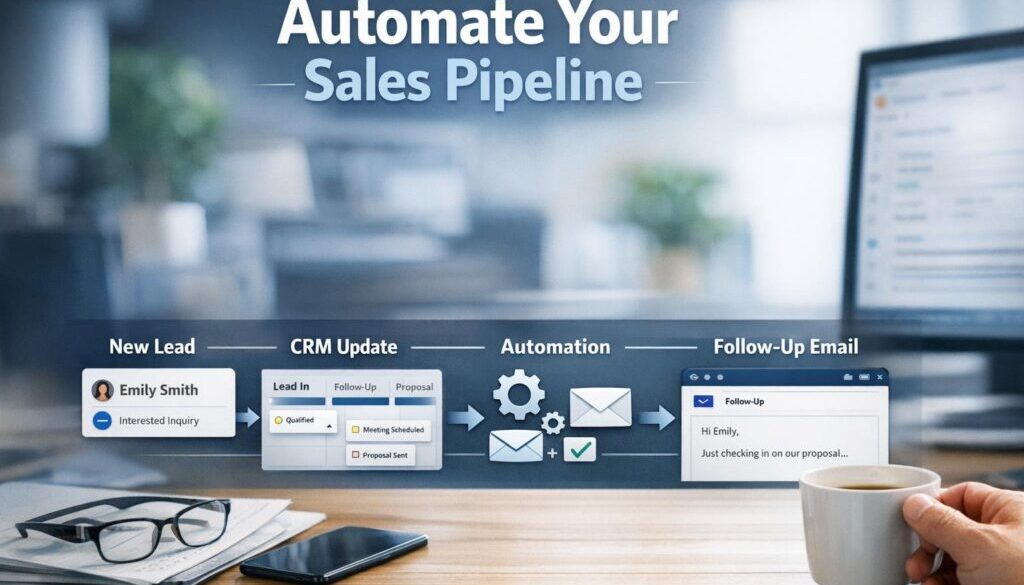
When someone fills out a website form, requests a quote, or books a consultation, that information can often create or update a record in your CRM automatically.
Current problem: staff manually copy enquiry details into a spreadsheet or CRM.
Automation opportunity: create the contact and deal automatically from the form submission.
Business benefit: faster response times and fewer missed leads.
Lead qualification
Not every enquiry is equal. Some are ready to buy, while others need more information. A short qualification form or internal review step can help decide which stage a deal belongs in.
Current problem: leads sit in the wrong stage because qualification is handled inconsistently.
Automation opportunity: use form answers or a simple rule to move the deal into a qualified stage.
Business benefit: a clearer pipeline and less manual sorting.
Meeting and call outcomes
After a call or meeting, a deal often needs to move forward, trigger a task, or receive a follow-up email. That is one of the most useful places to automate.
Current problem: team members finish a call, then forget to update the pipeline later.
Automation opportunity: when a meeting is completed or a call outcome is logged, update the stage and create the next task.
Business benefit: better follow-through and less chance of a deal going cold.
Proposal, quote and approval workflows
When a proposal is sent, viewed, approved or rejected, that status can often be reflected in the pipeline automatically.
Current problem: pipeline stages lag behind the actual quote or proposal status.
Automation opportunity: move the deal stage when a proposal is sent or signed, or notify the owner when a quote is approved.
Business benefit: faster handover and better visibility over where each opportunity sits.
Payment status and onboarding triggers
For service businesses, payment can be the trigger that moves a deal from sales to delivery or onboarding.
Current problem: a won deal is not handed over promptly, or admin staff must manually create onboarding tasks.
Automation opportunity: when payment is received or an invoice is marked paid, update the deal and trigger the next workflow.
Business benefit: smoother handover from sales to operations.
Stale deal cleanup
Many pipelines become messy because inactive deals are never reviewed. Automating reminders for stale opportunities helps keep the system clean.
Current problem: old deals sit in the pipeline for weeks with no action.
Automation opportunity: if there has been no activity for a set period, flag the deal, create a reminder or move it to a dormant stage.
Business benefit: a more accurate pipeline and better forecasting.
Reporting and forecasting updates
When pipeline data changes automatically, reports become more reliable. That makes it easier to understand open opportunities, upcoming work and likely revenue.
Current problem: reports are only as good as the last manual update.
Automation opportunity: refresh dashboards and send summary reports when key stages change.
Business benefit: better decisions with less manual reporting work.
How to automate sales pipeline updates step by step
The simplest approach is to build from the business process first, then choose the tools. That keeps the automation practical and avoids unnecessary complexity.
1. Map your pipeline stages first
Before you automate anything, define your stages clearly. For example: new lead, qualified, proposal sent, negotiation, won, lost, dormant.
Each stage should mean something specific. If your team uses different definitions for the same stage, automation will only make the confusion faster.
2. Standardise fields and next actions
Good automation depends on good data. At a minimum, decide what information must be captured for each deal, such as contact name, business name, source, deal owner and next action.
It also helps to define what must happen next at each stage. For example, when a deal moves to proposal sent, a follow-up task may need to be created automatically.
3. Choose the trigger
A trigger is the event that starts the workflow. Common triggers include:
- website form submitted
- meeting booked
- call completed
- proposal sent
- invoice paid
- no activity for a set number of days
The best trigger is usually the one closest to the actual business event you want reflected in the pipeline.
4. Choose the action
The action is what happens after the trigger. It might be as simple as changing a stage, or it may create a task, send a notification, or update a field in the CRM.
Keep the first version simple. A small business does not need a complicated sequence if a single update will solve the problem.
5. Test before rolling it out
Test the workflow using a small number of sample records before you switch it on for the whole team. Check whether the right deal is updated, whether duplicate records appear, and whether the notification makes sense.
One poorly designed automation can create more work than it saves.
6. Keep human review where needed
Not every pipeline update should be automatic. If a change affects a customer commitment, a sensitive pricing decision, or a complex service agreement, a human should still review it.
Automation should support decision-making, not replace judgement where judgement matters.
Tools small businesses commonly use
There is no single best tool for every business. The right choice depends on how many leads you handle, how many people are involved, and how much automation you need.
CRM platforms
A CRM is usually the best place to manage pipeline stages. Modern systems commonly support workflow automation, task creation and deal-stage changes. Official product pages from platforms such as HubSpot workflows, Pipedrive automations and Zoho CRM workflow rules show how common this has become.
Some businesses also use automation solutions to connect a CRM with other tools so the process runs with less manual effort.
Automation platforms
When you need tools to talk to each other, automation platforms can help. Examples include Microsoft Power Automate, Zapier and Make. Microsoft’s official Power Automate documentation explains how workflows can connect Microsoft 365 and other systems.
These tools are especially useful when your lead data starts in forms, email, spreadsheets or calendars rather than directly in the CRM.
Forms, email, calendar and invoicing tools
Many small businesses begin by connecting the tools they already use. A form submission can create a deal, a calendar booking can trigger a follow-up task, and a paid invoice can move a deal into onboarding.
Google Forms and Microsoft Forms are common starting points for enquiry capture, and both have official support documentation for setup and use.
When a spreadsheet stops being enough
Spreadsheets can work at the very beginning, but they become harder to manage as soon as multiple people need to update records, follow-ups are time-sensitive, or several tools need to stay in sync.
Signs you may have outgrown a spreadsheet include:
- multiple versions of the same pipeline exist
- rows are missed or overwritten
- follow-up reminders rely on memory
- reporting takes too long to prepare
- duplicate leads are common
At that point, a more structured CRM and automation setup is usually worth considering.
Where AI can help
AI can be useful in pipeline management, but it works best as an assistant rather than an autopilot. The most practical uses are the ones that reduce admin while still allowing human review.
Summarising emails and calls
AI can help turn a long email thread or call notes into a short summary that captures the key points, next step and likely stage. That can make it easier to update the CRM without reading through every message again.
Drafting follow-ups
After a meeting or enquiry, AI can help draft a simple follow-up email or recap. A staff member should still review it before sending, especially if the message includes pricing, commitments or time-sensitive details.
Classifying leads and extracting details
Some AI tools can help identify lead type, urgency or useful details from a form submission or message. That can reduce manual sorting, especially in businesses receiving a high volume of enquiries.
Why AI still needs human review
AI can misread context or make plausible but incorrect assumptions. That matters when the outcome affects customer communications, pipeline status or reporting. For that reason, AI should support the workflow rather than replace oversight.
For small teams, the best results often come from combining automation with a quick human check at the right point in the process.
Risks and mistakes to avoid
Automation can improve a pipeline, but only if the process underneath it is sound. The main risks are easy to overlook.
Bad data and duplicate records
If leads enter the system through multiple channels, duplicates can multiply quickly. Poor field design, inconsistent naming and manual entry mistakes can also spread through the pipeline faster once automation is turned on.
Over-automation
It is tempting to automate everything, but too much automation can create noise. For example, if every small change triggers multiple notifications, staff may start ignoring them.
The best workflows are the ones that remove repetitive work without making the system harder to trust.
Privacy and consent issues
Pipeline automation often involves personal information. The Office of the Australian Information Commissioner explains the Australian Privacy Principles, and business.gov.au provides practical guidance on privacy for small business.
If customer data is moving between systems, check what is being collected, where it is stored and whether your privacy notices and consents are appropriate.
Security and permissions
Every new tool connection adds another place where data can be exposed if permissions are not managed carefully. Review user access, remove old logins, use multi-factor authentication where available, and make sure only the right people can change sensitive records.
Spam compliance
If your automation sends follow-up or marketing emails, Australian spam rules may apply. The ACMA spam guidance and the Spam Act 2003 overview are useful starting points for checking your obligations.
Even a helpful automated email can become a problem if it is not set up with consent and compliance in mind.
What Australian small businesses should check before they automate
If your business is in Australia, there are a few extra checks worth making before you connect sales tools and automate updates.
Privacy obligations
Not every small business is covered in the same way, but privacy obligations can apply depending on the type of business and the information handled. Even when the law does not strictly require it, privacy-conscious practice is still the right approach.
Data storage and third-party tools
Ask where the customer data is stored, who can access it, and whether the vendor uses other services behind the scenes. If you are moving customer information across multiple platforms, be clear about the data flow before you automate it.
Staff access and audit trails
It is worth knowing who changed a deal stage, when it changed, and why. Good systems make it easier to review actions later, which is useful for both management and accountability.
Simple automation examples to start with
If you want to automate sales pipeline updates without overcomplicating the process, these are some of the most practical starting points.
Form submission to CRM deal creation
Current problem: enquiries arrive through a form and must be entered manually.
Automation opportunity: create a contact and deal in the CRM when the form is submitted.
How it could work: the form sends the data to the CRM, assigns the deal owner, and creates a follow-up task.
Business benefit: no missed enquiries and faster first response.
Meeting booked to follow-up task
Current problem: staff forget to follow up after meetings.
Automation opportunity: create a reminder task when a meeting is booked or completed.
How it could work: the calendar event triggers a task in the CRM for the assigned salesperson.
Business benefit: more consistent follow-up.
Proposal sent to stage change
Current problem: deals stay in the wrong stage after a quote or proposal is sent.
Automation opportunity: move the deal to proposal sent automatically.
How it could work: sending the proposal from the CRM or connected document tool triggers the stage update.
Business benefit: more accurate pipeline reporting.
Invoice paid to onboarding workflow
Current problem: once a deal is won, the handover to operations is still manual.
Automation opportunity: when an invoice is paid, trigger onboarding tasks and notifications.
How it could work: the accounting or invoicing tool updates the CRM and creates the next workflow.
Business benefit: smoother delivery and less internal chasing.
Real-world examples of practical automation
Pipeline automation works best when it is part of a broader process that removes repeated admin from everyday work. For example, document-heavy workflows and recurring content operations are both good candidates for automation.
Simple Automations has practical examples of this kind of work, including trust account automation, which shows how a repetitive administrative workflow can be simplified, and content calendar automation, which demonstrates how planning and scheduling work can be organised more efficiently.
For businesses dealing with digital delivery workflows, digital product automation is another useful example of how a process can be structured so the manual steps are reduced.
These examples are not about replacing people. They are about removing repeat work so people can focus on the parts of the business that need judgement, conversation and service.
Choosing the right system for your business
The best system is the one your team will actually use. That usually means simple, reliable and easy to maintain.
What to look for in a CRM
- clear pipeline stage management
- easy task creation and reminders
- workflow automation support
- useful reporting and visibility
- good fit with your existing tools
- manageable permissions and access control
What to look for in an automation tool
- support for the apps you already use
- simple triggers and actions
- reliable data transfer
- easy testing before launch
- clear logs or history of what happened
Signs you need a more structured process
If the answer to any of the following is yes, it is probably time to improve the system:
- you rely on memory to keep deals moving
- your team has different versions of the pipeline
- follow-up is inconsistent
- the CRM or spreadsheet is not trusted
- reporting takes too long to prepare
That is often the point where a more deliberate workflow and some light automation can make a noticeable difference.
Ready to Simplify Your Sales Process?
If your pipeline still depends on manual updates, there is a good chance some of that work can be streamlined. Simple, well-planned automation can help you keep records current, reduce admin, and make follow-up more consistent.
Conclusion
To automate sales pipeline updates well, start with the business process, not the software. Define your stages, clean up your data, choose a few high-value triggers, and keep human review where judgement matters.
For most small businesses, the biggest wins come from a handful of simple workflows: form submission to CRM, meeting booked to follow-up task, proposal sent to stage change, and payment received to onboarding. Those automations can make the pipeline easier to trust and much easier to manage.
If you want a practical way to move from manual admin to a cleaner sales process, explore automation for small business or browse the Business Hub for more useful guidance.