How to Automate Missed Calls and Callback Requests
If your business relies on inbound phone calls, every missed call can mean a lost lead, a delayed service request, or extra admin work later. The good news is that you can automate missed calls in a way that captures the enquiry quickly, notifies the right person, and keeps the follow-up organised.
In this guide, we’ll look at what counts as a missed call, why it matters for small business, and how to build a simple callback workflow without making the process more complicated than it needs to be.
null
The goal is not to replace human service. It’s to make sure no enquiry slips through the cracks when staff are busy, on-site, in meetings, or after hours.
Along the way, we’ll also look at where automation fits into broader small business automation, what tools are usually involved, and when it makes sense to get help designing a more reliable workflow.
What counts as a missed call?
For automation purposes, a missed call is usually any inbound call that does not reach a person who can help the caller straight away. That might include:
- an unanswered call while staff are busy
- a call that goes to voicemail
- an after-hours enquiry
- a call abandoned in a queue
- a call that rings out without being picked up
In practice, these are not just phone events. They are often lead-capture moments. If someone is calling your business, they usually want information, a booking, a quote, support, or a callback.
That is why many businesses choose to automate missed calls instead of treating them as a simple phone system issue.
Why missed calls matter for small businesses
For a small business, missed calls can create three common problems.
1. Lost leads and delayed service
If a potential customer cannot get through, they may move on to someone else. Even when they do call back later, the delay can make the business seem harder to reach than it really is.
2. Extra admin work
When missed calls are handled manually, someone has to check the call log, note the number, write down the enquiry, send a message, and remember to follow up. That creates repetitive admin that could often be streamlined.
3. Inconsistent follow-up
Manual processes depend on someone noticing the missed call and taking action. During busy periods, that is where things often break down.
A well-designed workflow helps reduce that risk by creating a clear next step every time a call is missed.
The simplest way to automate missed calls
The best place to start is with a simple workflow that captures the enquiry and creates a follow-up task. You do not need a complex system to get value.
1. Detect the missed call
The workflow starts when a call is not answered, goes to voicemail, or comes in outside business hours. Many business phone systems can log these events or send notifications.
Common trigger points include unanswered calls, voicemail, abandoned calls, and after-hours enquiries. According to official documentation for workflow tools such as Microsoft Power Automate, a workflow can begin from an event-based trigger, which is the basic idea behind this kind of automation.
2. Capture caller details and reason for calling
Once a missed call is detected, the business should capture whatever information is available: the phone number, the time of the call, and any message left by the caller. If the system supports voicemail transcription, that can help summarise the reason for calling.
This stage matters because a missed call is only useful if it turns into a record that someone can act on later.
3. Send an automatic SMS or email
A simple response can reassure the caller that they have been heard. For example:
- “Sorry we missed your call. Please reply with your name and what you need, and we’ll call you back.”
- a link to a callback request form
- a booking link if the business takes appointments
If you send SMS or email follow-ups, it is important to keep Australian spam and consent rules in mind. The ACMA spam guidance is a useful starting point for understanding those obligations.
4. Create a task or CRM record
The next step is to create a task, ticket, or CRM entry so the enquiry is not left in someone’s inbox. This makes the missed call visible to the team and helps track whether the callback actually happened.
Workflow tools such as Zapier and Make are commonly used to connect phone events with forms, task lists, CRM records, and notifications. The exact setup depends on the phone system and the tools already in place.
5. Notify the right staff member
Not every missed call needs to go to the same person. Sales calls, support calls, and urgent customer issues may need different handling. A good workflow can route the task to the right person based on business hours, enquiry type, or who is available.
6. Track whether the callback happened
Automation should not stop at notification. The real value comes from tracking whether the callback was completed. That may mean marking the task as done, setting a reminder if nobody responds, or escalating the issue if it stays unresolved.
What software you usually need
To automate missed calls, businesses generally need a few building blocks. The exact products will vary, but the categories are usually the same.
Phone or VoIP system
You need a phone system that can show missed calls, voicemail, ring groups, call routing, or after-hours handling. Some platforms also support integrations or webhooks that make automation easier.
Official documentation from providers such as Aircall, RingCentral, and 3CX shows the kinds of phone features businesses often use for call handling, routing, and voicemail workflows.
SMS or email platform
You may need a way to send an automatic message after the missed call. This could be built into your phone system or handled by another tool. If the workflow sends outbound messages, make sure the setup is consistent with your customer communication rules.
CRM, helpdesk, or task tool
The missed call should land somewhere visible. That might be a CRM, a shared inbox, a helpdesk, or a task manager. The key is that someone owns the follow-up.
Workflow automation platform
A workflow platform connects the pieces together. It can watch for the trigger, move the data, send the message, and create the task. For Microsoft-based businesses, Power Automate triggers are a useful reference for understanding how event-driven automation works.
Optional AI assistance
AI can help summarise voicemail content, classify the call, or draft a simple response. But it should be used carefully, especially if the caller’s message is sensitive or urgent.
How the workflow works in practice
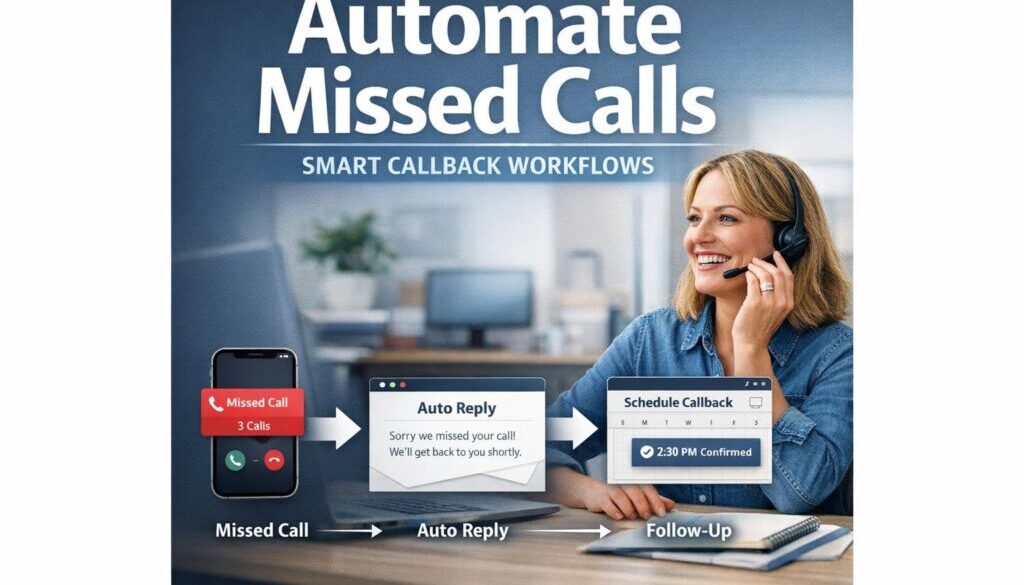
Here’s a simple example of what a missed-call workflow might look like for a small service business.
- A customer calls during a busy period.
- No one answers, so the phone system logs a missed call.
- The workflow checks the call details and creates a callback task.
- An automatic SMS thanks the caller and asks for the best way to help.
- The message is routed to the correct team member.
- If no one completes the task in time, a reminder is sent.
That may sound simple, but it removes a lot of manual chasing and reduces the chance that an enquiry gets forgotten.
Callback request via SMS or form
One of the most practical patterns is to send a short SMS with a callback link or reply prompt. That gives the caller an easy way to provide their name, enquiry type, or preferred callback time.
If your business already uses forms or shared inboxes, this can be a straightforward way to centralise the enquiry.
Routing by urgency or enquiry type
Some calls are routine, while others need immediate attention. For example, a billing question may wait until the next business day, while a service outage or urgent job could be escalated sooner. Automation can help sort those differently, but only if the rules are clear.
After-hours rules and escalation
After-hours workflows are especially useful for small teams. You might send a polite SMS, create a priority task, and flag the enquiry for first thing in the morning. If the message seems urgent, it can also be escalated to a manager or on-call staff member.
That way, the caller feels acknowledged and the team knows exactly what needs to be handled next.
Where AI helps, and where human review still matters
AI can be useful in missed-call workflows, but it should not be treated as a replacement for good process design.
Where AI can help
- transcribing voicemails
- summarising the caller’s message
- classifying the enquiry type
- drafting a first-response message
These are useful when the workflow needs to move quickly and the message is fairly routine.
Where human review is better
Human review is still important when the call is urgent, sensitive, complaint-based, or unclear. AI can misread details, miss tone, or classify the enquiry incorrectly. For that reason, businesses should be careful about allowing an automated system to make final decisions without oversight.
This is especially important when personal information is involved. The Privacy Act and the Australian Privacy Principles may apply where personal information is collected, stored, or shared as part of the workflow.
Privacy, spam, and security considerations in Australia
If your missed-call workflow collects names, phone numbers, voicemail recordings, transcripts, or enquiry details, you need to think about privacy and data handling from the start.
Privacy and data collection
Caller details and call transcripts can count as personal information. Businesses should only collect what they need, store it securely, and make sure staff can access it appropriately.
Consent for SMS and email follow-up
If the automation sends a message after a missed call, the business should make sure that communication is appropriate and compliant. The exact requirements will depend on the situation, but the key point is that automated outreach should not be treated casually.
Secure handling of call data
Call logs and transcripts should be treated like any other sensitive business record. The Australian Cyber Security Centre provides general guidance for small businesses on protecting information and improving cyber hygiene.
That matters because callback workflows often connect multiple tools. The more systems involved, the more important it is to manage access and keep the workflow simple.
Common mistakes to avoid
Missed-call automation works best when it is simple, reliable, and owned by a real person.
Automating the capture but not the follow-up
A common mistake is creating the alert but not assigning responsibility. If nobody owns the callback, the automation just produces another notification.
Making the workflow too complicated
It is tempting to build a process for every possible scenario. In reality, the best place to start is usually a single missed-call path with one clear owner and one clear next step.
Not planning for failures
Automation can fail if a phone platform changes, an integration stops working, or a message does not send. A fallback process is essential.
That might include voicemail review, a backup notification channel, or a manual daily check of missed calls.
Poor routing or unclear ownership
If the system sends every callback to everyone, no one feels responsible. Good automation should reduce confusion, not create it.
How to measure whether it’s working
Once the workflow is live, track a few simple measures so you know whether it is actually helping.
| What to track | Why it matters |
|---|---|
| Missed calls by time and day | Shows when staffing or routing issues are most likely |
| Callback completion rate | Tells you whether enquiries are actually being followed up |
| Average callback time | Helps you understand responsiveness |
| Repeat missed-call patterns | Highlights process gaps or staffing shortages |
If the numbers are improving, the workflow is probably doing its job. If not, the system may need better routing, stronger reminders, or a simpler process.
Real-world examples of practical automation
Missed-call workflows are a good example of practical automation because the business problem is clear: capture the enquiry, act on it quickly, and reduce manual admin. The same thinking applies to many other everyday workflows.
For example, document-heavy processes can often be simplified with automation. Our trust account automation case study shows how a repetitive administrative workflow can be streamlined when the right process is identified.
Content planning is another area where repetitive admin can slow a team down. Our content calendar automation case study is a useful example of turning a manual process into something more structured and consistent.
And for businesses that deliver digital files or products, digital product automation can remove a lot of repetitive follow-up and delivery work.
These examples are different in detail, but they share the same principle: use automation to handle the repetitive handoff, then keep humans focused on the parts that need judgement.
When to get help
If your missed-call process is simple, you may be able to start with an off-the-shelf tool. But if your workflow needs routing, after-hours rules, CRM updates, SMS follow-up, or multiple staff handoffs, it can be worth getting help designing the system properly.
That is especially true if you want the workflow to be reliable, easy to maintain, and aligned with your broader operations. Well-designed automation solutions can save time without making your business more complicated.
At Simple Automations, the focus is on building practical workflows that help small businesses reduce admin and respond faster without over-engineering the process.
Ready to Turn Missed Calls into a Better Follow-Up Process?
If missed calls are costing you leads or adding unnecessary admin, a simple automation can help your business capture enquiries faster and keep callbacks organised.
Final takeaway
If you want to automate missed calls effectively, start with a simple workflow: detect the missed call, capture the enquiry, notify the right person, and track the callback. Keep the process easy to understand, build in a fallback, and make sure privacy and messaging obligations are considered from the beginning.
The most useful systems are not the most complex ones. They are the ones that quietly reduce lost leads, save admin time, and help the business respond more consistently.
If you are looking for a practical way to simplify your follow-up process, Simple Automations can help you design a workflow that fits your business rather than forcing your business to fit the tool.