CRM vs Spreadsheet for Small Business: When to Switch
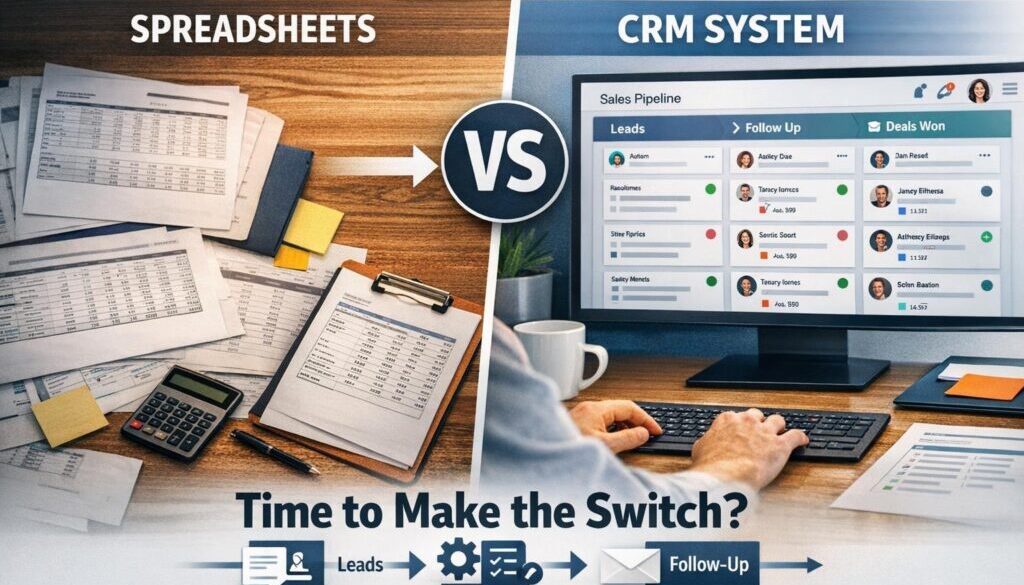
If you’re managing leads, customers and follow-ups in a spreadsheet, you’re not alone. For many small businesses, a spreadsheet is the easiest place to start. But as the business grows, the CRM vs spreadsheet for small business decision becomes less about preference and more about whether your current process is still reliable.
This guide breaks down what each tool does well, where spreadsheets start to fall short, and the warning signs that it may be time to move to a CRM. It also covers practical things Australian small businesses should think about, including privacy, security and automation opportunities.
null
At Simple Automations, we work with businesses that want cleaner processes without adding unnecessary complexity. If your customer management is starting to feel messy, this article will help you work out whether a spreadsheet is still enough or whether a CRM is the smarter next step.
Spreadsheet vs CRM: What’s the Difference?
A spreadsheet is a flexible tool for storing and organising information. A CRM, or customer relationship management system, is built specifically to manage contacts, leads, sales opportunities, tasks and follow-ups.
That difference matters. A spreadsheet can be a useful starting point, but a CRM is designed to support a customer workflow from enquiry to sale and beyond.
What spreadsheets do well
- They are familiar and easy to start using.
- They are cheap or already included in software you use.
- They work well for simple lists and basic tracking.
- They can be customised quickly without much setup.
Where CRMs are purpose-built for customer management
- They centralise contacts, notes, tasks and pipeline stages.
- They make it easier for teams to work from the same source of truth.
- They usually include reminders, reporting and workflow automation.
- They are better suited to ongoing customer relationship management.
If you want to explore broader ways to reduce admin beyond customer tracking, Simple Automations has small business automation solutions that can help simplify repetitive work across your business.
When a Spreadsheet Is Still Enough
There is nothing wrong with staying with a spreadsheet for as long as it still fits the way you work. In the CRM vs spreadsheet for small business conversation, the right answer is often “it depends on your process”, not “a CRM is always better”.
Low lead volume
If you only receive a small number of enquiries each week or month, a spreadsheet may be enough to keep track of names, notes and next steps.
Simple follow-up needs
If follow-ups are straightforward and do not require multiple reminders, pipeline stages or handovers, a spreadsheet can remain practical.
One person owns the process
Spreadsheets work best when one person is responsible for the whole workflow. Once several people are updating the same file, the risk of confusion increases.
Minimal reporting or automation needs
If you do not need detailed reporting, shared dashboards or automated reminders, a spreadsheet may still be enough.
Signs It’s Time to Switch to a CRM
The biggest trigger for moving away from spreadsheets is usually process complexity. If customer data is starting to create more work than it saves, the balance has shifted.
Duplicate records and version confusion
When the same contact appears in several files, or people are using different versions of the spreadsheet, it becomes hard to know which information is current.
Missed follow-ups
If leads are slipping through the cracks because reminders are manual, a CRM can help create more consistent follow-up behaviour.
Multiple people touching the same pipeline
As soon as more than one person needs to update the customer list, coordinate tasks or check deal status, a spreadsheet can turn into a coordination problem.
Reporting takes too long
If you are spending time pulling together reports manually, that is often a sign the process needs better structure. A CRM can make reporting much easier because the data is already organised around customer activity.
Customer data is getting harder to manage securely
Spreadsheets are often shared around in ways that make access control difficult. If customer information is being emailed, copied or stored in multiple places, it may be time to look at a more controlled system.
This is one reason many businesses look beyond basic tools and toward automation services that connect data collection, follow-up and reporting into one cleaner workflow.
What a CRM Improves
A CRM is not just a fancier spreadsheet. It changes how the work is managed.
Centralised contacts, deals, notes and tasks
Instead of customer information living in separate tabs or files, a CRM keeps the main details together in one place. That makes it easier to see the history of a lead or customer at a glance.
Better visibility across the team
With a CRM, team members can usually see who owns a lead, what stage it is at and what needs to happen next. That reduces the need for status meetings and manual checking.
Workflow automation
Many CRMs can trigger reminders, task creation and notifications when something happens in the pipeline. The exact features vary by product, but the goal is the same: reduce manual follow-up.
Reporting and accountability
Because the data is entered into a structured system, it is usually easier to report on activity, track pipeline progress and understand where opportunities are being lost.
If you want to see how structured processes can be simplified in practice, our trust account automation case study shows how a document-heavy workflow can be made more manageable. For content-led businesses, the content calendar automation example shows how organised workflows can reduce repetitive planning work.
Costs Beyond the Subscription Fee
One of the most common mistakes in the CRM vs spreadsheet for small business decision is focusing only on monthly software cost. The real cost is usually broader than that.
Setup and migration
Moving from a spreadsheet to a CRM often means cleaning up duplicates, standardising fields and deciding what data is actually worth keeping.
Training and process design
A CRM works best when the team agrees on how it should be used. Without that, the system can become messy very quickly.
Ongoing maintenance and discipline
Any CRM still needs care. Fields need to be maintained, stages need to be used consistently and records need to be updated properly.
The hidden cost of messy spreadsheets
Sometimes the cheapest option is not the least expensive one in practice. If a spreadsheet creates missed leads, poor visibility or duplicate work, those inefficiencies can cost more than software.
Australian Privacy and Security Considerations
For Australian small businesses, privacy and security are part of the decision. The Australian Privacy Principles set out key expectations around collecting, using, storing and securing personal information, while the OAIC guidance for small business and privacy explains how privacy obligations may apply.
Not every small business is covered in the same way, so this should be assessed carefully. But even when privacy law is not the main issue, good data hygiene still matters.
Personal information and access control
If your spreadsheet contains names, phone numbers, email addresses, notes or other customer details, it should be treated carefully. Restricting access is much easier when the system is designed for it.
Backups and account hygiene
Whatever tool you use, make sure your files and accounts are protected. The Australian Cyber Security Centre has practical guidance for small business cyber security, including simple steps businesses can take to reduce risk.
Auditability matters
One weakness of spreadsheets is that it can be hard to see who changed what and when. A CRM often provides better record-keeping and activity history, which can help when several people work with the same customer data.
What Can Be Automated in Either Setup?
Automation is not limited to a CRM. You can automate parts of a spreadsheet-based process too. The difference is that a CRM usually gives you a cleaner foundation for doing it.
Forms, alerts and task creation
Common automation opportunities include sending form responses into a spreadsheet or CRM, creating a task when a new lead arrives, and notifying the right person when a customer enquiry comes in.
Syncing spreadsheet data into a CRM
Some businesses start by collecting data in spreadsheets, then later move that data into a CRM. In many cases, the first step is not a full rebuild. It is simply connecting the existing process so information moves automatically instead of being copied by hand.
Microsoft’s Power Automate documentation is a useful reference if your business already uses Microsoft 365, and Google’s AppSheet support shows how spreadsheet-connected workflows can be extended in the Google ecosystem.
Using AI carefully for summaries and drafts
AI can be useful for drafting follow-up emails, summarising notes or helping organise customer information. But it should usually be treated as an assistant, not the source of truth. Human review still matters, especially when customer communication or sensitive information is involved.
If your business wants help identifying which parts of a process are worth automating, Simple Automations can help map the workflow before any build begins. Our Business Hub is also a good place to explore practical automation ideas and business resources.
How to Decide Whether to Switch
If you are still unsure about the CRM vs spreadsheet for small business decision, use the checklist below. It is not about company size alone. It is about whether your current process still works without creating extra manual effort.
A simple readiness checklist
- Do multiple people need access to the same customer data?
- Are follow-ups being missed or delayed?
- Are duplicates or inconsistent records causing confusion?
- Do you need better reporting on leads or sales activity?
- Is customer data becoming harder to manage securely?
- Are you spending too much time updating or cleaning the spreadsheet?
When to stay with spreadsheets
Stay with a spreadsheet if the workflow is simple, the lead volume is low, and one person can manage the process without difficulty.
When to move now
Move to a CRM if manual follow-up is breaking down, the team is growing, or the spreadsheet is starting to limit visibility and accountability.
When the process is the problem, the best answer is often not “more tabs”. It is a better system.
How to Prepare for Migration
If you decide to switch, the migration does not need to be overwhelming. The key is to clean up the data before importing it.
- Remove duplicates and outdated records.
- Decide which fields are actually necessary.
- Standardise names, phone numbers and status labels.
- Identify the main pipeline stages you want to track.
- Work out who needs access and what they need to see.
- Test the process with a small group before rolling it out fully.
This stage is often where businesses benefit from outside help. A good setup is less about software and more about designing a workflow people will actually use.
Related Examples of Practical Automation
To see how structured workflows can be turned into simpler processes, it can help to look at real examples. Our digital product automation case study shows how a delivery process can be made more reliable when the steps are handled consistently.
For more examples of practical automation work, you can also browse our automation case studies. These are useful if you want to understand how simple workflow improvements can reduce manual effort without adding unnecessary complexity.
Final Recommendation
The simplest way to think about CRM vs spreadsheet for small business is this: use a spreadsheet for simple tracking, but move to a CRM when coordination, visibility and follow-up become too important to leave to manual effort.
If you are still relying on spreadsheets, that does not mean you are behind. It just means your business may now be at the point where a more structured system would save time and reduce errors.
If you want help working out what should stay manual and what should be automated, Simple Automations can help you review the process and identify the most practical next step.
Ready to Simplify Your Business Processes?
If your spreadsheet is starting to cause confusion, missed follow-ups or extra admin, it may be time to review the workflow and decide what should be automated or moved into a better system.