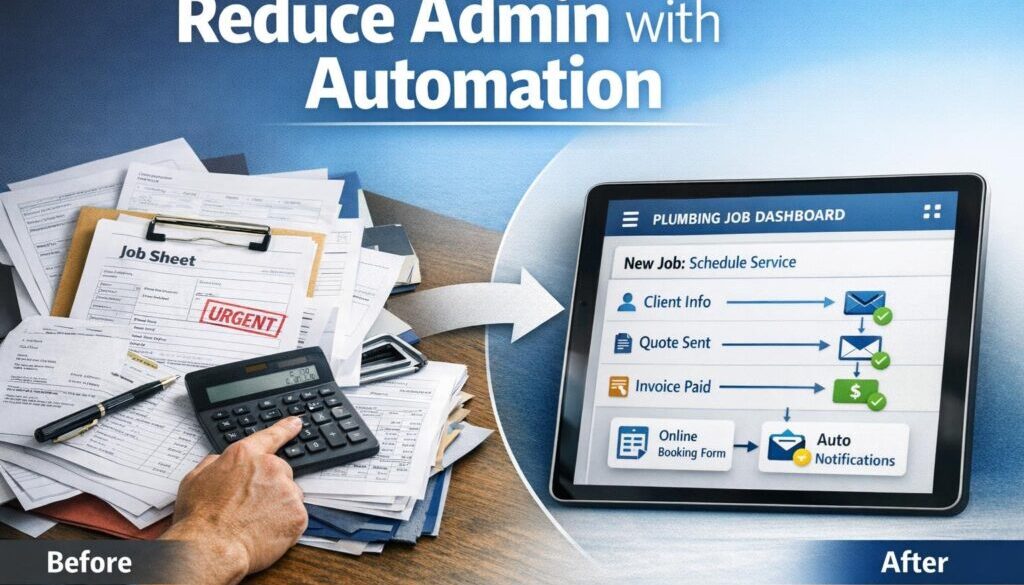
10 Smart Ways Plumbing Businesses Can Reduce Admin with Automation
For many plumbing businesses, the biggest time drain is not the work on site — it is the office admin around it. Quoting, scheduling, invoicing, payment follow-ups, job notes, payroll, and record-keeping can easily pile up, especially when everything is handled manually.
The good news is that plumbing businesses can reduce admin with automation without losing control of quotes, customer service, or compliance. The best approach is usually not to automate the whole business. It is to automate the repeatable handoffs between tasks, so office work becomes faster, more accurate, and easier to manage.
In this guide, we will look at the most practical places plumbing businesses can save time, what software usually sits in the stack, where AI can help, and what still needs a human to check.
null
If your plumbing business is still relying on manual retyping, phone reminders, and scattered job notes, there is a strong case for simple workflow improvements. This is exactly the kind of problem that small business automation is designed to solve.
Why plumbing businesses struggle with office admin
Plumbing work is often event-based. A lead comes in. A quote is sent. A job is booked. The job is completed. An invoice is issued. Payment is followed up. That makes plumbing a strong fit for automation because the same steps repeat over and over.
When those steps are managed manually, the business can run into predictable problems:
- missed enquiries
- delayed quotes
- double handling of data
- late invoices
- poor follow-up on outstanding payments
- lost job notes or photos
- extra payroll admin
Most of these issues are not caused by a lack of effort. They happen because the workflow relies on people remembering every handoff. Plumbing businesses can reduce admin with automation by removing those repetitive handoffs from the manual process.
The repetitive tasks that eat time
Common admin tasks in a plumbing business include:
- answering and logging new enquiries
- creating job records
- sending booking confirmations
- drafting quotes
- creating invoices after the job
- chasing overdue payments
- saving photos and documents to the right job
- collecting timesheets
- entering payroll data
These are all routine tasks, which makes them good candidates for workflow automation.
Why manual workflows create delays and errors
Manual admin creates friction in two places: when information is first entered, and when it needs to move from one system to another. If a customer’s details are typed into a job system, then retyped into an invoice, then copied again into accounting software, each step creates a chance for delay or error.
That is why the goal is not just speed. The goal is cleaner handoffs, fewer mistakes, and better visibility across the business.
What plumbing admin can be automated first
If you want practical results, start with the highest-volume, most repetitive tasks. For many plumbing businesses, that means the office work that happens around every job.
1) Lead enquiry capture
Current problem: enquiries come in by phone, web form, email, or message, and someone has to write them down or enter them manually.
Automation opportunity: create a job or lead record automatically when an enquiry comes in.
How it could work: a form submission or incoming message creates a new entry in the job system, alerts the office, and sends an acknowledgement to the customer.
Business benefit: fewer missed leads and less manual data entry.
2) Booking and dispatch
Current problem: once a job is accepted, someone has to organise the booking, assign the right person, and update the calendar.
Automation opportunity: create calendar entries and job assignments from a confirmed booking.
How it could work: once the quote is accepted or the job is approved, the system creates the booking and sends a confirmation message.
Business benefit: faster scheduling and fewer double-bookings.
3) Quote generation
Current problem: quoting often involves repeating the same wording, pricing structures, or service items.
Automation opportunity: use quote templates or prefilled job types to reduce repetitive typing.
How it could work: the office team or plumber selects the job type, adds the specific details, and the quote is generated from a template.
Business benefit: quotes go out faster and are easier to standardise.
That said, pricing and scope should still be checked by a human before anything is sent. Automation should support the quote process, not replace judgment.
4) Invoice creation
Current problem: jobs are completed, but invoices are delayed because someone has to build them manually.
Automation opportunity: create invoices from completed jobs or approved job records.
How it could work: when a job is marked complete, the system creates an invoice draft and sends it to accounting or directly to the customer.
Business benefit: faster billing and fewer missed invoices.
This is one of the clearest areas where plumbing businesses can reduce admin with automation because the trigger is simple and the workflow is repetitive.
5) Payment reminders
Current problem: overdue invoices have to be chased manually, which takes time and can feel awkward.
Automation opportunity: send polite reminder emails or SMS messages when a due date passes.
How it could work: the system sends a reminder automatically, then creates a follow-up task for staff if payment is still outstanding.
Business benefit: improved cash flow and less manual chasing.
6) Customer updates
Current problem: customers want to know when the plumber is arriving, whether the job is complete, and what happens next.
Automation opportunity: send status updates at key points in the job lifecycle.
How it could work: booking confirmation, arrival reminder, job completion notice, and review request are all sent from templates or triggers.
Business benefit: a better customer experience with less office time spent sending individual messages.
7) Timesheets and payroll input
Current problem: if plumbers or apprentices record time manually, office staff often need to clean up and re-enter the data.
Automation opportunity: move timesheet data into payroll or a timesheet system with fewer manual steps.
How it could work: time entries are captured in the field, then reviewed and transferred into payroll workflows.
Business benefit: less admin for payroll processing.
Payroll still needs human review. Employer records, payslips, and time data must be handled carefully, especially for businesses that employ staff.
8) Document and photo filing
Current problem: job photos, compliance documents, and site notes can end up scattered across phones, inboxes, and folders.
Automation opportunity: save files to the right job record or folder automatically.
How it could work: photos or documents uploaded from the field are filed under the correct customer and job reference.
Business benefit: easier retrieval and better record organisation.
9) Stock and supplier alerts
Current problem: parts run low, or office staff only realise a supplier order is needed when a job is already delayed.
Automation opportunity: alert the team when stock drops below a set level or a parts request is needed.
How it could work: job records or stock counts trigger a purchase request or an internal alert.
Business benefit: fewer delays and less manual stock checking.
The software stack most plumbing businesses use
Plumbing admin usually sits across several types of software. The specific products vary, but the categories are similar.
Job management and field-service software
This is often the centre of the workflow. Job systems help with scheduling, quoting, dispatch, customer history, mobile access, photos, and job status updates. Common platforms used by trade businesses include ServiceM8, simPRO, AroFlo, Tradify, and Fergus.
These tools are useful because they keep the job information in one place and reduce the need to copy details between systems.
Accounting and invoicing software
Accounting tools such as Xero and MYOB are often used for invoices, bank feeds, payment tracking, and record-keeping. The ATO’s record-keeping guidance for business is a useful reminder that invoices, receipts, and financial records need to be kept in a way that supports tax reporting and business administration.
For some businesses, e-invoicing may also be relevant. It is worth understanding, even if it is not the right fit for every plumbing business.
Office tools and shared files
Many plumbing businesses also rely on Microsoft 365 or Google Workspace for email, calendars, file storage, and internal forms. These tools are often the simplest place to start with automation because they are already in everyday use.
Google’s support resources for Workspace users and Microsoft’s Power Automate documentation are useful references for understanding how office tools can connect and support basic workflow automation.
Automation platforms that connect everything
Automation platforms such as Zapier or Microsoft Power Automate can help move information between systems if the software allows it. For example, an online enquiry can create a task, a completed job can trigger an invoice draft, or a form submission can notify the right staff member.
If you are looking at this type of setup, it often makes sense to start with automation solutions built around the workflow, rather than trying to force the business to fit the software.
Where AI can help — and where it can’t
AI is useful in plumbing admin, but only when it is treated as a helper. It should reduce the amount of typing and sorting staff need to do, not replace review and decision-making.
Drafting emails and reminders
AI can help draft:
- booking confirmations
- quote follow-ups
- payment reminders
- review requests
- customer updates
This can save time, but the final wording should still be checked so the message suits the customer and the situation.
Summarising job notes
Plumbing jobs often create messy notes from phone calls, site visits, and messages. AI can help turn those notes into a short summary that is easier to read and store.
That is useful when office staff need to understand what happened on a job without reading through a long thread of messages.
Extracting data from documents
Some software tools can extract data from invoices, receipts, and forms. That can cut down manual re-entry and help office staff process documents faster.
Even so, the extracted data should be checked. A bad number in a quote, invoice, or payroll record can create more work later.
Why human review still matters
AI can make mistakes, misunderstand context, or produce wording that is too generic. That is why the most reliable use of AI in a plumbing business is to assist with drafting, sorting, and summarising — not to make final decisions on pricing, compliance, or customer commitments.
This is especially important for records, invoicing, and employee data, where accuracy matters. The Fair Work Ombudsman’s guidance on record-keeping and payslips is a good reminder that payroll admin still needs proper handling.
Australian privacy, tax, and payroll considerations
When plumbing businesses automate admin, they usually move customer and staff data between systems. That means privacy and record-keeping need to be part of the plan from the start.
Customer data and privacy
Plumbing businesses often collect names, phone numbers, addresses, access details, photos, and payment information. The OAIC’s Australian Privacy Principles guidelines and its small business and privacy guidance are relevant if your business is storing or sharing personal information in cloud tools.
Practical things to think about include:
- who can access customer data
- whether contractors need full or limited access
- how long records are kept
- what happens if a device is lost or a staff member leaves
Record-keeping and invoicing
For Australian businesses, accurate records matter for BAS, GST, income tax, and general business management. If automation moves data into your accounting software, it should improve accuracy, not create a second source of errors.
That is why it is usually smart to test invoice workflows carefully before relying on them in day-to-day operations.
Employee records and payslips
If the business has employees, payroll admin becomes more complex. Timesheets, leave, wages, superannuation, and payslips all need to be managed properly. Automation can help transfer data and reduce manual entry, but it does not remove employer responsibilities.
How to choose simple automation without overcomplicating things
The best automation for a plumbing business is usually simple, visible, and easy to maintain. A good workflow should make the office more organised, not less.
Start with the highest-volume tasks
Look for tasks that happen every day or every week. If a workflow is repeated often, automation has a better chance of delivering practical value.
Good starting points include new enquiries, quote follow-ups, invoice creation, and payment reminders.
Keep the workflow mobile-friendly
Plumbing businesses work in the field, so the system needs to be easy to use on a phone or tablet. If it is difficult to update a job on site, people will avoid it.
Simple, mobile-friendly workflows are often more effective than complex systems with too many steps.
Automate handoffs, not judgment
This is the most important principle. Let automation move information, create tasks, send reminders, and file documents. Keep humans in charge of pricing, scope changes, complaint handling, and any situation that needs judgment.
That approach is also why practical automation usually works best. It supports the team instead of replacing it.
Test integrations before scaling
Before linking multiple systems together, test the workflow on a small scale. Check what data moves, who sees it, and whether the process behaves the way you expect.
If the goal is to simplify operations without introducing risk, then it is better to start small and build gradually. That is the kind of approach covered in our Business Hub, where practical automation ideas are explored in plain English.
How a plumbing business could think about automation in practice
Here is a simple way to view the opportunity.
| Manual workflow | Automation opportunity | Business benefit |
|---|---|---|
| Customer enquiry is written down by hand | Automatic lead capture into a job system | Fewer missed enquiries |
| Booking details are copied into a calendar | Calendar entry created automatically | Less double handling |
| Invoice is created after the job | Invoice draft generated from the completed job | Faster billing |
| Overdue invoices are chased manually | Automatic reminders are sent | Better cash flow follow-up |
| Job photos are saved in random folders | Photos are filed into the correct job record | Better record organisation |
This is the kind of pattern that makes plumbing businesses can reduce admin with automation such a practical idea. The business does not need to automate every decision. It just needs to remove repetitive admin from the path.
Real-world examples of practical automation
At Simple Automations, many workflow projects start with document-heavy or repeatable admin processes. For example, our trust account automation case study shows how a repetitive administrative workflow can be simplified when the process is well understood.
We have also applied similar thinking to content and file-based workflows. The content calendar automation case study is a useful example of a process that became easier to manage by reducing manual coordination. In a different kind of workflow, digital product automation shows how structured handoffs can make delivery simpler and more reliable.
While those examples are not plumbing businesses, the lesson is the same: if a task follows a repeatable pattern, there is usually an opportunity to make it simpler.
When to get help
If your plumbing business is already using several tools but the data still has to be copied between them manually, that is usually a sign the workflow could be improved. The right automation setup does not need to be complicated — it just needs to fit the way the business actually works.
That is where a practical review can help. A good automation plan starts with the real workflow, identifies the handoffs, and then connects the tools that already exist.
Ready to Simplify Your Plumbing Admin?
If you want to reduce repetitive office work without losing control of quotes, invoices, and customer communication, Simple Automations can help identify the best place to start.
Final takeaway
The best way for plumbing businesses to reduce admin is not to chase complexity. It is to automate the repeatable parts of the workflow: enquiry capture, scheduling, quoting, invoicing, reminders, job notes, and record filing.
Used well, automation saves time, reduces retyping, improves consistency, and helps the business stay organised without losing the personal service customers expect. If you are ready to take the next step, start with the highest-volume admin tasks and look for simple, practical improvements first.
For more practical guidance on making business processes simpler, visit Simple Automations.