Workflow Automation for Accountants: Practical Examples
If your team spends too much time chasing invoices, moving documents, checking approvals and re-keying data, workflow automation for accountants can make a real difference. The goal is not to replace professional judgement. It is to reduce repetitive admin, improve consistency and make routine accounting work easier to manage.
For small accounting practices and in-house finance teams, the challenge is usually the same: there is too much manual work and not enough time. This guide explains what workflow automation means in an accounting context, which tasks are best suited to automation, what should stay human-reviewed and how Australian compliance considerations affect the way you design a workflow.
null
Done well, automation can help a practice move faster without losing control. It can also support better recordkeeping, cleaner handovers and fewer errors in day-to-day processes. For businesses just starting to explore small business automation, accounting workflows are often a smart place to begin because the tasks are repeated often and the rules are usually clear.
What workflow automation means for accountants
In simple terms, workflow automation for accountants means using software to move information, create tasks, route approvals and store documents with less manual effort. Instead of someone having to copy data from one system to another, a workflow can handle some or all of that process automatically.
In practice, accounting automation often sits inside or between cloud tools such as accounting software, document capture tools, payroll systems, collaboration platforms and automation tools. Common examples include invoice capture, reminder emails, approval routing, task creation and document filing.
Automation vs AI vs manual review
It helps to separate three ideas:
- Automation moves tasks or data through a process based on rules.
- AI can help summarise, draft, classify or extract information from text and documents.
- Manual review is still needed where judgement, compliance or exceptions are involved.
In accounting, that distinction matters. AI may help a staff member draft an email or summarise a document, but it should not be treated as the final authority on tax treatment, payroll decisions or compliance checks.
Why cloud tools matter
Most modern workflow automation for accountants depends on cloud-based tools that can share information more easily. That might include your accounting platform, document capture app, email system, shared drive, task manager or automation platform. When those tools can connect, it becomes much easier to reduce manual administration.
If your team is still working across disconnected spreadsheets, email inboxes and shared folders, there is usually a lot of room to improve process flow before you even consider advanced automation.
Which accounting tasks are best suited to automation?
The best candidates for automation are usually repetitive, rule-based and high-volume. They do not require complex judgement every time, and the desired outcome is usually predictable.
Invoice capture and bill entry
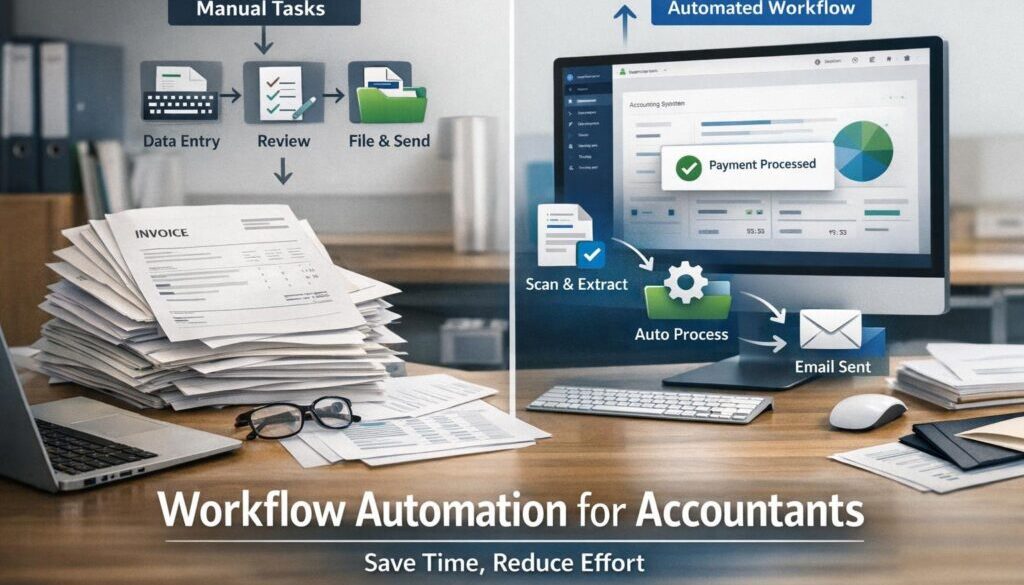
Supplier invoices often arrive by email or as scanned PDFs. A workflow can save the file, extract key details such as supplier name, amount and GST, create a draft bill and route it for approval if needed. That reduces manual data entry and helps invoices move through the system more quickly.
Receipt management
Receipts are another common source of admin. Staff can upload them, and a workflow can capture the transaction details, match the spend where possible and send the record to the right place for review. This is especially useful for expense claims and card transactions.
Bank reconciliation support
Bank feeds already reduce some manual work, but automation can go further by matching recurring items, suggesting coding based on rules and flagging unusual transactions for review. That can make month-end close faster and less frustrating.
Accounts payable approvals
When bills need sign-off, automation can route them to the right approver based on amount, vendor or department. It can also send reminders and record the status of each approval. That gives the business better visibility without adding more chasing.
Accounts receivable reminders
Overdue invoices are another good use case. A workflow can send reminder emails before and after due dates, create follow-up tasks and escalate the matter if payment remains outstanding. This supports collections without relying on someone to remember each step manually.
Client onboarding
New client onboarding often involves the same steps every time: creating records, requesting documents, setting up folders, sending welcome emails and assigning tasks. A workflow can standardise that process so fewer steps are missed and the client experience feels more consistent.
Payroll and admin tasks
Payroll workflows often include timesheet approvals, employee updates, missing information follow-up and document filing. These are administrative tasks that can benefit from rules-based automation, provided the payroll process still has the right human oversight.
Recurring compliance checklists
Month-end, quarter-end and year-end checklists are ideal for automation support. A workflow can create recurring tasks, assign owners, set due dates and store completion evidence. That helps the team stay organised and reduces the chance of missed steps.
Practical workflow automation examples
Below are a few simple examples of workflow automation for accountants in action. These are not about fully replacing staff. They are about removing repetitive friction from common processes.
1. Supplier invoice received, extracted, approved and posted
Current problem: Someone receives the invoice, opens it, enters the details manually, emails it to a manager and waits for approval.
Automation opportunity: The invoice can be captured automatically, key information extracted, a draft bill created and an approval request sent to the right person.
How it could work: The email or upload triggers the workflow. The document is stored, details are extracted and the draft bill is sent for review before posting.
Business benefit: Less manual entry, fewer delays and a clearer approval trail.
2. Receipt uploaded, matched, coded and archived
Current problem: Staff send in receipts inconsistently, and someone has to sort, label and file each one.
Automation opportunity: A receipt upload can trigger data extraction, suggested matching and automatic filing into the correct folder.
How it could work: A staff member forwards or uploads the receipt. The workflow captures the document, extracts the details and sends it to the bookkeeping system or file storage.
Business benefit: Better recordkeeping and less time spent chasing missing paperwork.
3. New client form, task setup, folder creation and welcome email
Current problem: Onboarding a new client often means repeating the same admin tasks by hand.
Automation opportunity: A completed intake form can create a task list, set up folders, generate a welcome email and assign internal responsibilities.
How it could work: Once the form is submitted, the workflow creates the internal work items and sends the right documents or instructions to the client.
Business benefit: A more consistent onboarding experience and less chance of missing a step.
4. Overdue invoice reminder, escalation and follow-up task
Current problem: Chasing debtors takes time, and follow-up can be inconsistent across the team.
Automation opportunity: Reminder emails and internal follow-up tasks can be triggered based on invoice due dates.
How it could work: The system checks the invoice status, sends a reminder at a set point and creates a task if payment is still overdue.
Business benefit: Better consistency in collections and less manual follow-up.
5. Timesheet approval, payroll update and document archive
Current problem: Payroll teams often wait for approved timesheets or missing information before they can process pay runs.
Automation opportunity: Approved timesheets can trigger the next step in the payroll workflow, while incomplete records can create a follow-up task.
How it could work: Once a timesheet is approved, the workflow updates the next system or notifies payroll. If something is missing, the workflow flags it for review.
Business benefit: Fewer delays and a more reliable payroll process.
For a practical example of how repetitive administrative work can be simplified, see our trust account automation case study. It shows how a document-heavy workflow can be streamlined without losing control over the process.
What should remain manual or human-reviewed?
Not every step should be automated. In accounting, the safest approach is to automate the routine parts and keep judgement-based decisions under human review.
Exception handling
If something does not fit the usual pattern, a person should review it. Automation is great at standard work, but exceptions can quickly create errors if they are pushed through without checking.
GST and BAS treatment
Automated workflows can help with data capture and sorting, but GST coding and BAS-related decisions still need appropriate review. Australian recordkeeping and GST obligations must remain accurate.
Payroll anomalies
Anything unusual in payroll should be checked by a person. Automation can flag missing information or inconsistencies, but it should not make the final decision where payroll accuracy is at stake.
Disputed invoices
If a bill is challenged, paused or unclear, it is better to route it to the right person rather than let automation continue as normal. A workflow should support control, not remove it.
Compliance decisions
Automation can help maintain checklists and collect documents, but compliance decisions should stay with qualified staff. That is especially important in areas such as tax, payroll and privacy.
Common tools used in Australian accounting workflows
Workflow automation for accountants usually involves a stack of connected tools rather than one single platform. The exact setup depends on the firm’s size, systems and processes.
Accounting platforms
Common platforms in Australia include Xero, MYOB and QuickBooks Online. These platforms often sit at the centre of the workflow, with other tools connecting around them.
You can review official product information through the Xero documentation and MYOB support resources, or explore the QuickBooks Online Australia site for current product information.
Document capture tools
Tools such as Dext and Hubdoc are often used for receipt and invoice capture. They can help extract information from documents and reduce manual entry. For current product details, refer to the official Dext website and Hubdoc website.
Workflow and automation platforms
Platforms such as Microsoft Power Automate and Zapier are commonly used to connect systems, move data, send notifications and trigger tasks. Their official documentation is the best place to check current capabilities: Microsoft Power Automate documentation and Zapier help centre.
Office and collaboration tools
Many accounting workflows also rely on Microsoft 365 or Google Workspace for email, file storage, document collaboration and task visibility. AI features in those suites may help draft, summarise or organise content, but they still need human oversight. For official guidance, see Microsoft 365 Copilot support and Google Workspace help.
Privacy, security and compliance considerations
Any discussion of workflow automation for accountants needs to include compliance. Australian accounting workflows often involve personal information, employee records and financial documents, so privacy and security must be built into the process.
ATO recordkeeping and GST records
The ATO provides guidance on business recordkeeping and GST record keeping. That means automation should help preserve accurate source records, not weaken them. Records still need to be clear, accessible and retained appropriately.
You can review the ATO’s official guidance on record keeping for business and GST record keeping.
STP and payroll obligations
If a workflow touches payroll, it should be designed with reporting obligations in mind. The ATO’s Single Touch Payroll guidance is a useful reference point when designing payroll-related workflows.
Privacy and data handling
The OAIC explains the Australian Privacy Principles and how the Privacy Act can apply to small businesses in some circumstances. For accounting automation, this matters because client and employee information can move through multiple systems.
See the official OAIC pages on Australian Privacy Principles and small business and the Privacy Act.
Access control and vendor due diligence
Before connecting tools, make sure access is restricted to the right people, multi-factor authentication is enabled where possible and the vendor’s security practices are understood. Automation is only helpful if it is secure, auditable and well governed.
How to choose the first workflow to automate
If you are not sure where to begin, start small. The best first workflow is usually one that is repeated often, follows a clear pattern and creates noticeable admin load.
Start with high-volume, rule-based tasks
Look for tasks such as invoice capture, receipt filing, reminder emails or standard approvals. These are often the easiest place to gain value because the rules are already fairly clear.
Map the process before automating
Before building anything, write out the current process step by step. Identify the trigger, the decision points, the approval steps, the systems involved and any exceptions. This helps you avoid automating a broken process.
Test approvals, exceptions and records
A workflow should be tested with normal cases and unusual cases. You also need to check that records are stored properly, approvals are traceable and nothing important is lost along the way.
Verify integrations and permissions
Not every system connects the same way, and features can change over time. Check the official product documentation before relying on a workflow in production. If a process spans several systems, make sure the permissions, data fields and handover points are clearly understood.
For firms that want help identifying practical automation opportunities, our automation solutions page is a good place to start. You can also browse the Business Hub for more practical business resources.
Where Simple Automations can help
Not every accounting workflow needs a large software project. Sometimes the best result comes from simplifying one repeatable process at a time. That could mean reducing data entry, improving handover between systems or setting up a clearer approval workflow.
If your business has repetitive admin work and you want a practical way to improve it, a good first step is to identify the process that wastes the most time or creates the most errors. From there, you can decide what should be automated, what should stay reviewed by a person and how the workflow should fit your existing tools.
Simple Automations focuses on practical business process improvements that make everyday work easier to manage. If you want to explore how that might apply to your team, start with automation for small business or review content calendar automation as an example of a repeatable workflow being organised more effectively.
Another useful example is digital product automation, which shows how a structured delivery process can be simplified when the workflow is clearly defined. You can also explore the automation case studies page to see more practical examples of how automation can support everyday operations.
Ready to Simplify Your Workflow?
If you are looking for practical workflow automation for accountants or bookkeepers, Simple Automations can help you identify the right process to improve first and build a workflow around it.
Final takeaway
Workflow automation for accountants is most useful when it reduces repetitive admin without removing control. The best workflows are usually the ones that are rule-based, high-volume and easy to review. That means invoice capture, approvals, reminders, task creation and document handling are often strong places to start.
For Australian businesses, the key is to automate carefully. Keep compliance, privacy and recordkeeping in mind, and make sure people still review anything that requires judgement. When used well, automation can make accounting work simpler, more consistent and easier to scale.
If you want help thinking through which parts of your accounting workflow could be simplified, the right next step is to map the process and identify the repetitive tasks first. From there, it becomes much easier to design automation that genuinely supports the business.