How to Automate Purchase Orders and Supplier Approvals
For many small businesses, the hardest part of purchasing is not the buying itself. It is the admin around it. Requests arrive by email, approvals get buried in inboxes, purchase orders are created manually, and invoices are checked against spreadsheets or shared folders. If that sounds familiar, this guide will show you how to automate purchase orders and supplier approvals without losing control.
The goal is simple: reduce repetitive work, improve visibility, and keep a clear record of who approved what and when. The best approach is usually to automate the admin, not the judgement. That means you can speed up the workflow while still keeping human review where it matters most.
null
In this article, you will learn what a purchase order workflow looks like, which steps can be automated safely, how approval rules usually work, and what Australian small businesses should consider before choosing a tool.
If you are looking for broader guidance on workflow improvement, small business automation is often the best place to start. You can also explore automation solutions if you already know your purchasing process needs a better system.
What is a purchase order, and why does it matter?
A purchase order, or PO, is a document that confirms what a business intends to buy from a supplier. It usually includes the supplier name, items or services, quantities, prices, and approval details. For many businesses, the PO becomes part of the record that sits between the original request and the final invoice.
That matters because purchasing is not just about getting an item delivered. It is also about control, accountability, and making sure the business can trace each commitment back to an approved request.
Purchase request vs purchase order vs invoice
These three documents are related, but they do different jobs:
- Purchase request: a staff member asks for something to be bought.
- Purchase order: the business formally approves and sends the order to the supplier.
- Invoice: the supplier asks to be paid for the goods or services provided.
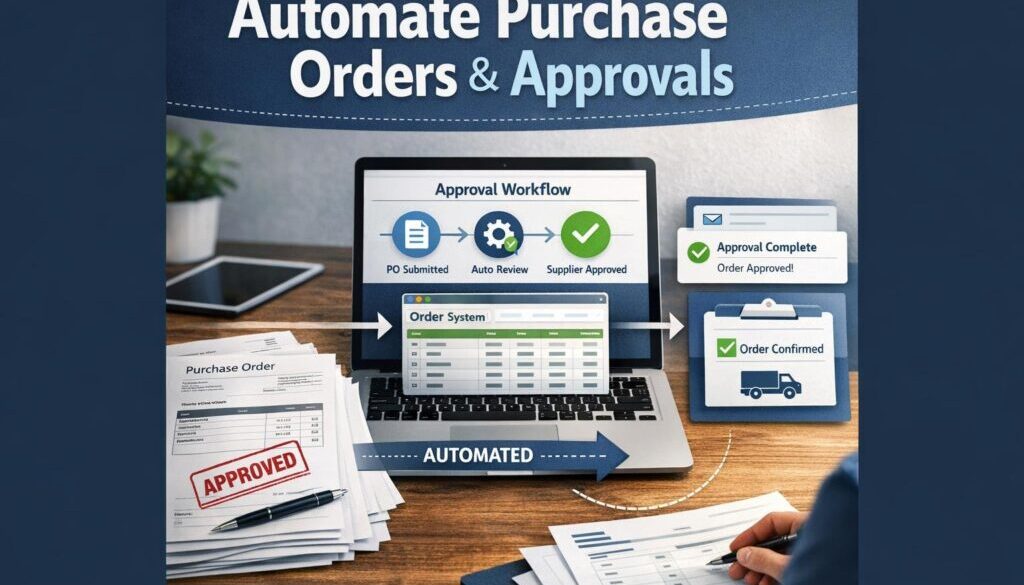
In a manual process, these steps often live in different places. A request might be in email, the PO might be in a spreadsheet, and the invoice might arrive in accounts. That makes it harder to follow the trail later. When you automate purchase orders and supplier approvals, the aim is to connect those steps into one clearer workflow.
Why small businesses still rely on manual POs
Many small businesses still manage purchasing manually because it feels familiar and low cost. A spreadsheet and inbox can seem easier than a new system. But as purchasing grows, those same tools become harder to manage.
Common reasons manual processes persist include:
- no dedicated procurement system
- small teams wearing multiple hats
- approvals handled by email or chat
- accounts staff recreating data in bookkeeping software
- no simple workflow owner
That is where practical automation can help. A well-designed workflow can reduce admin without making the process complicated.
Where manual supplier approval workflows break down
Manual approval processes usually work fine until the business starts dealing with more requests, more suppliers, or more spending categories. At that point, delays and errors start to appear.
Email chains, spreadsheets, and shared folders
These tools are useful, but they are not built for structured approvals. A request can be missed, a spreadsheet can be edited incorrectly, and supporting documents can be saved in the wrong folder.
Typical pain points include:
- approvals waiting in inboxes
- duplicate requests for the same supplier
- missing quotes or supporting documents
- unclear approval history
- manual re-entry of supplier details
When a business tries to automate purchase orders and supplier approvals, these are usually the first issues to target.
Common delays, errors, and visibility issues
Manual workflows often create three problems:
- Delays: approvers are not reminded automatically, so requests sit untouched.
- Errors: staff retype supplier names, amounts, or line items into another system.
- Poor visibility: no one can easily tell where a request is up to.
For a small business, those problems can slow down buying, complicate reconciliation, and create extra work for finance or operations staff.
What parts of the process can you automate?
The best automation is usually the parts of the process that are repetitive, rule-based, and easy to track. The key is to keep human review for the decisions that need judgement.
Purchase request intake
A good starting point is a standard request form. Instead of asking staff to send an email with whatever details they remember, use a form that collects the same information every time.
That form can capture:
- requester name
- supplier name
- item or service requested
- estimated amount
- cost centre or project
- reason for purchase
- required date
This makes it much easier to route, review, and approve the request later.
Approval routing and reminders
Once a request is submitted, it can be routed to the right approver automatically. For example, a low-value request may go to a team lead, while a higher-value request may go to finance or a manager.
Automation can also send reminders if a request has not been reviewed. That helps reduce bottlenecks and keeps purchasing moving.
Microsoft provides approval workflows in Power Automate, which is one example of how structured approvals can be built into a workflow. If you want to explore the platform itself, Microsoft also has Power Automate documentation.
Purchase order creation and sending
Once approved, the workflow can generate a PO number, populate a standard template, and send the purchase order to the supplier. It can also store a copy in the right folder or system for later reference.
This removes a lot of repetitive admin. It also reduces the chance of sending the wrong version of a PO or forgetting to file it properly.
Supplier onboarding and approval checks
New suppliers should usually go through a more careful process than existing suppliers. That is because supplier onboarding often includes sensitive details such as contact information and payment details.
A simple onboarding workflow can collect and validate details such as:
- legal business name
- ABN
- contact information
- payment details
- service category
Then the workflow can send the information for review before the supplier is marked as approved. This is one of the safest places to automate purchase orders and supplier approvals, because the process is structured but the final decision can still stay with a person.
Invoice matching and exception handling
When invoices arrive, automation can help match them to an approved PO. If the invoice amount, supplier, or line items do not line up, the system can flag the exception for human review.
That does not eliminate checking. Instead, it helps staff spend time on exceptions rather than rechecking every standard invoice manually.
Recordkeeping and audit trails
Every approval should leave a trail. That means storing the request, approval time, approver name, supporting documents, PO copy, and any exception notes.
This is not only useful for internal controls. It also supports better recordkeeping. The ATO’s guidance on keeping records explains the importance of retaining business records, and its tax invoices guidance is also relevant where GST applies.
How approval rules usually work
Good approval rules help automate the routine while still protecting the business. The rules should be simple enough for staff to understand and clear enough for the system to apply consistently.
Thresholds by amount, department, or project
A common approach is to use approval thresholds. For example:
- requests under a small amount may go to one approver
- requests over a certain amount may need a second approval
- project-related purchases may need the project owner’s review
The exact thresholds are a business decision. The important thing is that the rules are known in advance and applied the same way each time.
New supplier vs existing supplier approvals
Existing suppliers may follow a standard path. New suppliers may need extra checks. This is especially important if bank details, contracts, or sensitive commercial terms are involved.
A new supplier workflow can require additional approval steps before any order is sent or any payment details are accepted.
Escalations and exception paths
Not every request fits the normal rules. A good workflow should include an exception path for unusual spend, urgent purchases, or incomplete information.
That way, the business does not force every request through the same path. Instead, it can escalate only what needs a closer look.
How AI can help without replacing human review
AI can be useful in purchasing workflows, but it should assist the process rather than replace business judgement. The best use cases are often the ones that reduce reading, typing, and checking.
Document extraction from PDFs and invoices
AI can help extract supplier names, invoice numbers, totals, and line items from documents. That can save time when staff would otherwise have to read and retype the same information.
It is still important to check the extracted data, especially when the document is poor quality or the information is unusual.
Categorising requests and spotting anomalies
AI can also help classify requests by spend category, urgency, department, or supplier type. It may even help identify odd patterns, such as a duplicate invoice number or a supplier bank detail change that needs review.
This is helpful, but it should not be treated as a substitute for financial controls.
Summarising approvals for faster review
One practical use for AI is summarising the key details of a request for the approver. Instead of reading a long email thread, the approver can see a short summary with the amount, supplier, and reason for purchase.
That can make approvals faster and easier without changing the underlying approval rules.
What Australian small businesses need to consider
If you are planning to automate purchase orders and supplier approvals, it is worth checking the compliance and control side as well as the workflow side.
GST and tax invoice requirements
Where GST is involved, businesses need to handle invoices correctly. Purchase orders and invoices should line up with the supporting records used for accounting and tax purposes.
Do not assume a workflow tool automatically handles tax obligations. The process still needs to match your bookkeeping and recordkeeping practices.
Recordkeeping obligations
Records matter. Approval logs, PO copies, invoices, and supporting documents should be stored in a way that is easy to retrieve later. That makes it easier to answer questions, resolve disputes, and keep internal controls visible.
Privacy and supplier data
If your workflow stores supplier contact details, bank details, or personal information, think carefully about access and storage. The Australian Privacy Principles are a useful reference point, and the OAIC’s Privacy Act guidance explains the privacy framework in Australia.
Fraud and cyber risk
Supplier approval workflows can be exposed to invoice fraud, fake bank detail changes, or compromised email accounts. That is why it is important to use secure approvals, limit access, and verify changes to payment details.
The Australian Cyber Security Centre’s small business guidance is a useful reminder that cyber risk is part of process design, not just IT setup.
Common tools used to automate purchase orders
You do not always need a large enterprise system to improve this workflow. Many small businesses already have most of the building blocks in place.
Accounting platforms
Australian small businesses commonly use accounting platforms such as Xero, MYOB, and QuickBooks Online. Each product has its own purchase order and workflow features, so it is worth checking the official product pages before deciding how much automation you need.
For example, Xero has purchase order product information and a help article on purchase orders in Xero. MYOB also provides purchase order information, and QuickBooks Online has purchase order features for Australia.
Workflow and automation platforms
Tools such as Microsoft Power Automate, Zapier, Make, and no-code app platforms can connect forms, approvals, notifications, and recordkeeping. They are especially useful when your accounting software does not cover every step.
For example, Microsoft 365 users may use Power Automate, while Google Workspace users can use Google Forms or AppSheet for request capture and workflow building. Zapier also provides an approvals workflow category, and Make provides broader automation documentation.
Forms, email, and document storage
Even a simple setup can improve the process. A form for requests, email notifications for approvals, and a shared document repository for records can create a much cleaner workflow than unmanaged email threads.
The key is to connect the steps so the process is consistent and traceable.
What to check before choosing a workflow tool
If you are comparing tools, start with the process rather than the software. Ask what problem you are trying to solve and who needs to approve what.
Integration with current systems
Choose tools that fit the systems you already use. If your business runs on Xero, MYOB, QuickBooks Online, Microsoft 365, or Google Workspace, the tool should work comfortably with those platforms.
Audit trail and permissions
Every approval should be traceable. Look for tools that capture timestamps, approver names, and change history. Access permissions also matter, especially where supplier details or payment information is involved.
Ease of use for approvers
Approvers are more likely to use the system if it is quick and clear. Mobile-friendly approvals and simple notifications usually work better than complex dashboards.
Security and data handling
Because purchase workflows may involve financial and supplier data, security is important. Check how the tool stores information, who can access it, and whether sensitive changes can be flagged for review.
Support for exceptions
A strong workflow does not just handle standard requests. It also manages exceptions cleanly. If a tool is rigid, staff may go around it instead of using it.
Practical examples of what to automate first
If your business is just getting started, begin with one workflow rather than trying to redesign everything at once.
- office supplies that are bought regularly
- software subscriptions that require sign-off
- subcontractor materials
- marketing spend that needs approval before purchase
- new supplier onboarding
Once the first workflow is working well, you can expand to other purchasing categories. This staged approach keeps the project manageable and makes it easier to see what is working.
How Simple Automations approaches practical workflow design
At Simple Automations, the focus is on building systems that are useful in real life, not overcomplicated in theory. For purchase workflows, that usually means reducing manual admin, keeping approvals auditable, and making sure the business still has control.
Document-heavy workflows are often a good starting point for automation. For example, our trust account automation project shows how a repetitive administrative workflow can be simplified. If your team is also trying to manage recurring content or planning workflows, our content calendar automation example demonstrates how structured workflows can reduce manual coordination. For businesses that deliver files or digital products, the digital product automation case study is another example of how a repetitive process can be streamlined.
Those examples are different from purchasing, but the principle is the same: find the repetitive steps, keep the judgement where it belongs, and make the workflow easier to follow.
Conclusion: keep automation simple, controlled, and auditable
If your current purchasing process lives across email, spreadsheets, and shared folders, there is a good chance you can improve it. The best way to automate purchase orders and supplier approvals is to start with the repetitive steps: request capture, routing, reminders, PO creation, invoice matching, and recordkeeping.
What should stay with a person? New suppliers, unusual spend, bank detail changes, contract commitments, and other decisions that need judgement. That balance gives you the efficiency of automation without losing control.
If you want help thinking through what can be automated in your business, explore automation solutions or visit small business automation to see how practical workflows can simplify day-to-day admin.
Ready to Simplify Your Purchasing Workflow?
If your purchase orders and supplier approvals are still being managed manually, a well-designed workflow can save time and improve control. Simple Automations can help you identify what to automate and what should stay under human review.