CRM Automation for Small Business: Practical Uses and Benefits
CRM automation for small business is about making customer management easier without adding unnecessary complexity. Instead of chasing leads across inboxes, spreadsheets and reminders, you can automate the repeatable parts of your sales and service process so your team spends less time on admin and more time helping customers.
For most small businesses, the goal is not a fully automated customer system. It is usually much simpler: capture enquiries properly, follow up on time, keep records current and reduce the chance of missed opportunities. In this guide, we’ll look at the most useful automations, where AI can help, what should stay manual, and what Australian businesses should consider around privacy, spam and security.
null
When done well, CRM automation for small business can make your processes feel calmer and more organised. It can also help you create a more consistent customer experience, even if your team is small.
If you are still working out where automation fits in your broader business processes, you may also find our small business automation page useful as a starting point. For a deeper look at what Simple Automations does, visit Simple Automations.
What is CRM automation for small business?
A CRM, or customer relationship management system, is software used to manage customer and prospect information, conversations, tasks, pipeline stages and service history. CRM automation for small business is what happens when that system is set up to complete routine actions automatically when something important occurs.
How CRM software works
In simple terms, a CRM acts like a central place for customer information. It can store contact details, show where a lead is in the sales process, keep track of follow-up tasks and record interactions from your team. Many modern CRMs also include workflow automation, templates, task assignment tools and integrations with other business apps.
What automation actually does in a small team
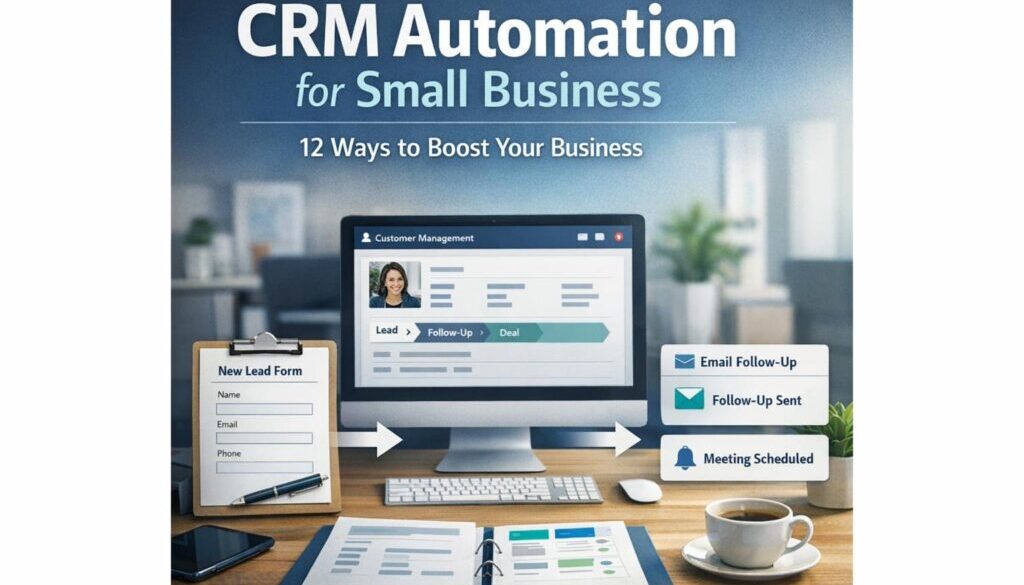
Automation does not replace the need for judgment. It reduces repetitive work so your team does not have to perform the same manual steps over and over again. In practice, CRM automation for small business can create a new contact from a web form, send an acknowledgement email, assign a lead to the right person, create a follow-up task after a quote, or move a deal to the next stage when a trigger occurs.
This is where automation becomes practical rather than abstract. A well-designed workflow helps your business respond faster, stay organised and avoid the kind of small delays that can lead to missed follow-ups.
Why CRM automation matters for small businesses
Small businesses often manage customer communication across email, spreadsheets, phone calls, calendars and different software tools. That makes it easy for information to get lost or for follow-up to slip through the cracks. CRM automation for small business helps reduce that friction.
Faster enquiry response
When an enquiry comes in, timing matters. A basic automated response can acknowledge the enquiry straight away, so the customer knows they have been heard. That does not mean a robot takes over the conversation. It simply means the customer gets an immediate response while your team prepares the next step.
Fewer missed follow-ups
One of the most common business problems is not a lack of interest, but a lack of follow-through. CRM automation for small business can create reminders, task alerts or follow-up sequences so leads are not left sitting unanswered for days.
Less manual data entry
Manually copying customer details from a form into a spreadsheet or CRM takes time and increases the chance of errors. Automation can reduce that repetitive entry work by creating or updating records automatically when a new lead comes in.
Better visibility across sales and service
When customer information is centralised, it becomes easier to see what is happening. You can check which leads are active, which quotes are waiting, what tasks are overdue and where service requests are up to. That visibility is a major benefit of CRM automation for small business, especially when you do not have a large admin team.
For businesses looking for practical implementation support, our automation solutions page outlines how these kinds of workflows can be built around real business needs.
The most useful CRM automations to start with
If you are new to CRM automation for small business, start with the workflows that create the most day-to-day value. The best automations are usually simple, repeatable and easy to understand.
1. Lead capture and contact creation
Current problem: A new lead submits a form, sends an email or fills in a landing page, but someone still has to enter the details manually.
Automation opportunity: Create or update the contact record automatically.
How it could work: When a form is submitted, the CRM creates the contact, stores the source of the enquiry and assigns the lead to the right staff member.
Business benefit: Less admin, faster response times and fewer missed leads.
2. Automatic enquiry replies and welcome messages
Current problem: A prospect sends an enquiry and waits for someone to reply.
Automation opportunity: Send a simple acknowledgement email or message.
How it could work: Once the lead enters the CRM, the system sends a short, professional response confirming receipt and outlining what happens next.
Business benefit: Customers feel acknowledged straight away and your team gains time to respond properly.
3. Follow-up reminders and sequences
Current problem: Follow-up gets delayed because staff are busy.
Automation opportunity: Create reminders or structured follow-up sequences.
How it could work: If a quote has not been opened or responded to after a set period, the CRM creates a task or sends a reminder email.
Business benefit: Better consistency and fewer opportunities slipping away.
4. Pipeline stage updates
Current problem: Staff manually update deal stages and sometimes forget.
Automation opportunity: Move records through the pipeline when something changes.
How it could work: When a form is completed, a quote is accepted or a payment is received, the CRM updates the deal stage and creates the next task.
Business benefit: Your pipeline reflects reality more accurately and everyone can see progress more easily.
5. Customer onboarding workflows
Current problem: A new customer is won, but the onboarding process relies on memory.
Automation opportunity: Trigger a structured onboarding sequence.
How it could work: Once the sale is marked as won, the CRM sends a welcome email, creates internal tasks and notifies the right team members.
Business benefit: A smoother handover and a more consistent customer experience.
6. Support routing and internal task assignment
Current problem: Support requests arrive in a shared inbox and need to be sorted manually.
Automation opportunity: Route the request to the right person or queue.
How it could work: A support form or tagged email creates a ticket or task and assigns it according to topic or priority.
Business benefit: Less time sorting emails and a clearer path to resolution.
7. Data hygiene and duplicate handling
Current problem: The CRM becomes messy over time.
Automation opportunity: Flag incomplete, duplicate or inconsistent records.
How it could work: The system highlights missing fields, duplicate contacts or bounced emails so they can be reviewed.
Business benefit: Cleaner records and better reporting.
Not every workflow needs to be built from scratch. In some businesses, an existing process can be simplified with a practical automation project. Our trust account automation case study shows how a repetitive administrative workflow can be streamlined when the process is clearly defined.
Where AI fits into CRM automation
AI is becoming part of many CRM systems, but it should be used as support rather than as a replacement for human oversight. In CRM automation for small business, AI can help with drafting, summarising and suggesting actions, but it should not be left to make important decisions on its own.
Drafting and rewriting messages
AI can help create a first draft of a follow-up email or rewrite a message so it sounds clearer or more professional. That can save time, especially when your team sends similar messages every day.
Call summaries and action items
Some CRM tools can summarise calls or meetings and pull out action items. That can make it easier to keep on top of next steps without relying on manual note-taking alone.
Lead scoring and next-step suggestions
AI may also help highlight which leads look active or suggest what to do next. That can be useful for prioritising work, but it should still be checked by a person who understands the customer and the context.
Why human review still matters
AI is useful, but it is not infallible. Customer-facing messages, pricing details, complaints and sensitive issues should always be reviewed before they are sent. In practice, the safest approach is to use AI to assist the team, not to remove the team from the process.
For examples of automation in action, you can also review our content calendar automation case study and our digital product automation project. While those examples are different from CRM, they show how well-designed automation can reduce repetitive work in a practical way.
Australian privacy, spam and security considerations
If your CRM automation for small business handles customer data, you also need to think about privacy, marketing consent and basic security. These are not just technical issues; they are part of trustworthy business practice.
Privacy and customer data handling
The Office of the Australian Information Commissioner provides guidance on the Australian Privacy Principles and small business privacy. At a practical level, that means collecting only the information you need, explaining how it will be used, and protecting it properly once it is stored.
Spam rules for email and SMS automation
If your CRM sends promotional emails or SMS messages, the Spam Act 2003 is relevant. Automated marketing messages should only be sent where you have the right consent, and they should clearly identify the sender and provide an unsubscribe option where required.
Security basics: access, MFA and permissions
The Australian Cyber Security Centre recommends sensible security practices for small businesses, including strong passwords and multi-factor authentication. The more customer data your CRM holds, the more important it is to control who can see and edit it.
That is one reason CRM automation for small business should be designed with care. Good automation does not just save time. It also needs to be built around responsible data handling.
How to start without overcomplicating your CRM
One of the biggest mistakes small businesses make is trying to automate too much too soon. The best approach is to start simple, automate one workflow at a time and build from there.
Automate one workflow at a time
Pick the process that is most repetitive or most likely to be forgotten. For many businesses that is lead capture, enquiry follow-up or task reminders. Once that is working properly, move on to the next step.
Clean your data first
Automation works best when the underlying data is tidy. Before you build anything, check whether your fields, tags and contact records are consistent. If the data is messy, the automation will be messy too.
Keep key decisions manual
Not every step should be automated. Decisions that involve nuance, judgement, pricing exceptions or sensitive customer issues are often better handled by a person. A good CRM supports your team rather than replacing them.
Review and refine regularly
As your business changes, your workflows may need adjusting. Review your CRM automation for small business regularly to make sure it still matches how your team actually works.
What to look for in CRM software
If you are comparing CRM options, focus on the features that make day-to-day work easier rather than the ones that simply sound impressive.
Workflow automation
Look for a CRM that can trigger tasks, send messages, update records and assign work based on business events. That is the foundation of useful CRM automation for small business.
Integrations
Your CRM should connect well with the tools you already use, such as email, calendars, forms and accounting software. Many businesses also need compatibility with tools like Xero or MYOB, depending on their stack.
Ease of use
If a system is too difficult for the team to use consistently, it will not deliver much value. A simple interface and clear process design often matter more than having every possible feature.
Reporting and task visibility
You should be able to see what is happening in the pipeline, which follow-ups are due and where service requests are up to. Visibility is one of the main reasons businesses move from spreadsheets to a CRM.
AI features with safeguards
If the software offers AI, check what it actually does and whether the output can be reviewed before it is used. In a small business environment, AI is most useful when it supports staff, not when it bypasses them.
When a workflow needs a more tailored build, it can help to work with a team that understands both the business process and the automation layer. You can explore that further through our Business Hub, which shares practical automation resources and business guidance.
CRM automation vs marketing automation
These two terms are often used together, but they are not exactly the same thing.
| Area | CRM automation | Marketing automation |
|---|---|---|
| Main focus | Managing leads, customers, tasks and follow-up | Managing outreach, campaigns and audience communication |
| Typical use | Lead capture, reminders, pipeline updates, onboarding | Email campaigns, nurture sequences, audience segmentation |
| Best for | Sales and service workflows | Promotion and engagement |
| Overlap | Both can send messages, update records and trigger actions based on customer behaviour | |
For many small businesses, the two overlap in practice. A CRM may trigger a welcome email, and a marketing tool may feed new leads into the CRM. The important thing is to decide which system owns which part of the process.
When a spreadsheet is enough, and when you need a CRM
Not every business needs a full CRM immediately. Some very small businesses can manage with a spreadsheet and a simple follow-up process, at least for a while. The question is whether that setup is still working reliably.
Signs you’ve outgrown spreadsheets
- Leads are being missed or followed up late.
- Customer information is stored in multiple places.
- It is hard to see who owns which enquiry.
- Manual data entry is taking too much time.
- Reporting is inconsistent or difficult to trust.
Signs a simple setup is still fine
- Your enquiry volume is low and manageable.
- Only one or two people handle customer follow-up.
- You do not need complex task assignment or reporting.
- Your current process is clear and consistent.
If you are somewhere in the middle, CRM automation for small business can still help. You do not need to implement every feature at once. A basic CRM with a few well-designed automations is often enough to improve organisation and reduce admin.
Practical examples of what to automate first
If you want to keep things simple, these are usually the first areas worth considering:
- Web form enquiries creating new contacts automatically
- Immediate enquiry acknowledgements
- Follow-up reminders after a quote or call
- Task assignment for new leads
- Customer onboarding checklists
- Service request routing
- Duplicate or incomplete record alerts
These workflows are common because they solve common business problems. They do not require a complicated system to be useful. They simply reduce repetitive work and make customer handling more reliable.
Frequently asked questions about CRM automation for small business
What should small businesses automate first?
Start with the workflows that save the most time or prevent the most mistakes. For many businesses that means lead capture, enquiry replies and follow-up reminders.
What tasks should stay manual?
Anything that needs judgement, negotiation, sensitive communication or exceptions should usually stay manual. Automation is best for repeatable steps, not every business decision.
How do you keep customer data accurate?
Use clear field definitions, regular reviews and data-cleaning rules. It also helps to avoid collecting unnecessary information in the first place.
Is AI safe to use in CRM workflows?
Yes, if it is used carefully. AI can help with drafting and summarising, but customer-facing content should be reviewed before it is sent. Human oversight is still important.
Conclusion: start simple and automate the right work
CRM automation for small business works best when it removes repetitive admin without taking control away from your team. The highest-value automations are usually the simple ones: capture the lead, send the acknowledgement, create the task, update the record and keep the follow-up moving.
If you want a CRM setup that is practical, manageable and suited to the way small businesses actually work, the best next step is to map your current process and identify the steps that should be automated first. From there, you can build a system that saves time, improves consistency and keeps your customer information easier to manage.
Ready to Simplify Your Customer Workflow?
If your team is spending too much time on manual follow-up and messy customer records, we can help you identify where CRM automation for small business will make the biggest difference.