Sales Automation for Small Business: 9 Workflows to Consider
If your sales process still relies on sticky notes, scattered emails and manual follow-up, sales automation can make a big difference. For a small business, it is usually not about replacing salespeople. It is about removing repetitive admin so leads are handled faster, records stay cleaner and customers get a more consistent experience.
In this guide, we will look at what sales automation means in plain English, which workflows are worth automating first, where AI can help, and what Australian businesses need to keep in mind around privacy and spam compliance.
null
If you are also thinking about broader operational efficiency, it can help to start with automation for small business rather than trying to automate everything at once. The best results usually come from fixing one bottleneck at a time.
What is sales automation for a small business?
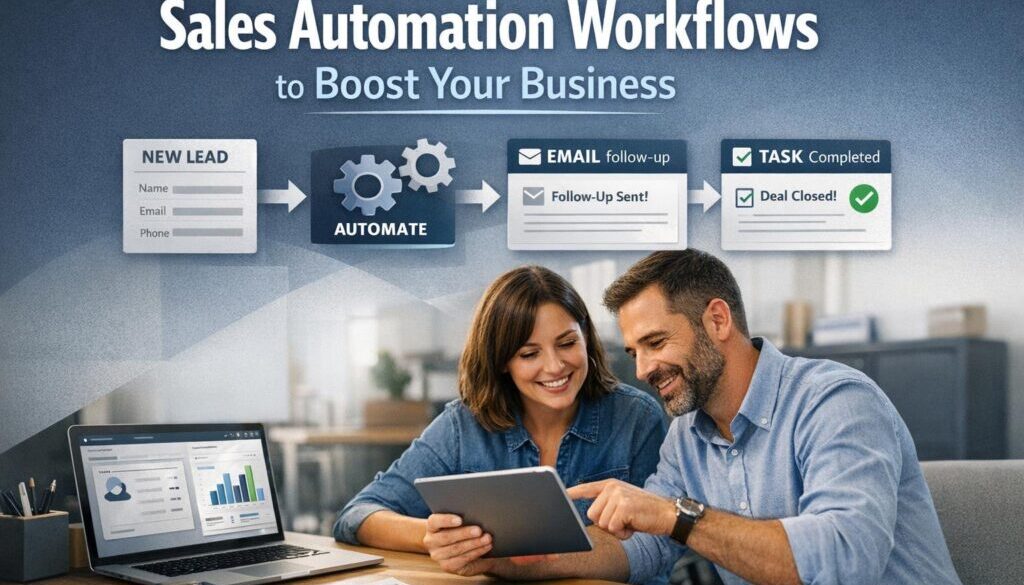
Sales automation means using software to handle repeatable parts of the sales process automatically. That might include capturing a lead from a form, creating a contact in your CRM, assigning follow-up tasks, sending reminders, updating pipeline stages or booking meetings.
For most small businesses, sales automation is really workflow automation. It does not replace judgement, pricing decisions or relationship building. It simply reduces the manual work around those steps.
Workflow automation, not full sales replacement
The most useful automations usually support the sales process rather than run it on their own. For example, a new enquiry can be logged automatically, but a salesperson still needs to decide how to respond, what to quote and whether the opportunity is worth pursuing.
That is why automation solutions work best when they are built around a specific business problem instead of a vague “we need AI” request.
Where AI helps and where humans still matter
AI can help with drafting emails, summarising calls, extracting information from messages or documents, and suggesting lead priorities. That can save a lot of time.
But human review is still important for pricing, commitments, exceptions, legal wording and anything customer-facing that could create confusion if it is wrong.
Think of AI as an assistant, not a replacement for judgement.
The 9 sales workflows worth automating first
If you are starting from scratch, these are the workflows that often give the quickest return in time saved and consistency improved.
1. New lead capture to CRM
Current problem: Leads arrive through your website, inbox, phone or social channels and then someone has to enter them manually.
Automation opportunity: Capture enquiry details automatically and create or update the lead in your CRM.
How it could work: A web form submission creates a new contact, assigns the lead source and adds a task for follow-up.
Business benefit: Less manual data entry, fewer missed leads and a cleaner sales record.
This is often the first place small businesses start because the workflow is simple and the value is obvious.
Businesses wanting a broader view of practical admin reduction can also explore small business automation solutions.
2. Instant lead acknowledgement
Current problem: A prospect sends an enquiry and waits hours or days for a reply.
Automation opportunity: Send an immediate acknowledgement email or SMS that confirms the enquiry was received.
How it could work: As soon as the form is submitted, the customer receives a short message explaining what happens next and when they can expect a response.
Business benefit: Faster response times and a more professional first impression.
Be careful here: if the message is promotional, spam rules may apply. Transactional messages and marketing messages are not always treated the same way.
3. Lead routing
Current problem: Leads sit in a general inbox and someone has to decide who should handle them.
Automation opportunity: Route enquiries to the right person based on location, service type, value or availability.
How it could work: A trade lead goes to the correct branch, a service enquiry goes to the right consultant, or a high-value lead gets flagged for priority handling.
Business benefit: Faster response, fewer handoff errors and less internal confusion.
For businesses that want help mapping this out properly, practical automation solutions can be a better fit than trying to force everything into one off-the-shelf template.
4. Follow-up for uncontacted leads
Current problem: Hot leads get buried when the team gets busy.
Automation opportunity: Create reminders or follow-up sequences for leads that have not been contacted within a set timeframe.
How it could work: If a lead has not been touched in two days, the CRM generates a task or sends an internal reminder. If the lead is warm but inactive, a polite follow-up email can be scheduled.
Business benefit: Better consistency and fewer opportunities slipping through the cracks.
This is one of the clearest examples of sales automation helping a small business stay responsive without hiring extra admin support.
5. Meeting booking and reminders
Current problem: Back-and-forth emails waste time before a meeting is even booked.
Automation opportunity: Let prospects choose a time, then send calendar invites and reminders automatically.
How it could work: A booking link shows available times. Once booked, the system sends a confirmation, adds the event to the calendar and reminds both sides before the meeting.
Business benefit: Less scheduling admin and fewer no-shows.
Official support documentation for booking workflows can be useful here, such as Microsoft Bookings or Google Calendar.
6. Quote or proposal creation
Current problem: Staff rebuild the same quote details over and over again.
Automation opportunity: Use CRM data to populate a quote or proposal template, then send it for human review.
How it could work: Customer details, product selections or service options flow into a template, reducing copy-and-paste work. A team member checks the final quote before it goes out.
Business benefit: Faster quote turnaround and fewer data entry errors.
For businesses that want to improve this part of the process, the trust account automation case study shows how document-heavy workflows can be simplified in practice: trust account automation.
7. Sales task management
Current problem: Follow-up tasks live in notebooks, inboxes and people’s heads.
Automation opportunity: Trigger tasks when a lead reaches a certain stage or when an action is needed.
How it could work: If a quote is sent, the system creates a task to check in three days later. If a prospect requests more information, a task appears for the right team member.
Business benefit: Better accountability and fewer forgotten next steps.
Small businesses often get the most value when sales automation is connected to a broader operating system rather than isolated tools. That is where a structured approach through Business Hub resources can help.
8. Deal stage updates and pipeline hygiene
Current problem: The pipeline looks different depending on who updated it last.
Automation opportunity: Update deal stages, close dates and status flags based on activity or task completion.
How it could work: When a meeting is booked, the deal moves to the next stage. When a quote is sent, the pipeline updates automatically. Stale deals can be flagged for review.
Business benefit: Cleaner reporting and a more reliable view of sales activity.
Pipeline hygiene sounds small, but it has a big effect on decision-making. If the data is messy, the reporting will be too.
9. Post-sale handoff
Current problem: Once the deal is won, the next team often has to chase details manually.
Automation opportunity: Trigger onboarding tasks, internal notifications, welcome emails or job setup steps when a deal is marked won.
How it could work: Sales marks the opportunity as won, operations receive a notification, onboarding tasks appear and the customer gets a clear next-step message.
Business benefit: Smoother handover and a better customer experience.
This kind of workflow is a good example of how sales automation supports service quality rather than just speed.
Where AI can help sales teams save time
AI can be genuinely useful in sales when it is used for support tasks rather than decisions. The goal is to save time without losing control of the message.
Drafting emails and follow-ups
AI can help write a first draft of an enquiry reply, follow-up note or re-engagement message. That can be especially helpful when the team is replying to similar questions all day.
The message still needs a human edit, especially if it includes pricing, promises, dates or service commitments.
Summarising calls and notes
AI can condense meeting notes or call transcripts into a short summary. That helps sales teams keep records tidy and move quickly to the next action.
This is useful where staff are making notes in different styles and the CRM needs a consistent summary format.
Extracting data from messages and documents
AI can sometimes pull names, contact details or request information from an email or document and help structure it for the CRM.
That can reduce manual typing, but the output should be checked carefully before it is used in a customer record or quote.
Prioritising leads
Some systems can help classify or prioritise leads based on the information they provide, such as service type, budget or urgency. This can help small teams focus on the best opportunities first.
Again, that should support judgement, not replace it.
Human review requirements
As a rule, a person should review anything that affects pricing, legal terms, service guarantees or final customer communication. AI is good at speed. Humans are still better at responsibility.
What tools small businesses commonly use
You do not need a huge software stack to get started. Most sales automation setups use a small combination of familiar tools.
CRM systems
A CRM is the central place for contact details, lead stages, tasks and notes. Many CRMs also have workflow automation built in. Official documentation for tools such as HubSpot, Pipedrive and Zoho CRM shows the range of automation features commonly available.
Email and calendar tools
Email and calendar tools are often part of the workflow because sales still happens through human conversation. Automated confirmations, reminders and booking links can remove a lot of repetitive admin.
For many small teams, Gmail and calendar tools are already part of the workflow, which makes them a natural starting point.
Forms and lead capture
Forms are often the front door of sales automation. A well-designed form can collect the right information once, which means the team does not have to ask the same questions repeatedly later.
Automation platforms
When different tools need to talk to each other, a workflow platform can move data between them. Official documentation for Power Automate and Zapier shows how these platforms are used to connect apps and reduce manual handoffs.
Quoting, invoicing and scheduling tools
Sales often leads into quoting, invoicing or booking. That is why platforms such as Xero and MYOB can matter in a sales automation plan as well.
The best setup is usually the simplest one that solves the problem cleanly.
Australian privacy, spam and security considerations
For Australian businesses, sales automation is not just a process question. It is also a compliance and trust question.
Spam Act and commercial messages
If your automation sends commercial emails or SMS messages, the Spam Act 2003 may apply. That means businesses need to think carefully about consent, unsubscribe handling and the difference between service messages and marketing messages.
You can read the legislation directly here: Spam Act 2003.
Privacy Act and personal information handling
Sales workflows often handle names, phone numbers, email addresses and notes about a customer’s needs. If your business is covered by the Privacy Act 1988, the Australian Privacy Principles matter when collecting, using and storing that information.
Official guidance is available from the OAIC: Australian Privacy Principles and privacy and your business.
Data security, vendor checks and overseas storage
Many small businesses use cloud software that may store data outside Australia. That is not automatically a problem, but it does mean you should check the vendor’s privacy terms, access controls and security settings.
The Australian Cyber Security Centre’s small business guidance is a useful starting point: ACSC small business cyber security guidance.
Avoiding over-automation and poor data quality
Automation only works well when the inputs are clean and the process is clear. If your CRM fields are inconsistent, your leads are duplicated or your stages are vague, the automation will amplify the mess.
It is also easy to overdo it. Too many automated messages can feel impersonal or spammy. For sales automation to work well, it should support a human relationship, not replace it.
How to keep sales automation simple
You do not need to automate every sales workflow at once. In fact, trying to do everything at once usually creates confusion.
Start with one workflow
Pick the one step that causes the most frustration or consumes the most time. For many businesses, that is lead capture, follow-up or scheduling.
Clean data first
Before you automate, make sure your fields, stages and naming conventions make sense. Good automation depends on good structure.
Use human approval for sensitive steps
Anything involving pricing, legal wording, special conditions or unusual customer requests should usually go through human review before it is sent.
Review and improve regularly
Once a workflow is live, check whether it is actually helping. Is it saving time? Is it improving response times? Is it creating cleaner records? If not, adjust it.
That practical, step-by-step approach is exactly how useful automation is built.
How Simple Automations approaches sales workflow problems
At Simple Automations, the focus is on making business processes simpler, not more complicated. That usually means identifying the repetitive parts of a sales workflow, mapping the handoffs and building automation that supports the team without removing the human touch.
For document-heavy or repeatable workflows, it can also help to look at real examples. The content calendar automation case study shows how a structured workflow can remove manual coordination, while the digital product automation project shows how a delivery process can be simplified when the steps are clear.
If your sales process is messy, slow or too manual, the right solution is usually not more software. It is a better workflow.
Ready to Simplify Your Sales Process?
If you want to reduce manual follow-up, clean up your CRM workflow or work out which sales tasks are worth automating first, Simple Automations can help you plan a practical approach.
Conclusion
Sales automation for small business is about making the sales process faster, cleaner and more reliable without losing the human touch. The best first automations are usually the ones that reduce repetitive admin, improve follow-up and keep your pipeline data accurate.
If you start small, keep human review where it matters and stay mindful of Australian privacy and spam obligations, sales automation can become a practical advantage rather than a tech distraction.
For a simple next step, look at the workflows causing the most manual work and see whether they could be handled more consistently with small business automation.