Phone Answering Automation for Tradies and Service Businesses: What It Is, What It Can Do, and What Still Needs a Human
If you run a tradie or service business, you already know how easy it is to miss calls when you’re on a job, driving between sites, or dealing with customers in person. That’s where phone answering automation can help. Done well, it can capture more enquiries, respond faster, and reduce the admin that comes with every missed call.
The key is to treat it as a smarter phone workflow, not a replacement for real customer service. In this guide, we’ll explain what phone answering automation is, which parts of the call process can be automated, what still needs a human, and what Australian businesses should think about before going live.
null
For many small businesses, the goal is simple: answer more calls without hiring extra front-desk staff. That’s why practical small business automation often starts with the phone, because missed calls can turn into missed quotes, missed bookings, and missed revenue.
What is phone answering automation?
Phone answering automation is a set of tools and workflows that help your business handle incoming calls more efficiently. It can route callers to the right place, take messages after hours, send follow-up texts, create tasks for your team, or collect basic information before a person takes over.
For tradies and service businesses, the most useful version of phone answering automation is usually not a fully automated “robot receptionist”. It’s a system that helps you respond quickly when you’re unavailable, while still making it easy for a human to step in when the call matters.
How it works in a tradie or service business
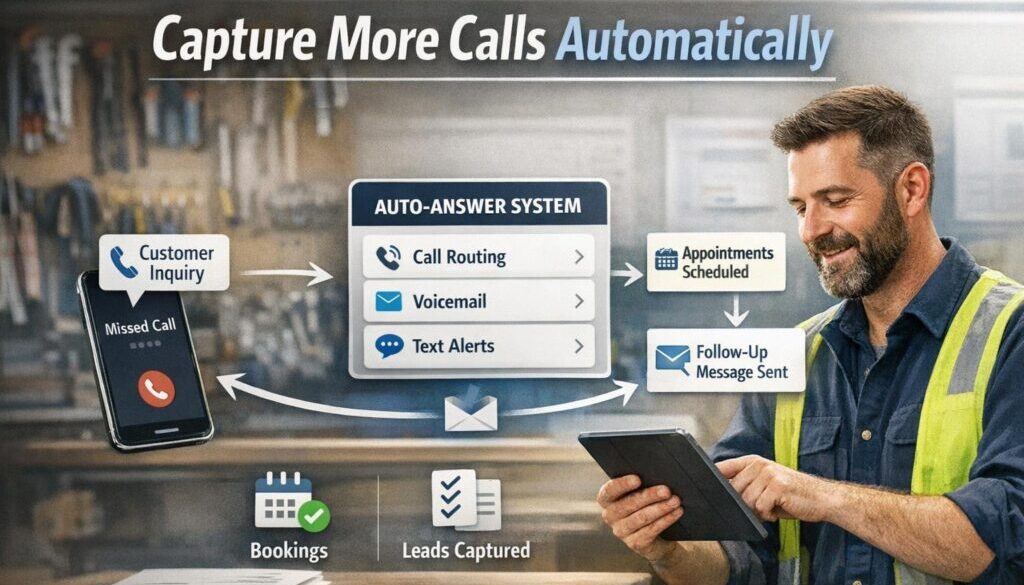
A practical workflow might look like this:
- A customer calls while you’re on-site.
- The phone system routes the call, takes a message, or sends the caller to voicemail.
- An automatic SMS thanks them for calling and asks for key details or a booking request.
- The lead is logged in your CRM or job management system.
- Your team follows up when they’re free, or immediately if the call is urgent.
That’s the real value of phone answering automation: it helps you keep the lead, even when you can’t answer right away.
Common tools involved
Most phone workflows use a mix of tools rather than one single platform. Depending on your setup, that may include:
- a business phone system with call routing and voicemail features;
- a CRM for tracking leads and follow-ups;
- job management software for booking and scheduling;
- SMS or email tools for instant replies;
- AI transcription or summarisation tools for call notes.
Official product documentation from providers such as RingCentral, Aircall and Dialpad shows the kinds of calling features many businesses now use as part of a phone workflow. The exact features available will depend on the product and plan you choose.
Why tradies and service businesses miss so many calls
The main reason is simple: the business is busy doing the work. Unlike a retail store with someone at the counter, many tradies spend much of the day on the road, on-site, or in noisy environments where answering every call is difficult.
On-site work and limited admin time
When you’re installing, repairing, cleaning or maintaining something, you often can’t stop every ten minutes to answer the phone. The call goes to voicemail, the customer hangs up, or the lead is lost entirely.
This is where phone answering automation becomes useful. It gives you a way to acknowledge the caller instantly, even if no one can speak live at that moment.
After-hours and peak-time enquiries
Many service businesses receive calls after hours, early in the morning, or during peak job times. If the phone rings when no one is available, those enquiries can disappear into the void.
Automation can help by playing an after-hours message, offering a booking link, or sending an automatic follow-up message. That way, a customer doesn’t feel ignored.
Why every missed call can mean lost revenue
For a tradie, a missed call is rarely just a missed call. It might be a quote request, an urgent repair, a repeat customer, or a high-value job.
That’s why improving response speed matters. The point of phone answering automation is not only convenience; it’s helping your business capture work you might otherwise lose.
What parts of the phone process can be automated?
Not every part of the call journey should be automated, but many common tasks are good candidates.
Missed-call SMS follow-up
If a call is missed, the system can send a polite text message straight away. The message might thank the caller, ask for their name and job type, and invite them to reply or book online.
This is one of the simplest and most useful forms of phone answering automation because it keeps the conversation going without needing someone at the desk.
After-hours messages and booking links
An after-hours message can explain your opening hours, tell customers what to do for urgent jobs, and direct them to a booking form or callback request.
For many businesses, this is a better experience than a generic voicemail because it gives the caller a next step.
Call routing and IVR menus
Call routing sends people to the right person or queue. An IVR menu is the “press 1 for…” style system that helps sort calls by type. In plain English, it helps the business direct callers without needing a person to manually transfer every call.
Used carefully, this can make phone answering automation feel more organised. Used badly, it can frustrate callers, so keep menus short and simple.
Lead capture and qualification
For non-urgent enquiries, automation can collect useful details such as:
- name
- suburb or location
- service needed
- urgency
- preferred call-back time
That information can then be passed to your team or logged in your CRM. This reduces back-and-forth and helps you prioritise the best leads.
Callback workflows and task creation
If someone leaves a message or requests a quote, the system can create a task for your team to call them back. It can also send an internal notification so nothing gets forgotten.
That is one of the most practical uses of automation solutions: turning a phone enquiry into a clear next action instead of a sticky note or a missed message.
Document-heavy workflows are often a good starting point for automation. Our trust account automation case study is one example of how a repetitive administrative process can be simplified when the right workflow is mapped out properly.
What still needs a human?
Even with good automation, some calls should always reach a person.
Urgent jobs and emergencies
Gas leaks, electrical faults, flooding, safety issues and other urgent matters usually need human judgement immediately. Automation can help identify the call type, but it should also provide a clear path to a person when needed.
Complaints, warranty issues and sensitive conversations
If a customer is upset, confused, or dealing with a warranty issue, a human conversation is usually the better option. A script can help, but it should not replace empathy.
Complex bookings and nuanced requests
Some enquiries are too specific for a simple automated flow. For example, a customer may need a same-day visit, a custom quote, or advice about multiple issues. In those cases, phone answering automation should hand the call over rather than try to guess.
Where AI can help
AI can make phone workflows faster and smarter, but it needs clear boundaries. The best use of AI is often to assist, not decide everything on its own.
Voice agents and call triage
Some systems can answer calls, ask basic questions, and categorise the enquiry before passing it on. This is sometimes called an AI voice agent or call triage.
That can be useful for simple tasks like identifying whether the caller needs a quote, a callback, or support with an existing job. But accuracy matters, especially in service businesses where a misunderstanding can cost time or money.
Transcription and call summaries
AI can also turn a call into text notes or a summary for the team. That can save time when staff need a quick overview of what the customer asked for.
If you use recordings or transcripts, keep privacy and storage in mind. The Australian Cyber Security Centre’s Essential Eight guidance is a useful starting point for thinking about secure systems, access controls and good cyber hygiene.
AI-generated follow-up notes and drafts
AI can help draft follow-up SMS messages, emails or internal notes. That said, someone on your team should review the message before it goes out, especially when the call involves an urgent or sensitive issue.
Where AI can get it wrong
AI does not always understand accents, background noise, job terminology, or the difference between a routine booking and an emergency. For that reason, good phone answering automation should always include escalation rules and human review where appropriate.
The main tools used in phone answering automation
Most businesses do not need to buy every tool at once. Start with the problem you want to solve, then choose the smallest set of tools that will do the job properly.
Business phone systems
Look for features such as:
- call routing
- ring groups
- voicemail-to-email
- business hours rules
- auto-attendants
These are common building blocks for phone answering automation.
CRM and job management software
A CRM or field service platform can capture leads, assign follow-up tasks, and keep enquiry history in one place. For tradies, job management software is often more useful than a generic sales CRM because it fits quotes, bookings and service jobs.
Australian service platforms such as ServiceM8 and simPRO are examples of the kind of software often used to manage jobs and follow-up processes. The best fit depends on your workflow and business size.
Booking tools
If customers can book online, you can reduce back-and-forth calls and capture more after-hours enquiries. The booking process can also be linked to your calendar so appointments are handled consistently.
That kind of setup is often a natural fit for business automation resources and internal workflow planning, especially when the phone is just one part of a larger customer journey.
SMS and email follow-up tools
These tools are useful for instant acknowledgements, callback requests, reminders and appointment confirmations. If you use them for marketing, remember that Australian spam rules may apply.
The ACCC’s spam guidance and ACMA’s spam compliance information are helpful references for consent, identification and unsubscribe requirements.
AI transcription and summarisation tools
These tools can help turn spoken conversations into structured notes. They are most useful when your team needs a fast summary rather than a full replay of the call.
If you’re considering more advanced automation, the tools themselves are only part of the equation. The more important part is how the workflow is designed so the right person gets the right information at the right time. That’s where Simple Automations focuses its work: making technology fit the business, not the other way around.
Content-heavy workflows can also be automated. Our content calendar automation case study shows how structured workflows can reduce manual coordination in a different business context.
Privacy, spam and security considerations in Australia
Any business using phone automation should think carefully about privacy, consent and security before collecting or storing customer details.
Privacy obligations and customer information
The Office of the Australian Information Commissioner explains that many small businesses are generally exempt from the Privacy Act, but there are exceptions. If you collect personal information, it’s still wise to handle it carefully and keep only what you need. You can read more in the OAIC’s guidance on small business and privacy.
If your phone answering automation collects names, addresses, job notes, access details or recordings, think about how that data is stored and who can access it.
SMS and email compliance
If your automation sends marketing messages, the rules are stricter. The ACCC and ACMA both provide guidance on consent, sender identification and unsubscribe requirements. Even when messages are operational rather than promotional, it’s important to be clear about why you’re contacting the customer.
Call recordings, transcripts and secure storage
Call recordings and transcripts can improve follow-up, but they also create security and privacy responsibilities. Keep access limited, store data securely, and only retain what you actually need.
If your business wants help designing a secure workflow, it’s worth looking at both the process and the tools together. That’s often easier than trying to bolt automation on after the fact.
How to start simply
You do not need a complex setup to get value from phone answering automation. In many cases, the best approach is to start small and improve the workflow over time.
Begin with missed-call SMS and after-hours routing
These two changes alone can make a noticeable difference to lead capture. If nobody answers, the caller should still receive a response and know what to do next.
Add booking and CRM workflows next
Once the basics are working, connect the phone workflow to your booking calendar, CRM or job management software. That turns a simple message into a real business process.
Test, review and refine before going live
Before rolling it out fully, test the system from the customer’s point of view. Check:
- what the caller hears;
- how long it takes to get a response;
- whether urgent calls are escalated correctly;
- whether the follow-up message makes sense;
- who receives the internal notification.
It’s also sensible to review the workflow regularly. A good automation should feel helpful, not mechanical.
Some businesses choose to start with a specific workflow rather than the entire phone system. That’s often the easiest way to get a win without overwhelming staff.
If you want to explore how a structured setup could work in your business, the best next step is usually to review your current enquiry process, then map out which calls can be automated and which should always go to a human.
Ready to Simplify Your Phone Workflow?
If missed calls are costing you jobs or creating more admin than your team can handle, a practical automation plan can help. Start by identifying the parts of your phone process that can be improved without making customer service harder.
Final takeaway
The goal of phone answering automation is not to remove people from the process. It’s to make sure callers are acknowledged quickly, routine enquiries are handled smoothly, and urgent matters reach a human when they should.
For tradies and service businesses, that often means fewer missed leads, less repetitive admin, and a more reliable customer experience. Start with the simplest useful workflow, then build from there. If you want help turning a messy phone process into something clearer and easier to manage, automation for small business is a practical place to begin.
As you refine your workflow, it can also be useful to see how automation has been applied in other contexts, including digital product automation in a separate business workflow. Different use cases, same principle: simplify the process so the business runs more smoothly.
For more practical examples, you can also review automation case studies and see how structured workflows are applied in real businesses.