What Is QuoteCaptain? A Practical Guide for Service Businesses
If you’ve been asking what QuoteCaptain is, you’re probably trying to work out whether it can make quoting faster, more consistent, and easier to manage in your service business. That’s a sensible question. Quoting is often one of the busiest parts of the sales process, and when it’s handled manually, it can become slow, inconsistent, and hard to follow up.
This guide explains the quoting problem in plain English, looks at how quoting software is typically used, and outlines what service businesses should check before adopting a tool like QuoteCaptain. Because product-specific details should be verified directly from official sources, this article focuses on the workflow and the practical business issues first.
For businesses that want to reduce repetitive admin and improve response times, quoting is often a strong place to start. It is also the kind of process that can fit well with small business automation when the workflow is clear.
null
What Is QuoteCaptain?
At a high level, QuoteCaptain appears to be quoting software designed to help businesses create, send, manage, and follow up on quotes or estimates. In simple terms, quoting software is a system that helps you turn an enquiry into a professional price proposal without rebuilding the same document from scratch every time.
For a service business, that can mean less copy-and-paste work, fewer mistakes, and a clearer process from enquiry to job acceptance. It may also help with version control, reminder follow-up, and record keeping, depending on the features the software actually offers.
The basics of quoting software
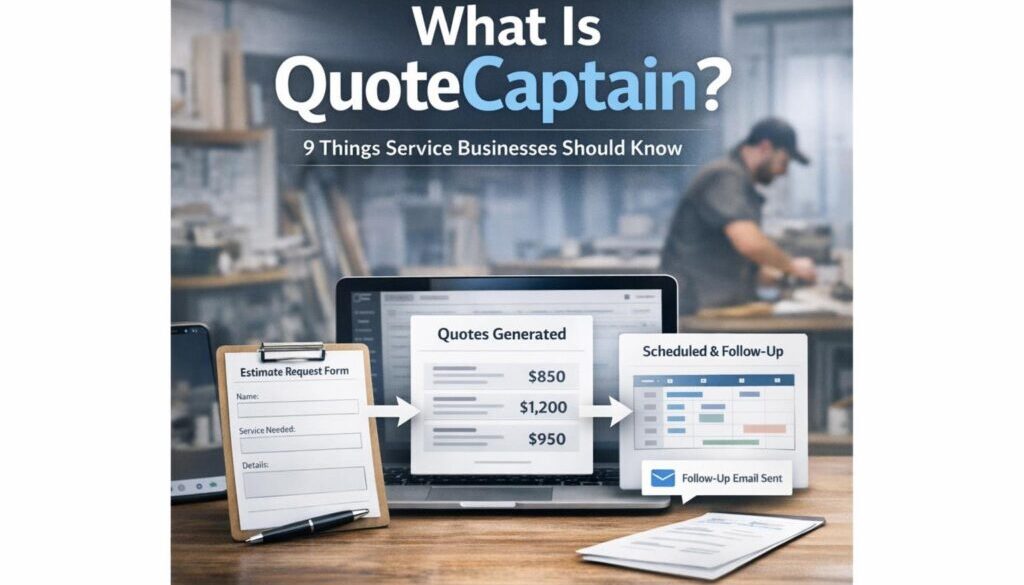
Quoting software usually helps with tasks such as:
- capturing customer details
- building a quote from templates or standard items
- sending the quote to the customer
- tracking whether it has been opened, accepted, or declined
- following up if the customer has not replied
- recording the final version for later reference
That matters because quoting is not just paperwork. It is part of your sales process, your customer experience, and your margin control.
What service businesses use it for
Service businesses often use quoting tools to standardise estimates for work such as trades, consulting, field services, cleaning, landscaping, agencies, and other project-based or labour-based services. The goal is usually the same: respond faster and quote more consistently without adding more admin.
In many businesses, quoting also sits close to other systems such as invoicing, customer records, and job setup. That is why some teams look at broader business automation solutions instead of treating quoting as an isolated task.
Why Quoting Is Such a Challenge for Service Businesses
Quoting looks simple from the outside. In reality, it often involves several small decisions and repeated admin tasks. That is where delays and inconsistencies creep in.
Manual quoting bottlenecks
Many businesses still quote by starting with an old estimate, copying customer details into a new document, adjusting line items, checking margins, and then sending the quote by email. That process can work, but it becomes hard to scale.
Common bottlenecks include:
- quotes waiting on one busy person
- duplicate data entry across systems
- inconsistent wording or pricing
- slow replies to customer enquiries
- missed follow-up after the quote is sent
When this happens, the problem is not just internal admin. Slow quoting can affect conversion, customer confidence, and the speed of job scheduling.
Common problems: delays, inconsistency, and lost opportunities
If a quote takes too long to prepare, the customer may move on. If the wording changes from quote to quote, staff may not be sure which version was final. If follow-up depends on memory, good opportunities can slip through.
That is why a structured quoting workflow is valuable. It gives the business a repeatable process instead of relying on ad hoc manual effort every time.
How a Quoting Workflow Typically Works
Whether you use QuoteCaptain or another platform, the underlying quoting process is usually similar. Understanding the workflow helps you work out where software can genuinely help.
From enquiry to quote draft
A customer sends an enquiry by web form, email, phone call, or referral. Staff then collect the key details needed to prepare the quote. This may include scope, location, timing, materials, access, and any special requirements.
This first step is often where automation can save time. For example, a form submission may be turned into a draft quote record automatically, rather than being retyped into a second system. Workflow tools such as Microsoft Power Automate documentation and Zapier show how small-business systems can be connected in practical ways, although any specific integration with QuoteCaptain would need to be confirmed officially.
Review, send, and follow up
Once the quote draft is ready, it should usually be checked before sending. That review step matters because even a small pricing or scope error can cause problems later.
After the quote is sent, the business should know whether it has been opened, accepted, declined, or still needs follow-up. A quoting tool can help track that status more clearly than a manual spreadsheet or inbox thread.
Acceptance and handoff to job setup
When the customer accepts the quote, the next step is usually to hand the job over to operations, scheduling, or invoicing. In a well-run workflow, that handoff should be clear and traceable.
This is where automation can be especially useful. A quote acceptance may trigger a task, a job record, or an invoice workflow, depending on the tools the business uses. If you want to see how automation can simplify repetitive document-heavy workflows, our trust account automation case study is a good example of a process that was designed to reduce manual handling.
Where Automation Can Help
Automation is most useful when the quoting process has repeatable steps. It is not about removing judgement. It is about removing avoidable manual work.
Quote creation and templates
Many businesses quote similar jobs again and again. Templates can make this much easier by preloading standard wording, inclusions, exclusions, and pricing structures.
Current problem: staff rewrite the same content for every quote.
Automation opportunity: use templates and prefilled fields to build quote drafts faster.
How it could work: once the job type is selected, the system inserts standard items and customer details.
Business benefit: faster quoting and more consistent presentation.
Approval workflows
Some quotes need internal review, especially if the scope is unusual or the margin is tight. An approval workflow can make that step clearer.
Current problem: discounts or exceptions are approved informally, which can lead to mistakes.
Automation opportunity: route certain quotes to a manager before they are sent.
How it could work: if a quote falls outside normal pricing rules, it waits for review before release.
Business benefit: better control over pricing and less risk of underquoting.
Follow-up reminders
One of the easiest wins in quoting is follow-up. Many quotes do not need a complicated system; they just need a reminder to check in at the right time.
Current problem: staff forget to follow up or rely on memory.
Automation opportunity: create reminders or tasks when a quote has not been accepted after a set period.
How it could work: the system flags quotes that are still pending and prompts the team to call or email.
Business benefit: better follow-up and a more professional customer experience.
Quote-to-job or quote-to-invoice handoff
Once a quote is accepted, the next step should be simple. The less re-entry required, the better.
Current problem: the team retypes accepted quote details into another system.
Automation opportunity: move approved quote information into the next stage of the workflow.
How it could work: acceptance creates a job record, project record, or invoice draft.
Business benefit: less admin, fewer mistakes, and faster delivery.
For businesses exploring broader workflow improvement, this is the type of process that can often be approached through automation services rather than by buying software alone.
How AI May Assist with Quoting
AI can support quoting, but it should be treated as an assistant, not the decision-maker. In a business setting, human review still matters.
Drafting scope language and follow-up emails
AI can help draft the wording for a quote, especially when the business wants a professional tone that explains scope, assumptions, and exclusions clearly. It can also help write simple follow-up emails for pending quotes.
That does not mean the content should be used as-is. It still needs checking for accuracy, pricing, and business-specific terms.
Summarising enquiries and extracting details
Long emails and messages can be time-consuming to interpret. AI may help summarise the enquiry into a short quote brief, or pull out key details such as location, service type, and deadlines.
This can save time, especially in businesses where staff receive many similar requests each day. But again, anything customer-facing should be reviewed before it is used.
Why human review still matters
AI is useful for speed, not certainty. It can misread details, make assumptions, or produce wording that sounds polished but does not match the job correctly.
That is why quoting should always include a review step. A quote is a commercial offer, so the final responsibility sits with the business.
What Service Businesses Should Check Before Using QuoteCaptain
Because the official features of QuoteCaptain should be verified directly, it is important to check the product against your workflow before committing. The right software is the one that fits your process, not the other way around.
Features and workflows
Start by checking the basics. Can the tool handle the way your business actually quotes? For example, can it support templates, custom pricing, approvals, reminders, and version history?
If a product does not match your real workflow, your team may end up forcing the business to adapt to the software instead of improving the process.
Integrations
Quoting rarely exists on its own. It may need to connect with accounting, CRM, email, or job management tools. Before you choose any platform, check whether it connects cleanly to the systems you already use.
Common business tools worth considering include Xero, MYOB support, and the rest of your office stack such as email, documents, and workflow tools.
If you are still mapping what could be automated in your business, the Business Hub is a useful place to explore practical guidance.
Pricing and plans
Pricing matters, but it should be weighed against fit and admin savings. A cheaper tool that creates extra manual work is usually not a good deal.
Ask what is included, what costs extra, and whether the plan suits your number of users and quote volume. Because pricing changes often, it is best checked on the official product site.
Data privacy and security
Quote records often contain names, phone numbers, email addresses, site addresses, pricing, and notes about the work. That means privacy and security should be taken seriously.
Australian businesses should think about personal information handling, even if they are small. The Australian Privacy Principles guidance and the OAIC’s small business privacy guidance are useful starting points.
You should also consider cyber security controls such as access control, backups, patching, and multi-factor authentication. The Essential Eight is a helpful government resource, and business.gov.au’s cyber security guidance is practical for small businesses.
Australian tax and record-keeping considerations
If your quotes later become invoices, or if you need to retain records of accepted quotes and scope changes, make sure your process supports good record keeping. The ATO record-keeping guidance is worth reviewing, along with the ATO’s page on tax invoices.
This is especially important for Australian service businesses that need clarity around GST, quote history, and supporting records.
Risks and Limitations to Watch Out For
Quoting software can improve the process, but it does not remove business risk. In fact, good automation usually makes those risks more visible.
Underquoting and scope errors
If a template is wrong, or if AI writes a scope that misses an important detail, the business can underquote the job. That can hurt margin and create awkward conversations later.
Quotes should always be reviewed by someone who understands the work.
Version control and approvals
Without clear version control, a business can accidentally send the wrong quote or work from an outdated version. Approval rules help reduce this risk, especially when discounts or exceptions are involved.
Privacy and cyber security
Quote data is business data. If the system is not well secured, there is a risk of exposing customer details, pricing, or internal notes.
If you are evaluating software, ask where the data is stored, who can access it, and how accounts are protected. If customer information is compromised, the OAIC’s Notifiable Data Breaches guidance is relevant.
Is QuoteCaptain Right for Your Business?
That depends less on the brand name and more on whether the product matches your workflow. A quoting tool should make the process simpler, not more complicated.
Best-fit business types
Quote software is often most useful for service businesses that quote similar work repeatedly, need fast follow-up, or want more structure around approvals and acceptance.
That may include trades, agencies, consultants, cleaners, landscapers, and other businesses that prepare estimates regularly.
Questions to ask before adopting it
- Does it fit the way we actually quote?
- Can we use it without creating extra admin?
- Does it support our follow-up process?
- Can it connect with our accounting or CRM tools?
- Are privacy, security, and record-keeping needs covered?
- Can our team use it easily without heavy training?
If you want help identifying which parts of your quoting process could be simplified, a practical workflow review is often the best place to start. Our content calendar automation case study shows how a repeatable workflow can be structured more clearly, and while it is a different use case, the same principle applies: reduce manual steps, standardise the process, and make follow-up easier.
For another example of a workflow where document handling needed to be streamlined, see our digital product automation project.
Final Takeaway
QuoteCaptain may be useful if it helps your business create and manage quotes more efficiently, but the most important question is whether it fits your workflow and supports your business rules. For service businesses, quoting is often where speed, consistency, and follow-up make a real difference.
The best quoting systems reduce manual admin, improve clarity, and make it easier to move from enquiry to accepted job. If you are looking at quoting software, start with the process, check the features carefully, and pay attention to privacy, record keeping, and integration needs.
If you want to explore how automation could simplify quoting and other repetitive admin in your business, Simple Automations can help you think through the workflow and identify practical opportunities.
Ready to Simplify Repetitive Business Work?
If your quoting process is slowing down response times or creating avoidable admin, a simple automation review can help you work out what should be standardised, automated, or reviewed.