How to Reduce Missed Leads in a Busy Service Business
If you want to reduce missed leads, the first step is usually not getting more enquiries. It is making sure the leads you already receive are captured, acknowledged and followed up properly.
In busy service businesses, leads are often lost because of simple workflow problems: missed calls, slow replies, scattered inboxes, and no clear owner for follow-up. The good news is that these problems can often be fixed with a better process and a few well-chosen tools.
This guide explains where leads slip through the cracks, what a basic lead capture workflow should do, and where automation can help without removing the personal touch.
null
For small service businesses, this is often an operational issue rather than a marketing issue. A better system can help you reduce missed leads, respond faster, and make it much easier to turn enquiries into booked jobs.
Why service businesses miss leads
Most missed leads are not caused by a lack of demand. They happen when the business is busy, the process is fragmented, or nobody is clearly responsible for moving an enquiry forward.
Unanswered calls and missed callbacks
If the phone rings while your team is on a job, with another customer, or away from the desk, the call can be missed. If there is no reliable callback workflow, that lead may never get a proper response.
Slow replies to forms and emails
Web forms and email enquiries are easy to overlook when the inbox is full. Even a short delay can be enough for a prospect to contact someone else.
Fragmented inboxes and scattered channels
Many businesses receive leads from phone calls, website forms, SMS, email, chat, social media and booking tools. If those channels are not centralised, it becomes hard to see the full picture.
No clear ownership of follow-up
When nobody knows who should respond, leads stall. A simple rule for ownership and escalation can make a big difference.
What a basic lead capture workflow should do
A good workflow does not need to be complicated. It just needs to make sure every enquiry is seen, acknowledged and tracked until it is resolved.
Capture every enquiry in one place
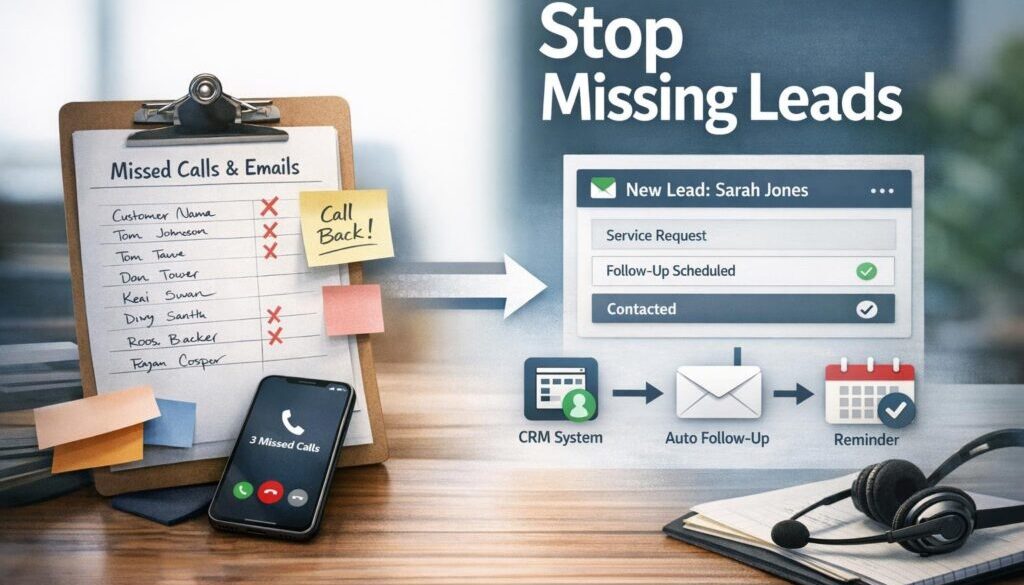
The first goal is to log each lead into one system, whether that is a CRM, a shared inbox, a spreadsheet, or another central record. The important thing is that staff can see what came in and what happened next.
Acknowledge the lead immediately
People want to know their enquiry has been received. An automatic acknowledgement can confirm that the message arrived and let the customer know when to expect a reply.
Route it to the right person
If a lead is for a specific service, location or job type, it should go to the right person straight away. That can prevent delays and stop enquiries from bouncing around the team.
Track follow-up status clearly
Every lead should have a status such as new, contacted, awaiting reply, quoted, booked, or closed. That makes it easier to spot anything that has gone stale.
For businesses that want a practical starting point, small business automation is often the simplest way to remove repetitive admin from the enquiry process.
Practical ways to reduce missed leads
Once you understand where leads are being lost, you can start fixing the workflow. The aim is to reduce friction and make the next action obvious.
Use shared inboxes and central records
A shared inbox gives the team one place to see and manage enquiries. Combined with a lead log or CRM, it creates visibility and reduces the chance of a message being forgotten.
This is also the kind of process that often benefits from automation solutions when the business is juggling high enquiry volume or multiple service channels.
Set up instant acknowledgements
Automated acknowledgements are useful for forms, missed calls and inbound email enquiries. A short reply can let the customer know the message has been received and explain the next step.
That simple acknowledgement does not replace personal service. It just buys time and reassures the customer that they have not been ignored.
Create missed-call follow-up workflows
Missed calls are a common source of lead leakage. A good workflow can create a follow-up task, log the missed call, and send a message asking the customer to reply or book a time.
Add reminders and task escalation
If nobody responds to a new lead within a set time, a reminder should appear automatically. If the lead is still unresolved, it can be escalated to someone else or flagged for urgent review.
Use booking links to shorten response time
When an enquiry needs a consultation or call back, a booking link can make the next step easier. It reduces back-and-forth and helps the customer take action while they are still interested.
What to automate, and what to keep human
Automation is most effective when it removes repetitive steps. It should not replace judgment where judgment matters.
Good automation candidates
- Instant acknowledgements
- Lead logging
- Routing to the right person
- Task reminders
- Follow-up prompts
- Booking confirmations
What should still be reviewed by staff
- Quotes and pricing
- Complaints
- Complex service requests
- Sensitive information
- Anything that could create a legal or commercial commitment
That balance matters. Automation should support the team, not create confusing or impersonal communication.
Simple, repeatable workflows are exactly the kind of work shown in our trust account automation case study, where a document-heavy process was simplified through a more structured workflow.
How CRM, inbox, booking and automation tools fit together
You do not need every tool under the sun. You just need the right tools working together in a sensible order.
CRM for pipeline tracking
A CRM helps you see where each lead is in the process. It gives the team a shared view of contacts, notes, statuses and follow-up history.
Shared inboxes for team visibility
Shared inboxes help avoid the classic problem of “I thought someone else replied.” They make ownership clearer and improve visibility across the team.
Forms and booking tools for structured capture
Well-designed forms can collect the details you need up front. Booking tools can then turn interest into an appointment without extra manual chasing.
Automation platforms for routing and reminders
Automation tools can connect these systems so that a new enquiry triggers the next step automatically. For example, a form submission can create a record, send an acknowledgement and assign a follow-up task.
When businesses need these tools connected properly, a business automation resources page can be a useful place to continue learning about practical workflow improvements.
How AI can help with enquiry handling
AI can be useful in a service business, but only if it is used carefully. Think of it as a support tool, not the final decision-maker.
Summarising messages
If an enquiry is long or messy, AI can help summarise the main point so the team can respond faster.
Extracting key details
AI may help pull out useful information such as the customer name, service type, suburb, preferred time, or urgency. That can save time when the enquiry is buried in a long message thread.
Drafting first responses
AI can help prepare a first draft reply based on your standard process. Staff should still check it before sending, especially if the message includes pricing, sensitive details or anything that may create a commitment.
Flagging urgent enquiries
If a message contains words that suggest urgency, AI may help route it for priority review. That can be useful when the business is handling different types of jobs at once.
Why human review still matters
AI can misunderstand context, miss nuance, or produce a response that sounds right but is not appropriate. That is why human oversight is still important, especially for complex or sensitive enquiries.
For businesses exploring practical AI use, the article should also be read alongside content calendar automation, which shows how a structured workflow can support repeatable business tasks.
Australian privacy and spam considerations
When you collect lead data, you may be handling personal information. That means privacy and consent need to be part of the workflow, not an afterthought.
Personal information and the Privacy Act
The Australian Government’s Privacy Act 1988 is the main law governing privacy obligations in Australia. The Australian Privacy Principles explain how personal information should be collected, used, stored and disclosed.
Follow-up messages and the Spam Act
If you send electronic follow-up messages, the ACMA spam guidance and the Spam Act 2003 are relevant. Businesses should be careful to distinguish between service-related communication and marketing messages.
Secure storage and access controls
Lead data can include phone numbers, addresses, service details and other sensitive information. It should be stored securely and only accessible to people who need it.
When consent matters
If you plan to use the information for promotional follow-up, make sure your process reflects the consent you have and the type of message you are sending. If you are unsure, get advice before automating marketing messages.
How to know if missed leads are falling
You cannot improve what you do not measure. A few simple indicators can show whether your changes are working.
Track missed calls and response times
Start by recording how many calls are missed and how quickly new enquiries are being answered. That gives you a basic benchmark.
Monitor lead-to-booking conversion
If more enquiries are turning into bookings, your process is probably improving. If bookings are still low, look for bottlenecks in follow-up or qualification.
Review unresolved enquiries
Check how many leads are still sitting in “new” or “awaiting reply” status. Those are often the ones at risk of being lost.
Look for patterns by channel or time of day
You may find that missed leads happen more often after hours, during busy job periods, or from a particular channel such as email or social media. That can help you target the right fix.
For a real-world example of a workflow that needed careful structure, see the digital product automation case study. While the use case is different, the principle is the same: reduce manual handoff points so nothing gets lost.
A simple setup to start with this week
If you want a quick starting point, keep it simple. You do not need a complete overhaul to make a meaningful difference.
One inbox
Bring enquiries into one shared inbox or one central location so the team knows where to look.
One lead log
Use one place to record every new lead. A CRM is ideal, but a well-structured spreadsheet can also work as a starting point.
One response rule
Decide how fast a new enquiry should be acknowledged, and make that rule clear to the team.
One follow-up reminder
Set one automated reminder for leads that have not yet been answered. That prevents new enquiries from sitting untouched.
One booking path
If the customer is ready to book, make the next step obvious. A booking link or a clear callback process can save time for everyone.
If you want help turning this into a practical workflow, Simple Automations can help design systems that reduce admin and improve follow-up without making the process more complicated. A good place to start is our business automation solutions page.
Ready to Reduce Missed Leads?
If enquiries are slipping through the cracks, the issue is usually a process problem, not a lack of interest. Simple Automations can help you map the workflow, identify the gaps and build a simpler system for capturing and following up every lead.
Conclusion
To reduce missed leads, focus on the points where enquiries are being lost: missed calls, slow replies, scattered inboxes and unclear follow-up ownership. A simple system that captures, acknowledges, routes and tracks every enquiry can make a big difference.
For busy service businesses, the goal is not to automate everything. It is to make sure every lead gets seen, every follow-up happens, and the right people are involved at the right time. That is how technology makes business simpler.
If you are ready to improve your lead handling, Simple Automations can help you turn a messy process into a practical workflow that your team can actually use.