How to Automate Lead Capture from Website Forms
If your website enquiries still arrive in an inbox and then get copied into a CRM or spreadsheet by hand, you are doing extra work that automation can usually remove. This guide explains how to automate lead capture from website forms in a practical way, so enquiries are recorded, routed, and followed up more consistently.
For many small businesses, the real goal is not “more technology” — it is fewer missed leads, less manual data entry, and a faster response to people who are ready to enquire. We’ll cover what the workflow looks like, what tools are commonly used, where AI can help, and the privacy and spam considerations Australian businesses should keep in mind.
null
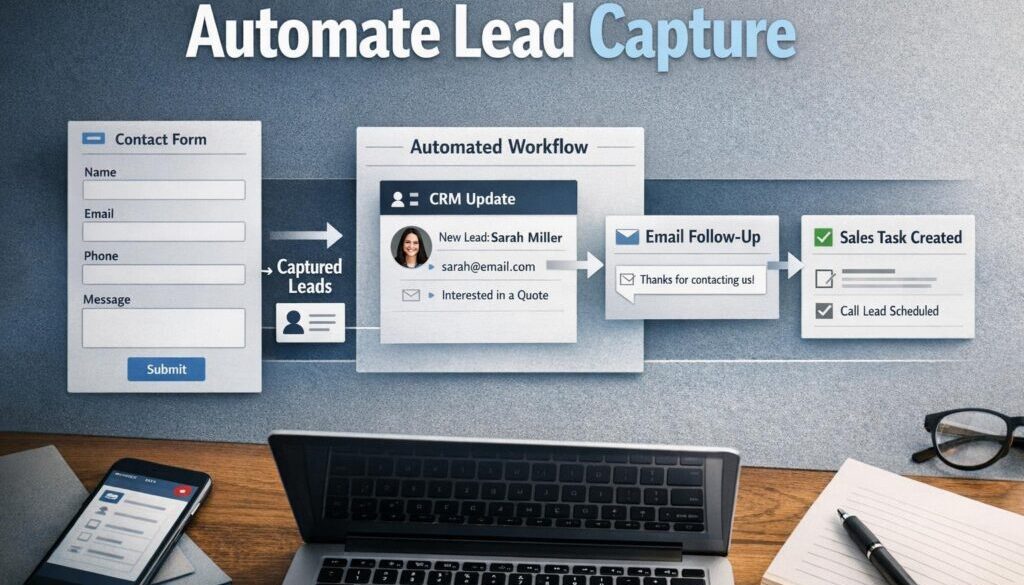
Where a form submission currently needs to be checked, copied, sorted, and assigned by hand, automation can take over the repetitive parts. That is the basic idea behind lead capture automation: one enquiry comes in, and the system does the routine admin for you.
What does it mean to automate lead capture from website forms?
To automate lead capture from website forms means connecting your website form to the rest of your business systems so the enquiry does more than just sit in an inbox. A submission might create a CRM record, send a notification, create a task, send an acknowledgement email, or route the lead to the right person.
In other words, the form becomes the starting point for a workflow rather than a dead end.
The manual workflow most small businesses still use
Many businesses still follow a process like this:
- A customer submits a form on the website.
- The enquiry lands in a shared inbox.
- Someone reads the message and checks the details.
- The information is copied into a CRM, spreadsheet, or job system.
- A follow-up task is created manually.
- The business hopes the response happens quickly enough.
This works, but it is slow and easy to get wrong.
What automation changes
When you automate lead capture from website forms, the workflow can be much cleaner:
- The form is submitted.
- The lead is recorded automatically in the right system.
- The right team member is notified.
- Acknowledgement or follow-up steps begin immediately.
- The business has a better record of what was submitted and when.
This is the kind of practical process improvement that sits at the heart of small business automation: less repetitive work, fewer delays, and a more reliable customer experience.
Why manual lead handling causes delays and missed opportunities
Manual lead handling is usually not a disaster in one-off situations. The problem is that it does not scale well. The more enquiries you receive, the more likely it is that something gets delayed or missed.
Duplicate data entry
If a lead has to be copied from a form into a CRM, then into a spreadsheet, and maybe into a quoting tool as well, every extra step creates more work. It also increases the chance of errors, typos, or incomplete records.
That is why many businesses look at ways to automate lead capture from website forms and reduce duplicate entry.
Slow follow-up and lost enquiries
Leads often go cold when the response is slow. If a submission sits unnoticed in an inbox, or if the right person is away from their desk, the opportunity can slip through.
An automated acknowledgement, internal notification, or task assignment can help the business respond sooner and more consistently.
Inconsistent routing and reporting
Without a set workflow, different staff members may handle the same type of enquiry in different ways. That makes reporting harder and can create confusion about who owns the lead.
A structured workflow gives the business a more consistent path from enquiry to follow-up.
What information should a lead form collect?
If you want to automate lead capture from website forms well, the form itself needs to be designed properly. Automation cannot fix a form that asks the wrong questions or collects too much unnecessary information.
Essential fields vs optional fields
Most businesses only need a few core fields to start:
- Name
- Email address
- Phone number, if needed
- Service or product interest
- Message or enquiry details
Optional fields can help with routing and qualification, but they should only be used if they genuinely improve the workflow.
When to ask for budget, location, or preferred contact time
Extra fields can be useful when they help you sort leads or prepare a better response. For example, location may matter for service businesses, preferred contact time may help with follow-up, and budget may help qualify serious enquiries.
The key is to only ask for information you will actually use. Long forms often reduce completion rates and can also make the data less reliable.
Avoiding over-long forms
A shorter form often works better than a long one. If the main goal is to capture the enquiry, collect only what is necessary at the first step. More detailed qualification can happen later.
This helps keep the process simple for the customer and easier to automate for the business.
How website forms connect to CRM and workflow tools
There are a few common ways to automate lead capture from website forms. The right setup depends on what software you already use and how much of the follow-up process you want to automate.
Form submission to CRM record creation
A common setup is to send the form submission directly into a CRM so a new contact or lead record is created automatically. Official documentation from tools such as HubSpot forms and Zoho Forms shows that forms can feed CRM records and work with automations.
This gives the business a clean record of the enquiry without manual re-entry.
Notifications, tasks, and acknowledgements
Once the submission is captured, the workflow can send a notification to the relevant person, create a task, or send an acknowledgement email. In many businesses, that is enough to improve response time significantly without building a complex system.
Simple Automations often starts with this kind of practical foundation before layering in anything more advanced.
Routing leads to the right person
Some enquiries need to go to a specific team member based on the service requested, the type of customer, or the location. That routing can often be automated so the enquiry reaches the right person without someone manually sorting it.
If routing is done well, the business is less likely to lose leads in a general inbox.
Automation tools commonly used for this
Common tools used to connect form submissions to other systems include automation platforms such as Zapier, Make, and Microsoft Power Automate.
These tools are often used to move data between forms, CRMs, inboxes, spreadsheets, and task systems.
Common tools used to automate lead capture
You do not need a large enterprise system to automate lead capture from website forms. Many small businesses use a combination of a form builder, a CRM, and an automation platform.
Form builders
Form builders are the tools that collect the enquiry in the first place. Depending on the business, this may be a dedicated form platform, a website plugin, or a simple built-in form.
Examples include tools with official integration and workflow support such as Jotform, Microsoft Forms, Google Forms, and others suited to smaller teams.
CRMs
A CRM stores contact details, enquiry history, and follow-up information. When the form creates a CRM record automatically, the business gets a better view of the lead pipeline and can track what happened next.
HubSpot, Zoho CRM, Pipedrive, Salesforce, and Microsoft Dynamics 365 are all common examples of CRM platforms that may be used in this kind of workflow, depending on the business.
Automation platforms
Automation platforms connect apps together and pass data from one step to the next. They are especially useful when the form tool and the CRM are not part of the same ecosystem.
For small businesses, these platforms can often be the simplest way to automate lead capture from website forms without custom development.
Simple office tool setups
Some businesses start with email notifications and spreadsheets. That can be a useful first step, especially if the team is not ready for a full CRM rollout. But even in a simple setup, it is still worth thinking about structure, naming conventions, and ownership of each enquiry.
Where AI can help in lead capture workflows
AI can support lead capture workflows, but it should be used carefully. The best use cases are usually practical and assistive rather than fully autonomous.
Summarising enquiry text
If a form includes a free-text message, AI may be able to summarise the enquiry into a shorter note for staff. That can save time when the submission is long or detailed.
Classifying and routing enquiries
AI can sometimes help classify the enquiry by topic, urgency, or service category. That may assist with routing, prioritisation, or drafting a suggested reply.
But if you are using AI this way, it is wise to keep a human in the loop for anything important or ambiguous.
Why human review still matters
AI is useful for triage, but it should not be treated as perfect. Human review is still important for high-value enquiries, complex requests, and any lead that is unclear or sensitive.
That is especially true when you want to automate lead capture from website forms without compromising accuracy or customer care.
Privacy, consent, and compliance considerations in Australia
When a form collects personal information, privacy matters. Australian businesses should consider how data is collected, disclosed, stored, and used — especially if it is passed into third-party software.
Useful official references include the Privacy Act 1988 and the OAIC guidance on Australian Privacy Principles.
Personal information and privacy notices
If you are collecting names, emails, phone numbers, or other identifying details, the form should clearly explain how that information will be used. A privacy notice on or near the form is a sensible best practice.
Third-party data handling
Many automation setups rely on external software services. That means the lead data may pass through more than one system, so it is important to understand where the information goes and who can access it.
Security and storage
The OAIC’s guidance on security of personal information is relevant here. Businesses should use reasonable safeguards for storing and transmitting lead data.
Small business privacy considerations
The OAIC also provides guidance on small business and the Privacy Act. Even where a small business exemption may apply in some situations, privacy best practice is still important when handling customer enquiries.
How to reduce spam and bad data
One of the biggest practical issues when you automate lead capture from website forms is not the automation itself, but the quality of the submissions coming through it.
CAPTCHA and bot protection
Public forms can attract bots and spam. CAPTCHA or other bot protection can help reduce fake submissions before they enter your workflow.
Validation and rate limiting
Validation helps make sure fields are filled in correctly. Rate limiting can help reduce repeated submissions from the same source in a short period of time. These controls make the workflow more reliable.
Duplicate detection and review
It is also worth having a process for spotting duplicate leads or suspicious submissions. Automation can help flag them, but a person should still review anything that looks unusual.
Common mistakes to avoid
Even a simple automation setup can cause problems if the workflow is poorly designed. These are the most common mistakes to avoid.
Over-automation
Not every lead should be fully processed without review. High-value or sensitive enquiries may still need a person to check them before the next step happens.
Poor form design
If the form is too long, asks confusing questions, or collects irrelevant data, the automation will inherit those problems.
Weak field mapping
Field mapping is the simple process of telling the system which form field should go into which CRM field. If this is set up badly, data can end up in the wrong place.
Ignoring failed automations
Automations should be monitored. If a workflow breaks, submissions may still arrive, but the downstream steps might stop working. That is why testing and ongoing checks matter.
The simplest setup for a small business
If you are just starting out, the simplest way to automate lead capture from website forms is often the best way.
Start with notification + CRM sync
First, make sure each submission is captured in your CRM or lead register automatically, and that the right person receives a notification straight away.
Add routing and follow-up tasks
Once the basic capture is working, add lead routing and task creation so the enquiry reaches the right person and the next action is clear.
Layer in AI or enrichment later
Only after the core workflow is stable should you consider AI summarisation, classification, or enrichment. That keeps the setup manageable and easier to troubleshoot.
This is also where a more tailored automation solutions discussion can be useful if the workflow is becoming more complex than a simple off-the-shelf setup.
When human review should still happen
Automation is valuable, but it should not remove judgment where judgment is needed.
High-value enquiries
If a lead could become a large project or an important long-term client, it is often worth reviewing the details manually before the business responds.
Sensitive requests
Some enquiries contain sensitive information or require careful handling. Those should not be pushed through an entirely automatic response path without review.
Incomplete or ambiguous submissions
If the form is missing key details, or if the message is unclear, a person should check it before the lead is routed or qualified.
Real-world examples of practical automation
Lead capture is a good example of how automation can simplify repetitive admin, but it is not the only type of workflow that benefits from this approach. Document-heavy or routine processes are often strong candidates too.
For example, trust account automation shows how a repetitive administrative workflow can be simplified, while content calendar automation demonstrates how planning work can be organised more efficiently. In a different context, digital product automation is another example of a process that benefits from clearer workflow design.
These examples are useful because they show the same principle: when a business has a repeatable process, there is usually a practical way to make it simpler.
How Simple Automations approaches this kind of workflow
At Simple Automations, the goal is not to make businesses more complicated. It is to help them reduce repetitive work and improve the way information moves through the business.
If your team is still manually copying enquiries from website forms into your CRM, inbox, spreadsheet, or task manager, there may be a straightforward opportunity to improve the process. In some cases that means a simple notification workflow. In others it may mean a more structured solution that routes, records, and follows up on leads automatically.
To explore what that might look like for your business, you can review our Business Hub for practical resources or look at our small business automation page for a broader overview of how we help businesses simplify admin.
Ready to Simplify Your Lead Capture?
If website enquiries are still being handled manually, there is usually room to make the process faster and more reliable. We can help you map the workflow and identify the simplest way to automate it.
Conclusion
To automate lead capture from website forms is really to turn a simple enquiry form into a reliable business workflow. Done well, it reduces manual data entry, speeds up follow-up, improves consistency, and gives your team a clearer process to work from.
The best approach is usually simple: capture the lead, record it in the right place, notify the right person, and keep human review where it still matters. For Australian small businesses, it is also important to think about privacy, security, and spam controls from the start.
If you are ready to make your enquiry process simpler, start by looking at the workflow you already have — then decide which parts should stay human and which parts can be automated.