How to Automate Sales Reports for Small Business
For many small businesses, sales reporting is one of those jobs that never quite finishes. Data comes from a POS system, an ecommerce store, accounting software, payment platforms and maybe a spreadsheet or two. Someone then has to copy it all together, clean it up, check the numbers, format the report and send it out.
If that sounds familiar, the good news is that you can automate sales reports for small business in a way that saves time without losing control of the numbers. The key is to automate the repeatable parts and keep human review where accuracy really matters.
In this guide, we’ll look at what a sales report is, which parts can be automated, what tools are commonly used, and how to keep the workflow simple, accurate and secure.
null
What Is a Sales Report for a Small Business?
A sales report is a summary of sales activity over a set period, such as a day, week or month. It helps business owners and managers understand what is selling, when it is selling and how the business is performing overall.
For a small business, sales reports are often used for cashflow planning, performance reviews, stock decisions, staffing decisions and tax-related checks such as GST reconciliation.
Common types of sales reports
- Daily sales summaries
- Weekly or monthly revenue reports
- Sales by product or service
- Sales by location, channel or team member
- Refund and discount reports
- GST-inclusive and GST-exclusive summaries
Why accurate reporting matters
Sales reports are only useful if the figures are trustworthy. That is especially important when reports are used for BAS preparation, reconciliation, forecasting or management decisions. The Australian Taxation Office record-keeping guidance explains why business records need to be kept accurately and in an organised way.
Which Parts of Sales Reporting Can Be Automated?
The easiest parts to automate are the tasks that happen the same way every time. If your report follows a clear pattern, automation can usually take over a large part of the process.
Data extraction and refresh
Instead of exporting data manually each time, a reporting workflow can pull information from connected systems on a schedule. This is often the biggest time saver, especially if you currently need to log into multiple platforms and download files by hand.
Calculations, charts and summaries
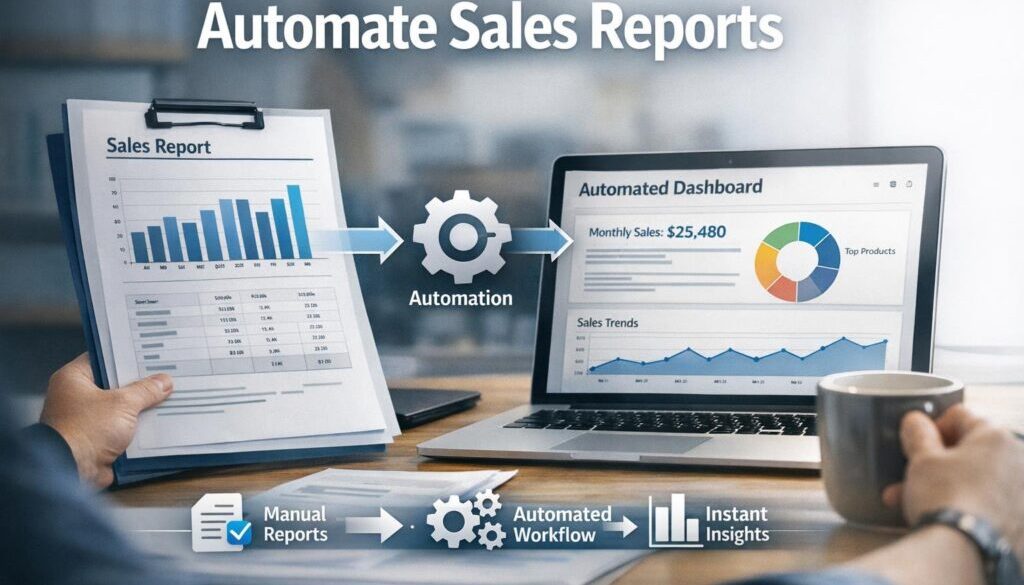
Once the data is in a spreadsheet or dashboard, formulas, pivots and charts can calculate totals, group sales by category and show trends over time. This is one of the most practical ways to automate sales reports for small business without building a complex system.
Scheduled delivery and alerts
Reports can often be sent automatically by email or shared link at a set time. Alerts can also be triggered if sales drop below a target or spike unexpectedly. This keeps the reporting process moving without someone needing to remember every step.
What Tools Can Automate Sales Reports?
There is no single best tool for every business. The right choice depends on where your sales data lives, how often you need reports and how comfortable your team is with spreadsheets or dashboards.
Excel and spreadsheet workflows
Microsoft Excel remains a common choice because it is flexible and familiar. It can be used for formulas, charts, pivots and data import workflows. Microsoft’s documentation for Office Scripts in Excel also shows how some tasks can be automated in supported Microsoft 365 environments.
Spreadsheets are often the best option when you want a low-cost, simple setup and the report is not too complex.
Google Sheets and Apps Script
Google Sheets is useful when multiple people need to view or edit a report. It also supports automation through Google Apps Script. This can be helpful for scheduled updates, custom calculations or linking simple workflows together.
Power BI and dashboard reporting
If you want a more visual reporting experience, Power BI may be a better fit. Microsoft’s Power BI scheduled refresh documentation explains how datasets can be refreshed automatically, which is useful when you need dashboards that stay current.
Dashboards are especially valuable when managers want to see trends quickly rather than work through rows of spreadsheet data.
Accounting, POS and ecommerce tools
Many businesses already have sales data inside accounting software, a POS system or an ecommerce platform. For example, Xero, QuickBooks Online, Shopify and Square all provide reporting resources through their official help centres. Those reports can often be exported or connected into a broader workflow.
Automation platforms like Zapier, Make and Power Automate
Workflow tools can connect systems that do not naturally talk to each other. Platforms such as Zapier and Make are commonly used to move data between apps or trigger actions when something changes. These tools can be helpful when you want to automate the handoff between systems without building custom software.
How to Set Up an Automated Sales Reporting Workflow
A good reporting workflow does not need to be complicated. In many small businesses, the best approach is to build one reliable report first and then expand from there.
1. Connect your source systems
Start by identifying where the sales data comes from. It may be a POS system, ecommerce platform, accounting software or CRM. If you can get the data into one place on a repeatable basis, the rest becomes much easier.
2. Standardise the report format
Decide what the report should always include: date range, totals, refunds, discounts, tax treatment and any key breakdowns such as product, channel or location. A standard format makes it easier to automate and easier to review.
3. Build refresh and distribution rules
Once the report structure is set, create rules for when it refreshes and who receives it. For example, a daily summary may go to the owner every morning, while a monthly report may go to the operations manager and bookkeeper.
4. Archive reports for later review
Keeping a history of reports helps with comparison and makes it easier to investigate unusual results later. It also supports stronger record keeping, which matters for both business management and tax purposes.
For businesses that need a more tailored workflow, a practical automation setup can be built around your existing systems. That is where business automation solutions can be especially useful.
Spreadsheet vs Dashboard: Which Is Better?
Both spreadsheets and dashboards can work well. The better choice depends on how the report is used.
| Best for | Spreadsheet report | Dashboard report |
|---|---|---|
| Flexibility | Very flexible for ad hoc analysis | More structured and standardised |
| Ease of use | Familiar for many small businesses | Easy to scan once set up |
| Visual reporting | Possible, but manual to manage | Strong visual focus |
| Collaboration | Good for small teams | Good for shared management reporting |
| Best use | Detailed checking and analysis | Recurring monitoring and summaries |
Best use cases for spreadsheets
Spreadsheets are often the right choice when you want to control the report manually, review the numbers closely or build something simple and affordable. They are especially useful when sales volumes are not high or when the reporting needs are still evolving.
Best use cases for dashboards
Dashboards are usually better when you want live or regularly refreshed reporting that others can view quickly. They suit businesses that need to monitor performance at a glance rather than edit the report itself.
What Can AI Help With in Sales Reporting?
AI can assist with reporting, but it should not replace the numbers or the checks that keep the report reliable. The best use of AI is as a helper, not as the source of truth.
Trend summaries and narrative updates
AI can help turn a table of numbers into a short written summary. For example, it might help draft a weekly update that highlights which sales channels improved, which products slowed down and where there were unusual changes.
Drafting formulas or scripts
If you already know the report structure, AI can sometimes help draft formulas or simple scripts for spreadsheet automation. That can reduce setup time, especially for routine tasks.
What AI should not replace
AI should not be used to guess missing figures or override reconciliation. It should also not be trusted blindly with sensitive customer or financial information. If your report contains personal information, you need to think carefully about privacy, access and where the data is being processed.
The OAIC’s Australian Privacy Principles guidance is a useful starting point for understanding how personal information should be handled. The OAIC small business privacy page is also worth reviewing if your reports include customer or staff details.
What Checks Should Happen Before You Trust an Automated Report?
Even the best workflow needs a human checkpoint. Automation can speed things up, but it cannot tell you whether the figures make sense in the context of the business.
Reconciliation and source-data checks
Check that totals line up with the source systems. If sales data is pulled from multiple platforms, look for mismatches caused by timing, duplicate records or missed transactions.
Refunds, chargebacks and tax treatment
Refunds, voids and chargebacks can change the report significantly. Tax treatment also matters, especially if you are using the report for GST-related decisions. A report that looks fine on the surface may still need a close review before it is used.
Reviewing unusual spikes or drops
Automation is useful for raising a flag, but a person should investigate strange changes. A sudden spike may be a real sales opportunity, or it may simply be a data issue that needs correction.
This is why good automate sales reports for small business workflows should include a review stage, not just a generation stage.
Privacy and Security Considerations for Australian Small Businesses
Sales reports can contain sensitive business data and, in some cases, personal information. That means privacy and security need to be part of the setup from the beginning, not added later.
The Privacy Act and personal information
If your report includes customer names, contact details, order history or other personal information, you may need to consider how the data is collected, stored, shared and retained. The OAIC’s guidance on the Australian Privacy Principles and small business obligations is a sensible place to start.
Access control and secure sharing
Not everyone in the business needs access to every report. Limit access to the people who actually need it, use strong passwords and multi-factor authentication where available, and be careful about sharing reports through unsecured channels.
The Australian Cyber Security Centre’s Essential Eight guidance is useful for thinking about basic protection measures such as patching, access management and account security.
Third-party tool risk
If you use a third-party automation platform, review what data it can access, where it stores information and what permissions it needs. A simple workflow is usually safer and easier to maintain than a complicated one with too many connections.
Common Mistakes to Avoid
It is easy to overcomplicate reporting, especially when there are multiple systems involved. The best automated report is often the one that is simple enough to trust every time.
Automating bad data
If the source data is messy, inconsistent or incomplete, automation will simply produce bad reports faster. Fix the source data first, then automate the workflow.
Skipping human review
Do not assume the report is correct just because it was generated automatically. A quick review is often enough to catch issues before they spread.
Overcomplicating the workflow
Many small businesses only need a few core numbers. Starting with a lean report is usually better than building a complex system that no one understands.
The Simplest Way to Start
If you want a low-cost starting point, begin with one report that matters most to the business, such as daily sales or monthly revenue. Pull the data into a spreadsheet or dashboard, standardise the format and automate the refresh. Then add a short human review step before the report is shared.
This approach keeps the workflow practical while still reducing repetitive admin. It is also often the easiest way to automate sales reports for small business without disrupting the rest of the business.
One useful way to think about automation is: let the system do the copying, calculating and distributing, while your team keeps responsibility for the checks and decisions.
That same practical mindset is behind our small business automation approach at Simple Automations, where the focus is on making everyday processes simpler rather than more complicated.
How Simple Automations Can Help
When a reporting process becomes repetitive, it is often a sign that there is room to improve it. We help small businesses identify which steps are worth automating, which tools fit the job and where human review should stay in place.
That might mean a lightweight spreadsheet workflow, a dashboard that refreshes automatically, or a broader workflow that connects reporting with other parts of the business. The right solution depends on your systems, your team and how the report is actually used.
If you want practical help working out what can be automated, our automation for small business services are designed to keep things clear and manageable.
For examples of how we apply automation in real workflows, you may also find these case studies useful: trust account automation, content calendar automation and digital product automation.
For more practical reading on business systems and automation ideas, visit our Business Hub.
Ready to Simplify Your Sales Reporting?
If your team is still spending too much time pulling together reports by hand, we can help you map the workflow and identify the parts that make sense to automate.
Conclusion
To automate sales reports for small business, start with the repeatable parts: data extraction, refreshes, calculations, formatting and delivery. Keep a person involved for reconciliation, refunds, GST checks and unusual results. That balance gives you the speed of automation without losing confidence in the numbers.
If you keep the workflow simple, secure and focused on the business questions that matter, sales reporting becomes much easier to manage. That is the real value of automation: not replacing judgement, but removing the repetitive work that gets in the way of it.