Workflow Automation for Accountants: Practical Examples
Workflow automation for accountants is about reducing repetitive admin work by using software to move information, trigger tasks, collect documents, and keep jobs moving without constant manual follow-up. For small accounting practices, bookkeepers, and finance teams, that can mean less time spent chasing emails, renaming files, copying data, and nudging the next person in the process.
The goal is not to remove professional judgement. It is to make the routine parts of the work simpler, faster, and more consistent. In this guide, we’ll look at where workflow automation for accountants is most useful, which tasks are worth automating first, how AI fits in, and what Australian privacy, record-keeping, and security issues you need to keep in mind.
null
If you are thinking about broader automation opportunities across your practice, it can help to understand the basics of small business automation first. The same principles apply whether you are streamlining client onboarding, invoice handling, or monthly reporting.
What workflow automation means in accounting
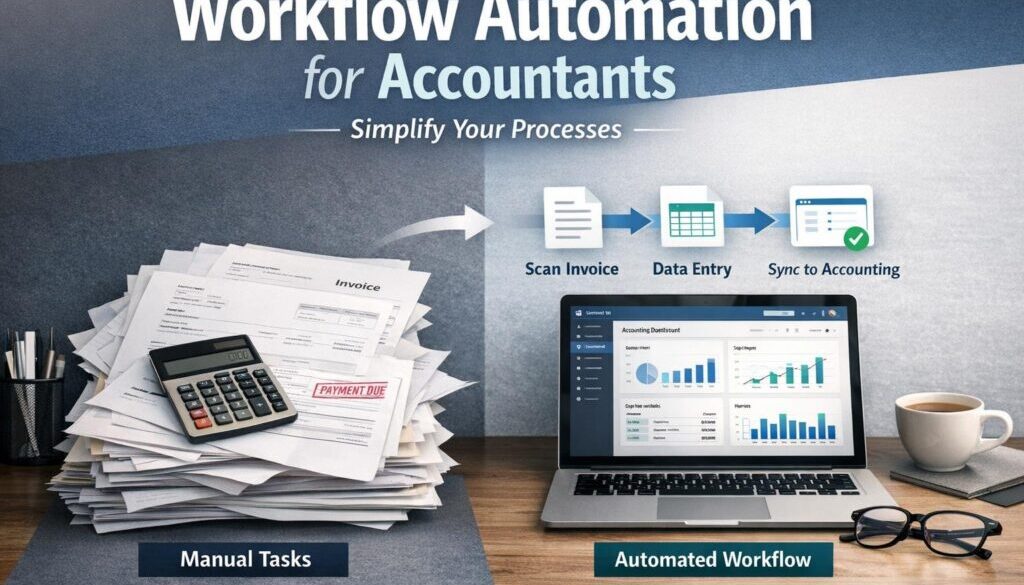
In an accounting context, workflow automation means designing a process so that software handles the repetitive steps for you. Instead of manually checking inboxes, forwarding documents, creating jobs, or reminding clients about missing information, the system can trigger those steps automatically.
This is especially useful in small practices where the same tasks happen over and over again. A well-designed workflow can reduce delays, cut down on data entry, and make work easier to track. That is why workflow automation for accountants is usually most effective when the process is structured, repeated often, and has a clear outcome.
The manual tasks it replaces
Most accounting workflows still involve a lot of routine admin. Common examples include:
- copying client details between systems
- saving invoices and receipts into the right folder
- creating jobs after onboarding
- sending reminders for missing documents
- routing bills or reports for approval
- manually distributing recurring reports
- chasing status updates by email
These tasks are not difficult individually, but they add up quickly. That is where workflow automation for accountants can make a practical difference.
Why small practices feel the pain most
Large firms often have dedicated systems and staff to manage admin-heavy processes. Smaller practices usually do not. That means the same person may be responsible for client communication, file management, job tracking, reporting, and follow-up.
When that happens, small inefficiencies become noticeable fast. A missed reminder, a misplaced invoice, or a delayed approval can hold up the whole workflow. Simple automation can help reduce that friction without requiring a major software overhaul.
The accounting workflows most suitable for automation
Not every process should be automated. The best candidates are usually repetitive, predictable, and easy to define. They also tend to have a clear trigger and a clear next step.
In practice, workflow automation for accountants is usually most valuable in the areas below.
Client onboarding
When a new client signs up, there are usually several steps to complete: creating a record, setting up folders, assigning a job, sending a welcome email, and requesting documents. These steps are ideal for automation because they happen in the same order each time.
A simple workflow might start when an engagement letter is signed or a form is submitted. From there, the system can create a job, prepare the client folder, send the first email, and notify the right staff member that onboarding has started.
Document collection and intake
Collecting source documents is one of the biggest admin pain points in many practices. Clients email invoices, upload files, forward receipts, or send photos of paperwork. Someone then has to sort, save, and file everything correctly.
Automation can help by saving attachments to the right location, renaming files consistently, and notifying staff when a document needs review. If a key piece of information is missing, the workflow can also trigger a request back to the client.
Invoice and expense processing
Invoices and expenses are often repetitive, structured, and high volume. That makes them a strong candidate for workflow automation for accountants. A system may be able to capture common details from a bill or receipt, route it for approval, and send it into the next stage of the process.
What matters most here is not full replacement of human review. It is reducing the amount of manual handling so staff can focus on exceptions and judgement calls.
Reconciliations and exceptions
Bank reconciliation support is another area where automation can help. Recurring transactions can often be matched automatically, while unusual items can be flagged for review. That means routine matching becomes faster, and exceptions stand out more clearly.
For small teams, this is valuable because it keeps the workflow moving without removing the need for attention on the harder items.
Recurring client reminders
Many accounting jobs depend on clients sending information on time. BAS reminders, payroll inputs, bank statements, and missing receipts all need regular follow-up.
Instead of sending each reminder manually, a workflow can trigger messages on a schedule or when a milestone is reached. That improves consistency and helps reduce the risk of things being forgotten.
Approvals
Approvals are a good fit for automation because they usually follow a predictable path. For example, a bill above a certain amount can be routed to the right approver, with the decision logged automatically.
This is useful for maintaining an audit trail and keeping the process moving. It also reduces the chance that an approval request sits in someone’s inbox unnoticed.
Reporting and distribution
Month-end reporting often involves the same routine steps: preparing files, sending summaries, distributing reports, and archiving the final version. These are ideal for a structured workflow.
Automating the distribution step can save time and reduce the chance of missed emails or version confusion. It also makes reporting more consistent for clients and internal stakeholders.
Practical examples of workflow automation for accountants
Here are some practical examples of how workflow automation for accountants can work in a small practice. The exact tools may differ, but the logic is the same: trigger, action, review.
Automatically creating client jobs after onboarding
Current problem: a team member manually creates a job after a client has signed on.
Automation opportunity: create the job automatically when the onboarding form or signed engagement is received.
How it could work: once the form is submitted, the system creates the client record, opens the job, adds standard tasks, and alerts the relevant staff member.
Business benefit: less setup time, fewer missed steps, and a more consistent onboarding experience.
Saving emailed invoices into the right folder
Current problem: invoices arrive by email and need to be downloaded, renamed, and filed manually.
Automation opportunity: route email attachments into the correct folder and apply a consistent naming pattern.
How it could work: the workflow watches for incoming documents from a known sender or mailbox, saves them to the right location, and notifies the team if something is missing.
Business benefit: less inbox clutter, faster filing, and easier retrieval later.
Routing bills for approval
Current problem: bills are forwarded around manually until the right person approves them.
Automation opportunity: send bills to the correct approver based on business rules such as amount, supplier, or category.
How it could work: once a bill is captured, the workflow sends it to the right person, records the decision, and moves the bill forward after approval.
Business benefit: clearer accountability and a more reliable approval trail.
Sending BAS or payroll reminders
Current problem: someone has to remember to chase clients for the same information every month or quarter.
Automation opportunity: schedule reminders based on the lodgement cycle or workflow stage.
How it could work: the system sends reminder emails automatically, then follows up if no response is received.
Business benefit: more consistent follow-up and fewer last-minute delays.
Generating and distributing month-end reports
Current problem: reports are prepared manually and sent to clients one by one.
Automation opportunity: trigger report distribution when the month-end workflow is complete.
How it could work: once the report pack is finalised, the workflow sends it to the right recipient and archives the copy for record keeping.
Business benefit: less repetitive admin and more reliable delivery.
Document-heavy workflows are often a good starting point for automation. Our trust account automation case study is one example of how a repetitive administrative workflow can be simplified.
Where AI can help, and where it should not decide
AI can be useful in accounting workflows, but it should be treated as an assistant rather than a decision-maker. In practice, AI is best used for tasks where speed and pattern recognition help, but human judgement is still required before anything is final.
OCR and document extraction
One of the most practical uses of AI is reading information from documents. This can help capture invoice details, receipt information, or other structured data from files that would otherwise need to be entered manually.
That does not mean the data should be trusted blindly. It should still be reviewed, especially when the document is unclear or the numbers matter for compliance.
Drafting client emails and summaries
AI can also help draft routine emails, summarise client correspondence, or turn long notes into a shorter internal summary. This can save time when the message is repetitive and low risk.
For example, AI can help prepare a reminder about missing documents or summarise a job note for another team member. But the final message should still be checked by a person before it is sent.
Classification and anomaly detection
Some systems use AI to suggest categories or highlight unusual items. That can be helpful when a workflow contains a large number of similar transactions. It can also help staff notice exceptions faster.
Still, any AI suggestion should be treated as a prompt for review, not as a final accounting decision.
Why human review still matters
This is especially important in accounting because the work touches tax, compliance, client advice, and financial records. AI can assist with workflow automation for accountants, but it should not replace judgement in areas where mistakes have real consequences.
Human review matters most for:
- tax treatment
- GST coding
- exception handling
- client advice
- approvals
- anything unusual or high risk
Common tools used for accounting workflow automation
The right tool depends on the process you want to improve. Most accounting workflow automation starts with a combination of existing platforms and simple integrations rather than a single all-in-one system.
Accounting platforms
Cloud accounting software is usually the starting point. Many businesses already use platforms such as Xero, MYOB, or QuickBooks Online. Their current features and connected apps should always be checked directly on the official websites before making decisions.
Practice management and job tracking tools
Practice management systems are useful for assigning work, tracking due dates, and keeping jobs visible. They can often be part of a larger workflow that includes reminders, status updates, and internal notes.
For firms looking to move beyond scattered spreadsheets, this is often where workflow automation for accountants starts to feel more organised.
Microsoft 365 and Google Workspace
Many small practices already use Microsoft 365 or Google Workspace, which means automation can often be built on top of tools the team already knows. Microsoft’s Power Automate documentation shows how workflows can be built around triggers, approvals, and connected systems. Microsoft also provides guidance for its AI assistant through Copilot documentation.
For Google Workspace users, the Google Workspace Learning Center is a useful official reference for document-based workflows across Gmail, Drive, Forms, and Docs.
Integration platforms and eSignature tools
Integration platforms can connect forms, email, storage, accounting systems, and job tracking tools. eSignature tools can also be helpful for engagement letters, authorities, and approval workflows.
If your process depends on information moving between systems, these tools are often the glue that makes workflow automation for accountants practical.
Australian privacy, record-keeping, and security considerations
Accounting workflows often handle highly sensitive information, so automation needs to be designed carefully. In Australia, that means paying attention to privacy, record keeping, and cyber security from the start.
Privacy and personal information handling
The Office of the Australian Information Commissioner provides guidance on the Australian Privacy Principles and on small business and the Privacy Act. If your workflow handles payroll records, identity documents, employee details, or other personal information, you need to think carefully about access, storage, and sharing.
Even where a business may not be fully covered in every circumstance, sensitive financial data should still be handled with care.
ATO record-keeping expectations
The ATO provides guidance on record keeping for business and GST record keeping. Automation should support those requirements, not weaken them. That means preserving receipts, invoices, approvals, and other records in a way that is reliable and easy to access later.
Workflow automation for accountants should also make sure that audit trails are preserved rather than hidden.
Security and access control
The Australian Cyber Security Centre’s small business cyber security guidance is a useful reminder that finance systems need strong controls. This includes secure passwords, multi-factor authentication where available, role-based access, and careful handling of shared files.
When automating accounting work, it is important to make sure the workflow does not accidentally give too many people access to sensitive documents or records.
Vendor due diligence
If you are using cloud tools or AI features, check how they handle data, where information is stored, and what permissions they need. This is especially important where financial or personal information is involved.
Good automation should make the process simpler without creating hidden risk.
Risks to avoid when automating accounting workflows
Automation is useful, but only when it is designed properly. A poor workflow can create new problems instead of solving old ones.
Weak exception handling
Automation usually works best for standard cases. If exceptions are not planned for, they can get stuck or flow into the wrong place. That is why every workflow should include a path for unusual items.
Incorrect routing or duplication
If the rules are too broad or too loose, documents can be sent to the wrong person, jobs can be duplicated, or clients can receive unnecessary reminders. These errors are avoidable, but only if the workflow is tested carefully.
Over-reliance on AI
AI can help with extraction, drafting, and summarising, but it can also be wrong. Treating AI output as final is risky in accounting, where judgement and accuracy matter.
Compliance gaps
Automation should not bypass approvals, weaken record-keeping, or create gaps in the audit trail. If a process involves tax, BAS, payroll, or client advice, there should always be a clear human review step.
How to start simply
The best way to begin with workflow automation for accountants is to pick one small, repetitive process and improve that first. You do not need to automate everything at once.
Choose one repetitive process
Start with a workflow that happens often and causes regular admin pain. Good starting points include client onboarding, invoice filing, reminder emails, or approval routing.
Define the trigger, action, and review step
Before building anything, map the process in plain English:
- Trigger: what starts the workflow?
- Action: what should happen automatically?
- Review: who checks the output before it moves on?
That simple structure keeps the workflow understandable and easier to maintain.
Keep humans in the loop
For accounting work, there should almost always be a human checkpoint somewhere in the process. That is especially true where compliance, exceptions, or client decisions are involved.
Test before scaling
Start with a small workflow, test it, and refine it before extending it to more clients or more task types. That reduces risk and makes it easier to spot issues early.
For teams looking for a practical place to start, a tailored automation approach can help turn a manual workflow into something repeatable. The automation solutions page explains how Simple Automations approaches practical business workflow problems.
How Simple Automations can help
For many small accounting practices, the challenge is not understanding that automation could help. The challenge is deciding what to automate first and how to do it without creating compliance or security headaches.
That is where a practical, business-focused approach matters. Simple Automations works with small businesses to identify repetitive workflows, simplify the process, and build automation that supports the way the business actually operates.
For broader reading and practical guidance, the Business Hub is a useful place to explore more ideas about automation, process improvement, and reducing admin. You can also explore more examples in the automation case studies section.
Another useful example of structured workflow improvement is our content calendar automation case study, which shows how a repeatable workflow can be organised more efficiently. For digital workflows involving file delivery, the digital product automation example is also relevant.
Final takeaway
Workflow automation for accountants works best when the process is repetitive, structured, and supervised. It is not about replacing judgement. It is about removing unnecessary manual work so your team can focus on the parts of the job that really need expertise.
If you begin with one clear workflow, keep humans involved, and pay attention to privacy, security, and record-keeping, automation can make a small practice far easier to run.
Ready to Simplify Your Accounting Workflows?
If you want help identifying the best place to start, Simple Automations can help you map the process and design a practical automation that fits your practice.