How QuoteCaptain Can Reduce Estimate Admin for Small Businesses
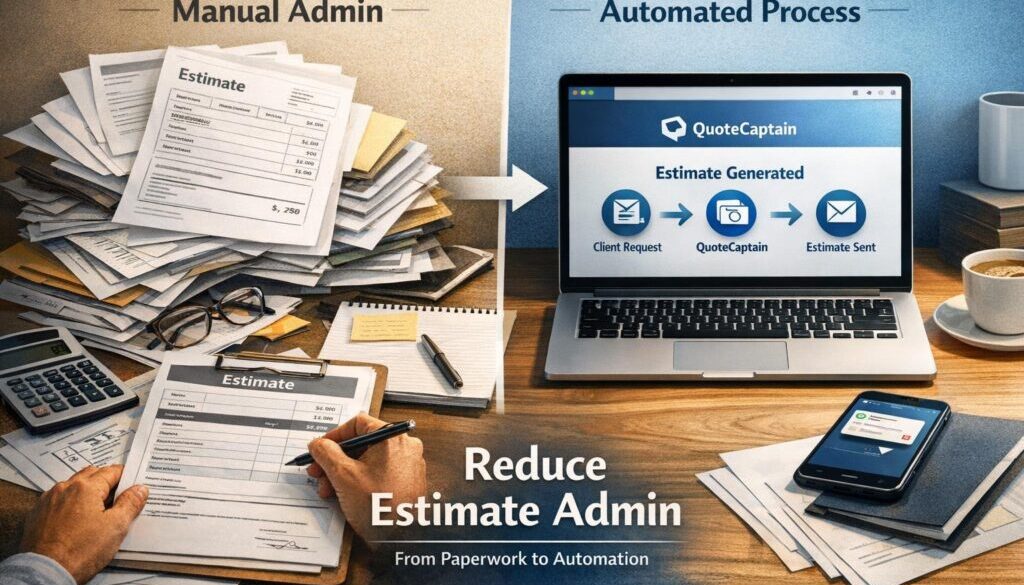
For many small businesses, estimate admin is one of those tasks that quietly eats up time every week. You gather job details, build a quote, check the numbers, send it off, follow up, then turn the accepted quote into the next step in the workflow. None of that is difficult on its own, but it is repetitive, and repetition is where mistakes and delays often creep in.
This article looks at where quote and estimate automation can help, how estimate admin can be simplified, and where a tool like QuoteCaptain may fit into the workflow. Because product capabilities can change, it is important to verify the current features in official QuoteCaptain documentation before making purchasing decisions.
null
The goal is simple: reduce manual quoting work without adding complexity. That matters for Australian small businesses, especially when estimates eventually become invoices or part of a record-keeping process that needs to stay organised.
For businesses looking at broader ways to streamline admin, automation for small business is often a useful starting point. And if you want to see how Simple Automations approaches practical workflow improvements, the business automation solutions page is a helpful place to start.
What is estimate admin?
Estimate admin is the behind-the-scenes work involved in preparing, sending, tracking and recording quotes or estimates. It usually includes more than just typing a price into a document. In many businesses, it also includes customer data entry, scope notes, pricing calculations, follow-ups and hand-offs into invoicing or job management.
Typical estimate admin tasks include:
- capturing enquiry details from email, phone, web forms or messaging
- checking service scope, pricing and margins
- building a professional quote or estimate document
- adding GST where relevant
- sending the quote to the customer
- tracking whether it was accepted, declined or ignored
- following up on unanswered quotes
- turning accepted quotes into invoices, jobs or projects
- keeping records for accounting and business history
When these steps are done manually, the same information is often typed more than once. That is where errors and delays start to build up.
Why estimate admin becomes a bottleneck
Many small businesses start out with spreadsheets, email templates or accounting software and that works fine for a while. The issue is that quoting usually grows with the business. More leads mean more follow-up. More repeat work means more templates. More admin means more opportunities for inconsistency.
The most common pain points are:
- duplicate data entry across different systems
- slow quote turnaround because details need to be retyped
- missed follow-ups on unaccepted quotes
- inconsistent wording or scope notes
- quote history that is hard to search or audit later
- extra bookkeeping work when quotes turn into invoices
For service businesses, this can be especially frustrating because quoting is often the first step in winning the job. If the process is clunky, the whole sales cycle feels slower.
Where estimate admin automation helps most
Automation is most useful where the same information moves through the same steps again and again. That is why estimate admin is a strong candidate for simplification. You do not necessarily need a fully automated quoting system to get value. Even small improvements can reduce admin load.
Capturing enquiry details
Current problem: enquiry details arrive in email, web forms, calls or messages, then someone manually copies them into a quote.
Automation opportunity: capture customer and job details once, then reuse them in the estimate process.
How it could work: a form submission or enquiry record is used to start a draft quote with customer information already populated.
Business benefit: less typing, fewer mistakes and faster response times.
Populating quote templates
Current problem: the same quote structure is rebuilt every time from scratch or copied from an old file.
Automation opportunity: reuse a standard template for common services, terms and business details.
How it could work: a quote tool inserts standard wording, line items and pricing fields into a prepared layout.
Business benefit: more consistent quotes and less time spent formatting documents.
Sending and tracking quotes
Current problem: quotes are emailed manually and it is not always easy to know what happened next.
Automation opportunity: track when a quote has been sent and whether it has been accepted or declined.
How it could work: the software records quote status so the team can see which items need action.
Business benefit: better visibility and less chance of follow-up being forgotten.
Following up on unaccepted quotes
Current problem: staff need to remember which quotes need a reminder.
Automation opportunity: create a reminder task or follow-up message after a set period.
How it could work: if a quote remains unanswered, the system prompts a follow-up email or task.
Business benefit: more consistent follow-up without relying on memory.
Converting accepted quotes into jobs or invoices
Current problem: once a quote is accepted, the information has to be copied again into the next system.
Automation opportunity: reuse accepted quote data in the job or invoicing stage.
How it could work: accepted quote details are carried forward into the next workflow step, reducing re-entry.
Business benefit: faster handover from quoting to delivery and billing.
How QuoteCaptain may fit into the workflow
Because QuoteCaptain-specific capabilities should be confirmed from official sources, the safest way to think about it is as a possible quoting workflow tool rather than assuming every feature is available. The important question is not just “can it make a quote?” but “which parts of estimate admin does it actually simplify?”
Quote creation and document generation
If QuoteCaptain supports quote drafting or document generation, it may help turn a repeatable estimate process into a more structured workflow. That could mean less manual formatting and a more consistent customer-facing document.
This is particularly useful when a business sends similar quotes every week. A standard layout can reduce the need to rebuild each estimate from scratch.
Acceptance tracking and status updates
If the platform tracks quote status, that can make it easier to know which estimates have been viewed, accepted or still need attention. For a busy small business, that visibility is often just as valuable as the quote itself.
Knowing which quotes are pending means fewer opportunities for follow-up to fall through the cracks.
Hand-off to invoicing or job management
One of the best ways to simplify estimate admin is to avoid retyping accepted quote information later. If QuoteCaptain supports hand-off into invoicing or job workflows, that could reduce duplicate entry and keep records more consistent.
That said, this is exactly the kind of feature that should be checked in the product’s official documentation before you rely on it in day-to-day operations.
What to confirm in official product documentation
Before adopting any quoting system, confirm:
- whether quote templates are supported
- whether follow-up reminders are built in
- whether quote acceptance is tracked
- whether accepted quotes can be turned into invoices or jobs
- whether GST settings suit Australian business use
- whether it connects with your accounting or CRM software
- whether customer data handling matches your privacy requirements
For businesses already using accounting software, it can also help to compare the workflow with tools such as Xero’s official help centre, MYOB support or QuickBooks Australia. Those platforms often provide quote or estimate features of their own, which makes comparison worthwhile.
Why this matters for Australian small businesses
Australian businesses do not just need a quote that looks professional. They also need a process that supports good records, sensible tax handling and responsible data management. That makes estimate admin more than a time issue; it is also a business process issue.
GST and record keeping
Quotes are not invoices, but quote-to-invoice workflows often overlap with GST and record-keeping obligations once a job is won. The ATO provides guidance on invoices and records and on record keeping for business.
If your quoting process feeds into invoicing, those records need to be accurate and easy to retrieve later. Good automation supports that by keeping the quote history in one place.
Privacy and customer data
Quote data often includes names, phone numbers, email addresses, site addresses and project notes. The OAIC’s guidance on Australian Privacy Principles and the APP guidelines is relevant when customer information is stored in software.
Even if a business is not directly covered by every privacy obligation, good privacy practice still matters. Quote systems should be reviewed for access control, data retention and secure handling of customer information.
Cyber security
Cloud tools are useful, but they should be chosen carefully. The Australian Government’s small business cyber security guidance is a good reminder that quote systems can contain sensitive business and customer data.
When comparing tools, ask who can access the data, how logins are protected and what happens if staff change or leave.
Which businesses benefit most from estimate admin automation?
Almost any business that quotes regularly can benefit, but some types of businesses feel the impact more than others.
Trades and field-service businesses
Trades often handle recurring jobs, site visits, variations and urgent turnaround times. That makes them a strong fit for estimate admin automation, especially if quoting currently happens between jobs or on the road.
If quoting is part of a wider trade workflow, it may also be worth looking at specialist tools such as mechanics quoting automation, plumbers quoting automation or tradie quoting automation, depending on the business type and the features available.
Consultants and service providers
Consultants, agencies and professional services firms often quote on a recurring basis using similar scope structures. Even if the work itself changes, the admin pattern is often very repetitive. That makes standard templates and status tracking especially useful.
Sole traders and micro-businesses
For sole traders, the biggest benefit is often not enterprise-level automation. It is simply fewer interruptions, fewer duplicate tasks and a clearer process for turning enquiries into paid work.
In other words, a simple system that reduces estimate admin can be more valuable than a complicated platform that is difficult to maintain.
What to watch out for before adopting a quoting tool
Automation can help, but only if it fits the business properly. Before introducing a new quote tool, check the practical details rather than assuming the software will solve everything.
Pricing accuracy and scope gaps
Automated quotes still need careful review. If pricing tables, template wording or exclusions are wrong, the same error can be repeated quickly. That can create disputes later.
Human review is especially important for custom jobs, variations and anything with assumptions or exclusions that need to be stated clearly.
Over-automation and poor communication
Automating the process should not make customer communication feel cold or generic. A quote still needs to make sense to the customer and explain what is included.
The best systems reduce admin while preserving a clear, human explanation of the work being offered.
Integration and data-security checks
Many businesses want to know whether a quoting tool connects with their accounting or CRM software. That is reasonable, but integration claims should be verified carefully. Do not assume a platform works with your existing stack just because it sounds compatible.
The same applies to privacy and data storage. Confirm where data is stored, how access is managed and whether the software suits your internal processes.
How Simple Automations approaches quoting and admin workflows
At Simple Automations, the focus is not on adding technology for its own sake. The goal is to make business processes simpler, clearer and easier to manage. Quote and estimate workflows are often a good place to start because they involve repeated steps, repeated data and a clear business outcome.
A practical automation project usually starts by mapping the current process:
- How does the enquiry come in?
- Who prepares the estimate?
- What information is reused?
- Where does manual re-entry happen?
- What happens after the quote is sent?
- How is acceptance recorded?
- What needs to happen next?
That sort of workflow review often reveals the best opportunities for simplification. In some cases that means using a dedicated quoting tool. In others it means connecting existing systems more effectively.
Examples from Simple Automations’ work show how this thinking applies in different contexts. For instance, the trust account automation case study shows how a repetitive administrative workflow can be simplified when the process is carefully mapped. The content calendar automation case study shows how a planned workflow can reduce manual coordination. And the digital product automation case study demonstrates how structured delivery can remove unnecessary manual steps.
Different industries, same principle: when a process repeats, there is usually an opportunity to simplify it.
When estimate admin automation is worth it
Not every business needs a complex system. Sometimes a better template and a reminder process are enough. Sometimes the right answer is simply to tidy up the existing quote workflow and keep things consistent.
Estimate admin automation becomes especially worthwhile when:
- the same quote structure is used repeatedly
- staff are retyping the same information
- follow-up is inconsistent
- accepted quotes need to move into billing or delivery quickly
- records need to stay organised for future reference
- the business is growing and admin is becoming harder to manage
If that sounds familiar, a quoting workflow review can usually identify the first few improvements without overcomplicating the system.
Ready to Simplify Your Business?
If estimate and quote admin is taking too much time, Simple Automations can help you identify practical ways to reduce the manual work and improve your workflow.
Final take: simplify the quoting work first
QuoteCaptain may be useful if it helps reduce repetitive estimate admin, but the real question is not the tool name. The real question is whether the workflow becomes faster, clearer and easier to manage.
For most small businesses, the best outcome is a quoting process that:
- captures information once
- uses it consistently
- reduces duplicate entry
- keeps follow-up visible
- supports records and hand-offs
If a quoting tool helps achieve that, it can be a worthwhile investment. If it adds complexity without removing manual work, it may not be the right fit. Either way, a careful review of the workflow is the best place to start.
For more practical guidance on streamlining repetitive business processes, visit small business automation or browse the Business Hub.